
Custom Keys - Custom Keys
Custom Keys is a function that, via Compliance Suite’s Custom Connector, can assign a specific role in an external system and at the same time export the relevant data from Compliance Suite to the system.
You can create Custom Keys in Compliance Suite. The function is available under "Connectors | Custom Keys":

Create new Custom Key
Click on "+New" and fill in the fields as described:
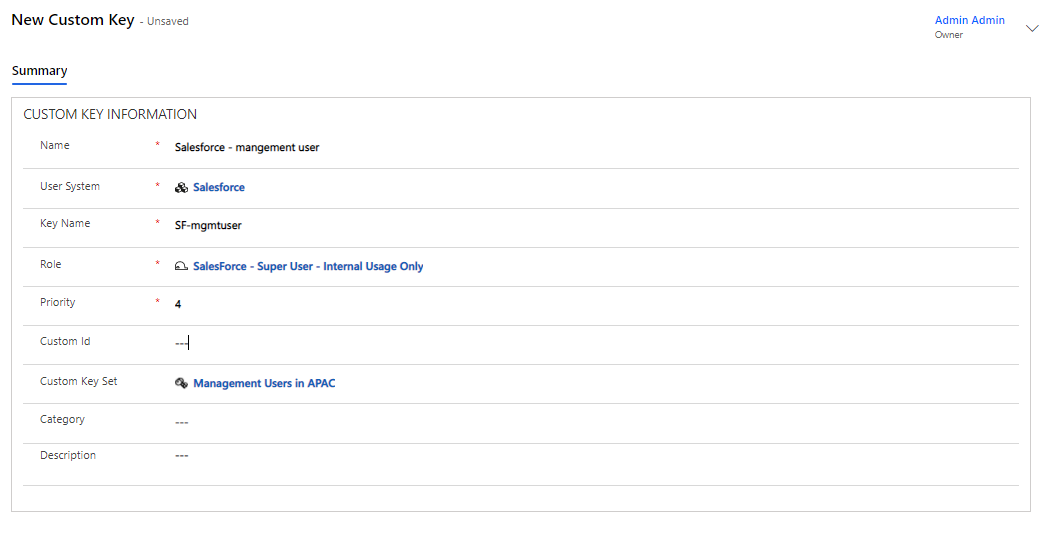
Fields to be filled in:
| Entity | Used for | Fields |
|---|---|---|
Custom Key |
Specify roles to be imported as Keys (transformation of name to fit the external system) |
* Name, * System, * Key Name, * Role, Priority, Key Set, Category / CustomID / Description |
| Field (entity) | Type | Descriptions |
|---|---|---|
Name |
Text |
Name the Custom Key with the name it should have in the Compliance Suite |
User System |
Look-Up |
Select the User System to handle |
Key Name |
Text |
Name of the key in the system. It is transformed to fit the external system. |
Role |
Look-Up |
Specify the role or roles to be turned into keys. |
Priority |
Numbers |
Set the priority. |
Custom ID |
Text |
Enter an ID if desired. |
Custom Key Set |
Look-Up |
Add a Custom Keys Set if desired. |
Category |
Look-Up |
Enter a category if desired. |
Description |
Text |
Enter a text for description |
How it works
If the person has a Key assigned in the database and a Role Key exists for the system, the person will be assigned the corresponding Access.
Examples of Keys include:
-
"Sales Force - Super User" or "Company Laptop".
|
Match is NOT case-sensitive and trimming will take place ("vip access"
and "VIP AccESs" match). Semicolons and colons and commas are forbidden fields in Key and are ignored if they are there. |
Connector Database tables
| Table Person | Table Keys |
|---|---|
|
|
Custom Keys is a visible tab on these systems:
| System | Functionality |
|---|---|
Custom System (when priority> 1000) |
Retrieves Accesses from special table via Keys |