
Password Definition
Password Definition determines the password that is generated for new users or during Password Reset.
The password can be mapped via a role and is assigned a priority.
The structure of a new password is defined when you create a new Password Definition in Compliance Suite. A new password is constructed as follows:
-
Words are added (from Password Definition Words)
-
Digits are added
-
Special characters are added
-
Normal characters are added
-
The length of the password is verified.
This is repeated until the password meets the length requirements (maximum 1,000 attempts, after which a random password is generated).
Create a new Password Definition
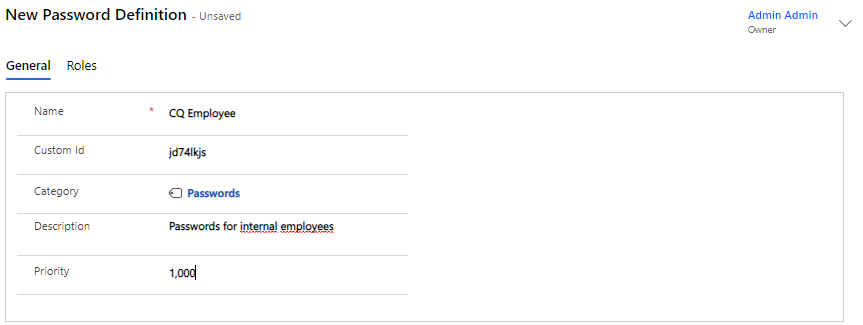
Click on "+New" and fill in the data:
Now, fill in the desired minimum and maximum length of the password:

Then chose the words, numbers and special characters to be used in the password:

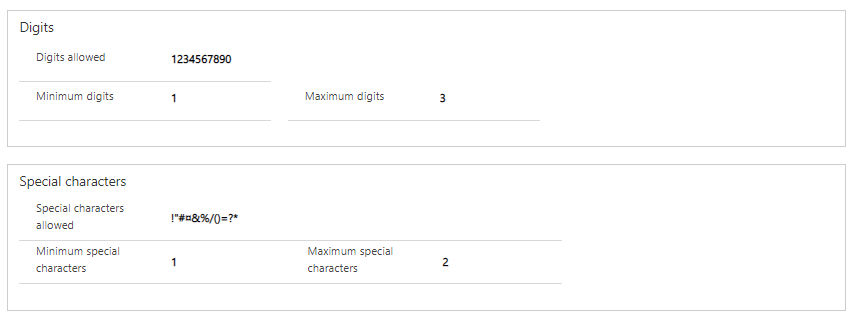
Since, in the above example, we replied Yes to both numbers and special characters, you need to choose which ones may be used.
| A password will only be created when you specify the allowed characters for your chosen parts. If a part does not contain the information about the allowed characters, a warning is issued. |
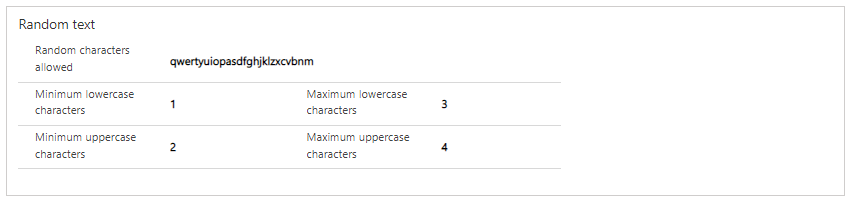
In cases where a password cannot be created with words from Password Definition Words, a random text will be generated. Here, we have to choose which letters can be used and how many lower and upper case letters can be used.
Click Save and your Password Definition is ready to be used.