
Email notifications
Disabling email notifications on server-side
Usually the Cryptshare Server manages all email communication between the participants of a transfer. However, when developing an own client application for Cryptshare communication, it might be desirable to send these notifications from within this client. Therefore, Cryptshare allows it to disable the sender and the recipient notification for each transfer.
Transfer transfer = new Transfer();
transfer.notifySender = false;
Transfer transfer = new Transfer();
transfer.notifyRecipients = false;
Requesting email templates from the Cryptshare Server
| Please also consider the documentation for Cryptshare Language Packages in the Cryptshare Server documentation. |
Developers of a Cryptshare client application might want to handle transfer notifications themselves, for instance for an email integration such as Cryptshare for Office 365 & Outlook. In order to still have the same layout and especially the unique information per recipient the API offers the possibility to request the HTML code for the email notification from the server.
- client.RequestMailTemplate
-
<template-name>: The name of the desired email template
<replacements>: Mapping of the placeholders in the template
<language>: The language of the template
<mailFormat>: The mail format which shall be used. This can either be '<nowiki/>HTML'<nowiki/> or '<nowiki/>plain'<nowiki/>
Email placeholders
Email placeholders are used to fill in individual information into the templates. This way each email recipient can retrieve an email with unique content, such as the personal download link, name or email address.
[...]
<p>Dear Sir or Madam,</p>

<p>Confidential data has been sent to you by <a href="`mailto:$email[`mailto:$email`]`">$name</a>.
[...]
Possible placeholders in email notifications
The following table shows available placeholders in email templates. Placeholders tagged with SENDER are specifically required for the sender template. Placeholders tagged with RECIPIENT are specifically required for the recipient template.
| Tag | Placeholder Key | Description | Additional Notes |
|---|---|---|---|
SENDER RECIPIENT |
TemplatePlaceholder.BASEURL |
The Cryptshare Server URL |
i.e. https://server.url.com |
RECIPIENT |
TemplatePlaceholder.SUBJECT |
The message subject |
|
RECIPIENT |
TemplatePlaceholder.MESSAGE |
The body of the message |
|
SENDER RECIPIENT |
TemplatePlaceholder.DATE_1 |
The expiration date of the transfer |
|
RECIPIENT |
TemplatePlaceholder.LIST_3 |
The list of the files in the transfer |
|
SENDER RECIPIENT |
TemplatePlaceholder.LINKREF |
The download link for the transfer |
|
RECIPIENT |
TemplatePlaceholder.PASSWORDMODE |
The type of password mode used for the transfer |
Possible values:
|
RECIPIENT |
TemplatePlaceholder.NAME |
The name of the sender |
|
RECIPIENT |
TemplatePlaceholder.PHONE |
The phone number of the sender |
|
RECIPIENT |
TemplatePlaceholder.EMAIL |
The e-mail address of the sender |
|
SENDER RECIPIENT |
TemplatePlaceholder.LIST_1 |
List of the recipients addressed in 'To' |
|
SENDER RECIPIENT |
TemplatePlaceholder.LIST_2 |
List of the recipients addressed in 'Cc' |
| Please note that the above table only shows the default configuration for Cryptshare emails. Any placeholder can also be used for a different purpose in own templates. Please see the Cryptshare Server guide for further details. |
How to use email placeholders
- #client.RequestMailTemplate()
-
Requires a very specific replacement-map in order to get the desired result. The parameter is a set holding instances of type TemplateReplacement.
A TemplateReplacement object is basically a key-value wrapper where the key is a specific placeholder enum and the value can either be a list or a single value. This allows it to retrieve customized templates per recipient with a single request.
// <replacements> Dictionary<ISet<string>, ISet<TemplateReplacement>>
replacements = new Dictionary<ISet<string>,
ISet<TemplateReplacement>>(); // <replacementSet>
ISet<TemplateReplacement> replacementSet = new
HashSet<TemplateReplacement>(); replacementSet.Add(new
TemplateReplacement(TemplatePlaceholder.NAME, "John Adams"));
replacementSet.Add(new TemplateReplacement(TemplatePlaceholder.EMAIL,
"john.adams@server.com"));

List<string> fileList = new List<string>();
fileList.Add("file_01.txt");
fileList.Add("file_02.docx");
replacementSet.Add(new TemplateReplacement(TemplatePlaceholder.LIST_3, fileList));

List<string> recipientList = new List<string>();
recipientList.Add("recipient1@otherdomain.org");
recipientList.Add("recipient2@otherdomain.com");
replacementSet.Add(new TemplateReplacement(TemplatePlaceholder.LIST_1, recipientList));

// <identifiers>
ISet<string> identifiers = new HashSet<string>();
identifiers.UnionWith(recipientList);
replacements[identifiers] = replacementSet;

MailTemplateResult mailTemplates = client.RequestMailTemplate("recipient", replacements, System.Globalization.CultureInfo.CreateSpecificCulture("ja"), "html");
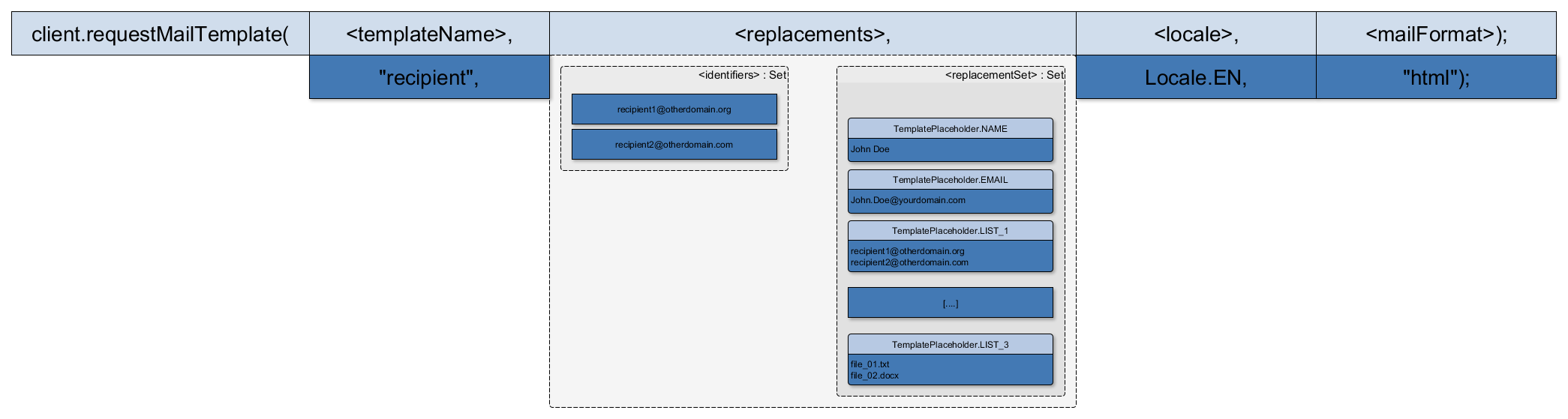
The result object of an email template request
When requesting an email template using #client.RequestMailTemplate(), the returned mapping contains a unique template per identifier-set. This means with one request a filled in template can be returned per single recipient or for all recipients together or for a combination of both.
// identifiers1: One single recipient, replacementSet1: Set of
replacements replacements [ identifiers1 ]  = replacementSet1; //
identifiers2: Two recipients, replacementSet2: Set of replacements
replacements [ identifiers2 ]  = replacementSet2; MailTemplateResult
mailTemplates = client.RequestMailTemplate("recipient", replacements,
System.Globalization.CultureInfo.CreateSpecificCulture("ja"), "html");
The above request would return two templates, one for each set of identifiers put into the replacement map. Both having a different content, meaning the placeholders have been filled in with the contents of replacementSet1, respectively replacementSet2.