
Provide your own Client Store
There may be situations in which you don’t want your application to write a client.store file containing the verification states to disk. To support this scenario, we offer several ways store the verification states in a secure manner. Below is an overview of the classes and interfaces that allow you to provide a custom IStore implementation.
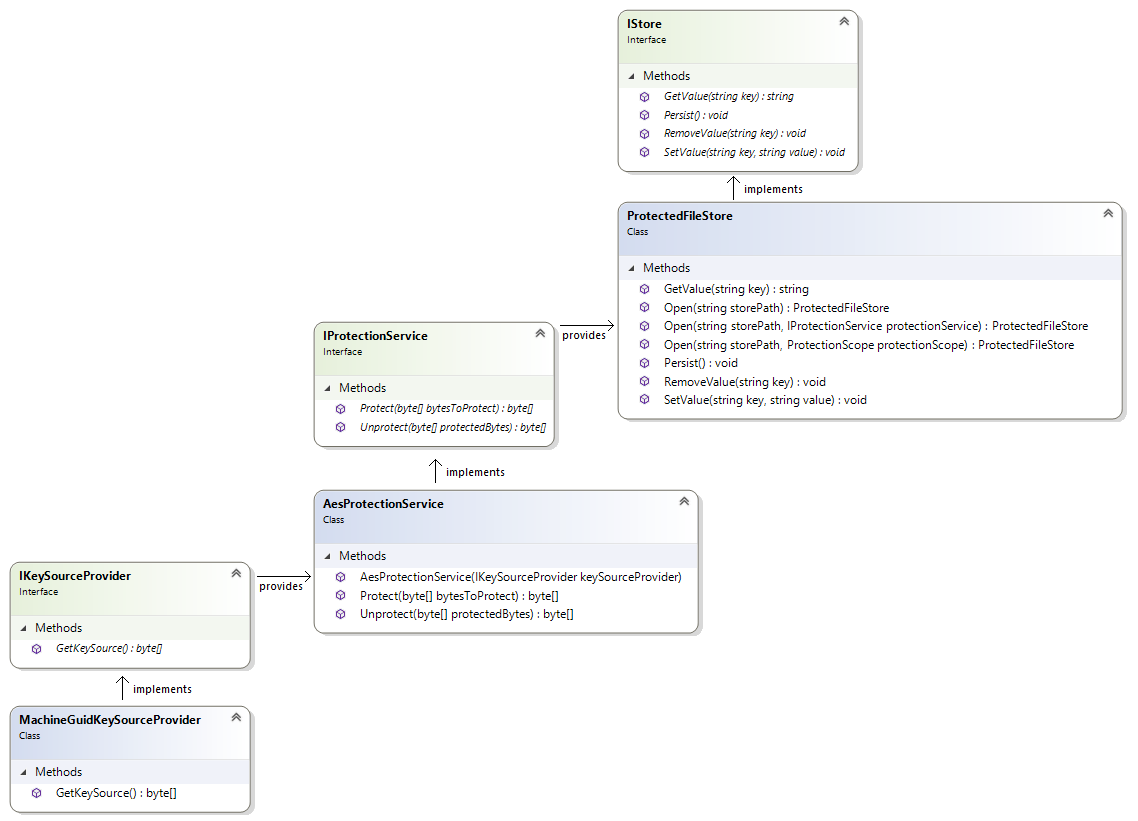
IStore
Interface
The default approach to instantiating a client is to pass its constructor a user email address, a Cryptshare Web Service URI, as well as a path to the client store that will persist the verification state of each user and will utilize Microsoft’s Data Protection API to protect its contents.
However, we also offer the possibility to pass in a custom IStore interface that implements the methods GetValue, SetValue, RemoveValue, and Persist. This might be useful if you, for example, want to store the verification state in a database or as a data stream in a remote location while providing custom implementations for each method. We provide a reference IStore implementation called ProtectedFileStore, which is also used internally to protect the contents of the client store via the DPAPI.
Implementation
The ProtectedFileStore class is a reference IStore implementation and, alongside implementing the IStore methods, introduces the concept of protecting the store contents via an IProtectionService to encapsulate the data storage/retrieval process from the data protection/unprotection process.
This allows you to use different protection mechanism without having to provide a separate implementation for the data storage. The ProtectedFileStore exposes the static method Load and, in addition to the file path, may also accept an IProtectionService which defines the protection mechanism to be used. If no IProtectionService is passed, it will default to the DpApiProtectionService (this approach is used internally when you instantiate a client with just a store path instead of an IStore).
If you want to have more control over how the data is going to be protected, you may provide your own custom IProtectionService, for which we also provide a reference implementation to cover the most common use case.
IProtectionService
Interface
The IProtectionService interface describes the general notion of protecting and unprotecting a byte array via their respective methods Protect and Unprotect. It is primarily used in the reference IStore implementation called ProtectedFileStore – data is protected whenever the IStore.Persist method is called, and unprotected whenever the ProtectedFileStore.Load method is called.
In general, the Cryptshare .NET API defaults to Microsoft’s Data Protection API via the DpApiProtectionService, but also provides the alternative AesProtectionService implementation, which uses the AES encryption algorithm and allows you to provide a custom key source.
Implementation
The AesProtectionService class is an IProtectionService implementation and an alternative to the DpApiProtectionService. While the latter focuses on ease of use and takes the key management part off your hands, the AesProtectionService allows you to specify a custom key source provider. This is especially useful if you want to make use of an already existing key source. You can create an AesProtectionService by simply providing it an IKeySourceProvider.
IKeySourceProvider
Interface
The IKeySourceProvider describes the contract for the implementation of the source material to build a cryptographic key. This key source will be used by the AesProtectionService to encrypt and decrypt the store content.
Implementation
The MachineGuidKeySourceProvider class is a sample implementation of the IKeySourceProvider interface. The GetKeySource method returns the MachineGuid (Computer\HKEY_LOCAL_MACHINE\SOFTWARE\Microsoft\Cryptography) which is located in the registry of the local Windows machine. The result will be converted to a byte array and then used to provide a cryptographic key for the AesProtectionService.
| The MachineGuidKeySourceProvider protects the store under the assumption that the Machine GUID is unique across all machines in your environment. This may be of importance if you use a so-called "golden" or "master" image to instantiate your VMs and run Sysprep on the image to ensure unique GUIDs. If you want the store to only be accessible from a particular machine and users are ensured to always be assigned to a particular machine, then MachineGuidKeySourceProvider is a suitable solution. Otherwise, it is advised to stick to the default DpApiProtectionService to ensure user-dependent keys. |
Custom IStore using AesProtectionService and MachineGuidKeySourceProvider
Example:
The following code implements a custom IStore that utilizes the ProtectedFileStore and AesProtectionService with the MachineGuidKeySourceProvider as the key source.
using Cryptshare.API;
using System;
using System.Globalization;

namespace MachineGuidManualTest
{
   class Program
   {
       static void Main(string[] args)
       {
           try
           {
               IProtectionService protectionService = new AesProtectionService(new MachineGuidKeySourceProvider());
               IStore store = ProtectedFileStore.Open(@"C:\Temp", protectionService);
               var client = new Client(
                   "foo@example.com",
                   CultureInfo.GetCultureInfo("en"),
                   new CryptshareConnection(new WebServiceUri("`https://cryptshare.example.com[`https://cryptshare.example.com`]`")),
                   store
               );
               CheckVerificationResult cvr = client.CheckVerification();
               if (!cvr.Verified)
               {
                   client.RequestSenderVerification();
                   Console.WriteLine($"A verification code has been sent to '{client.UserEmailAddress}'; please enter the code below and confirm with [Enter]:");
                   client.ConfirmSenderVerification(Console.ReadLine().Trim());
               }
               else
               {
                   Console.WriteLine($"The sender '{client.UserEmailAddress}' is verified; the client ID is:");
                   Console.WriteLine(client.ClientId);
               }
           }
           catch (Exception e)
           {
               Console.Error.WriteLine("An error has occurred: " + e);
           }
           finally
           {
               Console.WriteLine("Press any key to terminate the program.");
               Console.ReadKey();
           }
       }
   }
}