
Burger menu
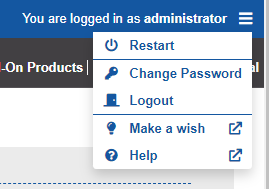
The burger menu is located in the upper right corner next to the view of the currently logged in user. Various user actions are grouped under it.
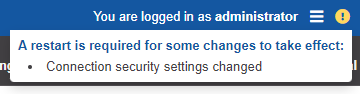
If changes have been made that require a restart, an icon is shown next to the burger menu. Click to reveal the reasons for restart.
Change password
The current user can change his password herewith. He will be prompted to enter his old and new password.
Log out
The current user will be logged out. The session is terminated and the login screen appears. The user can log in again.