Creation and Modification of Language Packages
About Modification and Creation of Language Packs
You can customize the language resources on your Cryptshare Server to your liking. You can change both the language resources that are shipped together with the Cryptshare Server, and create additional language resources yourself in order to present Cryptshare in further languages which are not part of the scope of delivery.
|
Language Packs and Server Updates
Please note that the update routines for Cryptshare Server may overwrite
existing language packs on the server with newer versions. This is
always the case when the server version you want to update to includes
new features for which additional language resources are required for
display. Cryptshare performs an automatic backup of the previous version
of Cryptshare Server before each update. This backup also includes the
language packages so that any changes that you have made are not lost
when language packs are overwritten during the update. However, they
must be manually copied from the backed-up version of the language
package and entered into the updated version of the language pack
accordingly. You can find the backups in the sub-folder "backup" of your
Cryptshare Server program directory. Open the .zip archive from which
you want to restore the language packs and navigate into the folder
|
|
Language packs and date formats
Please note that date formats for Java files ("server/texts/administration.properties", "server/texts/system.properties" and "server/texts/mail.properties") have to be compatible with the respective programming languages. You can find more details here: Java. |
Pre-Conditions
In general it is sufficient to only include those files into the package, which shall be changed (normally translated). If an element is missing within a language package the corresponding element from the fallback package will be used instead.
Apart from that the following conditions must be met:
| File/s | Condition |
|---|---|
version.xml |
Encoding has to be UTF-8 without BOM |
All Files |
Do not contain a language code in the file name |
<\*.properties> |
Encoding has to be ISO-8859-1. |
<\*.html> |
Encoding has to be UTF-8 without BOM |
|
When not using the encodings listed above this can cause errors in the User Interface and in email notifications. Therefore it is recommended to use an editor supporting different encodings for editing the files. The Windows editor 'Notepad' does not support a suitable format. Editors supporting additional formats are for example: |
Package Descriptor (version.xml)
Language Packages are defined and recognized (when installed) by their respective Descriptor-File (version.xml). The file describes the following details about the package:
-
Version of the Package
-
Language, and optionally the Country of the Package (ISO-639-1)
-
Product-Key for which this package is made
Language Package Version
The version number of a package consist of a Major Version Number and a Minor Version Number: <Major>.<Minor>. The Major-Number describes the compatibility with the product for which the package is made. The Minor-Number is count up for any change that has been made to the package.
Language Package Product-Key
The new language package management can differentiate between packages made for different Cryptshare Products. This is specifically interesting for the Email Templating-Engine in order to install different notifications on the server for different products. For instance, Cryptshare for Outlook (Classic) defines two different Email templates for the sender- and recipient notification.
| Product-Name | Product-Key |
|---|---|
Cryptshare Server |
server |
Cryptshare for Outlook (Classic) |
client.outlook |
Cryptshare for Notes |
client.notes |
Cryptshare Robot |
client.robot |
Cryptshare .NET API |
api.dotnet |
Cryptshare Java API |
api.java |
<locale>
    <value key="vendor" type="string">\[VENDOR\]</value>
    <value key="version" type="string">\[LANG\_VERSION\]</value>
    <value key="locale" type="string">\[LANGUAGE\]</value>
    <value key="product" type="string">\[PRODUCT\]</value>
</locale>
<locale>
   <value key="vendor" type="string">Pointsharp GmbH</value>
   <value key="version" type="string">4.0</value>
   <value key="locale" type="string">de\_DE</value>
   <value key="product" type="string">client.outlook</value>
</locale>
Structure of a language package
Cryptshare Server
A regular Cryptshare Server Language Package has the following structure:
| Path | Content | Mandatory |
|---|---|---|
version.xml |
Contains meta information about the language package:
|
Yes |
administration.properties |
Contents for the Administration Interface |
Only required if a translation of the Administration Interface is desired. |
web-app.properties |
Contents for the User Interface |
Only required if a translation of the User Interface is desired. |
web-common.properties |
Contents used for the User Interface as well as the Administration Interface. |
If either the Administration or the User Interface is modified, these resources should be modified as well. |
system.properties |
Contents that are used for system processes |
Yes |
mail.properties |
Contains text snippets for email notifications |
Yes |
templates |
Contains all email templates required for email notifications |
Yes, otherwise the defined fallback package is used. |
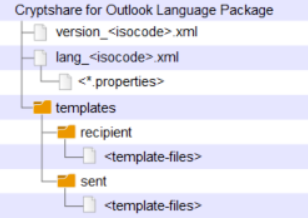
Cryptshare for Outlook (Classic)
| Path | Content | Mandatory |
|---|---|---|
version_<isocode>.xml |
Contains meta information about the language package:
|
Yes |
lang_<isocode>.xml |
Contains resources for the Cryptshare for Outloook (Classic) User Interface |
Yes |
templates → recipient |
The email template for the recipient notification when performing a transfer via Cryptshare for Outlook (Classic) |
Yes |
templates → sent |
The email template for the email stored in the sent-items folder of Outlook when performing a transfer via Cryptshare for Outlook (Classic) |
Yes |
templates → sms |
The email template for the SMS notification when performing a transfer via Cryptshare for Outlook (Classic) and choosing to send the password via SMS |
Yes |
Directory structure for a Cryptshare for Outlook Language Package