
Network Configuration
Network traffic
Certain functions of the Cryptshare Server require network connections to other systems. To do this, the network, and in particular intermediate firewalls, must be configured accordingly.
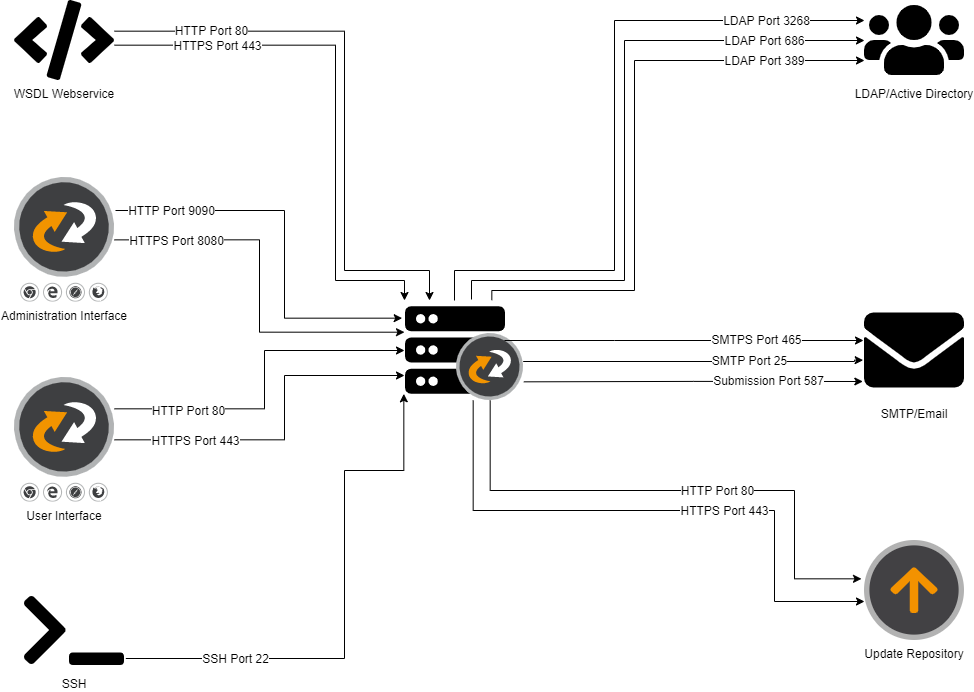
Ports
Please refer to the table below for the required network traffic that has to be permitted. Be aware that most of the network ports can be configured individually (for example, the web server ports), so the actual ports may be different.
| Port # (Default) | Service | Direction | Source/Destination | Purpose |
|---|---|---|---|---|
80 |
HTTP |
Inbound |
User clients (Intranet and Internet) |
Access to the Cryptshare User Interface. |
443 |
HTTPS |
Inbound |
User clients (Intranet and Internet) |
Access to the Cryptshare User Interface. |
80 |
HTTP |
Outbound |
OS Update Repositories (Internet) |
Access to update repositories for the Operation System (Appliances only). |
443 |
HTTPS |
Outbound |
Cryptshare Update Server |
Access to update repositories for the Cryptshare Server Application |
8080 |
HTTPS |
Inbound |
Administrative clients (recommendation: Intranet only) |
Access to the Cryptshare Administration Interface. |
9090 |
HTTP |
Inbound |
Administrative clients (recommendation: Intranet only) |
Access to the Cryptshare Administration Interface. |
22 |
SSH |
Inbound |
Administrative clients (recommendation: Intranet only) |
Access to the operation system shell via SSH (Linux and Appliances only). |
25 |
SMTP |
Outbound |
Email server / SMTP relay (Intranet) |
Email Delivery/Relaying for outgoing emails from the Cryptshare Server. |
465 |
SMTPS |
Outbound |
Email server / SMTP relay (Intranet) |
Email Delivery/Relaying for outgoing emails from the Cryptshare Server - authenticated SMTP over TLS/SSL (SMTPS). This is only required when the Mail Server Settings are configured to use this port. |
587 |
SMTP |
Outbound |
Email server / SMTP relay (Intranet) |
Email Delivery/Relaying for outgoing emails from the Cryptshare Server - email message submission (SMTP) . This is only required when the Mail Server Settings are configured to use this port. |
389 |
LDAP |
Outbound |
LDAP server (Intranet) |
LDAP queries to resolve policy rules. This is only required if the LDAP interface of Cryptshare is used. |
686 |
LDAPS |
Outbound |
LDAP server (Intranet) |
LDAP queries to resolve policy rules. This is only required if the LDAP interface of Cryptshare is used. |
3268 |
LDAP |
Outbound |
Active Directory server (Intranet) |
LDAP queries to resolve policy rules against the Global Search Catalog. This is only required if the LDAP interface of Cryptshare is used with an Active Directory and requests will be issued against the Global Search Catalog. |
22 |
SSH |
Outbound |
Archive server (Intranet) |
Access to the file system of the archive server. This is only required if the archiving interface (secure copy) is activated. |
|
In addition, it may be necessary to configure an activated software firewall on the Cryptshare Server itself. On Cryptshare appliances, the integrated firewall (SuSEFirewall) is not active by default. For all other systems, please refer to the help of your operating system / software firewall. |
Cookies
The Cryptshare web application uses cookies to recognize a browser session, to identify a verified user and to store additional user data. To ensure proper and user-friendly operation, the browser must be allowed to store and send cookies for the Cryptshare server. A list of all cookies used can be found in the Usage of Cookies.
|
If embedding the web app in other pages is permitted and the page is accessed without HTTPS, problems may occur due to the security settings of the cookies under Chrome. |
HTTP Headers
Cryptshare for Outlook communicates via REST with the Cryptshare Server. A part of the required information is transmitted via HTTP Headers. For flawless operation of Cryptshare for Outlook it is therefore necessary to have a correct firewall setup. The following application headers are used:
| Name of the HTTP header | Communication direction | Description |
|---|---|---|
X-CS-ClientId |
Client → Server |
Unique ID for the identification of single clients |
X-CS-MajorApiVersion |
Client → Server |
Specification of the required API version |
X-CS-MinimumMinorApiVersion |
Client → Server |
Specification of the required API version |
X-CS-ProductKey |
Client → Server |
Specifies the product making the request |
X-CS-Password |
Client → Server |
Transfer password |