
OpenID Connect (OIDC)
Cryptshare supports OIDC-based authentication for the Administration Interface. This feature enables the management of administrative access to the Cryptshare Server through an Identity Provider (IdP) that supports OIDC. It eliminates the need to manage administrative user accounts locally and provides significantly more granular options for controlling administrative permissions. When OIDC-based authentication is enabled, access for local administrative users is disabled. It is always possible to revert back to local authentication by disabling the Identity Provider configuration.
This feature requires a Cryptshare Enterprise License and is supported starting with Cryptshare version 7.5.0. If you are currently using a Cryptshare Business License, or if you already have a Cryptshare Enterprise License but the feature is not yet enabled in your license file, please contact your Cryptshare sales representative.
Recommendation
We recommend using the Pointsharp Identity Provider for a streamlined OpenID Connect (OIDC) integration. It allows administrative access permissions to be mapped directly without the need to manually create and maintain roles, as would typically be required when using identity providers such as Keycloak or Microsoft Entra ID. For configuration details, see Configuration.
Authentication behavior
When accessing the Admin Interface, the authentication flow behaves as follows:
-
The user is redirected to the configured Identity Provider.
-
The user authenticates at the Identity Provider.
-
After successful authentication, the user is redirected back to the Cryptshare Administration Interface.
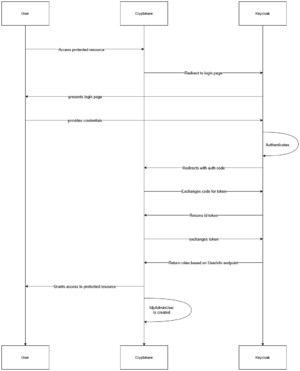
If the Identity Provider is unavailable or authentication fails, the login attempt fails.
User handling and role mapping
User existence
-
The user must exist in the Identity Provider.
-
On first successful login:
-
A local Cryptshare administrative user is created automatically.
-
Groups and Roles
-
The OIDC counterpart must provide role information that can be mapped to Cryptshare Admin Permissions.
-
For Keycloak, define the required roles and group assignments. For Microsoft Entra ID, define the corresponding app roles.
-
A standard role mapping is available for the Pointsharp Identity Provider. When using other Identity Providers, the required role mappings must be created manually.
-
Role mapping is configured exclusively in the Identity Provider.
If role mapping is missing or invalid, login is denied.
See Groups and roles.