RADIUS attributes
| This configuration is considered advanced and should not be changed unless there is a specific need. |
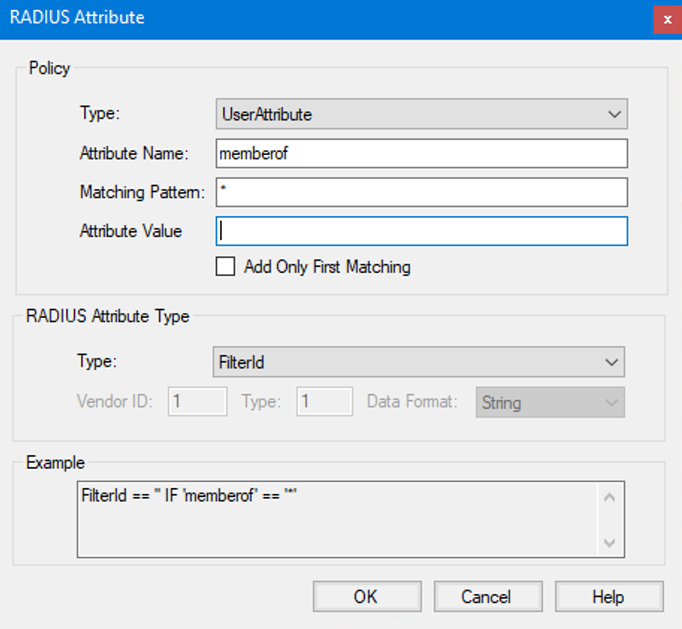
RADIUS attributes offer a mean to propagate user information, such as group membership or additional user information, to the RADIUS client which is performing the authentication with Pointsharp ID. RADIUS clients can for example require a certain role membership to access certain resources.
| For further information on RADIUS and RADIUS attributes, see RFC 2865. |
| RADIUS is using the UDP protocol, this should be kept in mind when configuring any firewalls. |
| Parameter | Description |
|---|---|
Type |
Select the type of policy that is to be evaluated when setting this RADIUS attribute. It is possible to set:
|
Attribute Name |
Set the attribute name to use when evaluating this policy for the user in User Storage. For example |
Matching Pattern |
Enter the matching pattern to use when evaluating this policy for the user in User Storage. The value can be combined with asterisks(*) to configure Starts With, Ends With and Contains matches. |
Attribute Value |
Set the attribute value to use when evaluating this policy for the user in User Storage. If this is left blank, the actual user attribute on the user in User Storage is used. For example, if the user attribute |
Add Only First Matching |
Enable this to only add the first matching value for this RADIUS attribute type. This is evaluated for all policies of the same RADIUS attribute type and have this flag enabled.
By using this it is possible to define a prioritized list of |
RADIUS Attribute Type |
Select a RADIUS attribute type. Attribute types are described more in detail below. |
CN=VPN-Users* will match if a memberOf attribute equals CN=VPN-Users,CN=Users,DC=acme,DC=com.
*@company.com will match if a mail attribute equals user@company.com.
*VPN-Users* will match if a memberOf attribute equals CN=VPN-Users,CN=Users,DC=acme,DC=com.
*-Users,CN=Users,DC=acme,DC=com will match if a memberOf attribute equals CN=VPN-Users,CN=Users,DC=acme,DC=com.
Note that the matching is not case-sensitive.
Attribute types
The attribute types are grouped in two "text"-based groups (single– and multivalued), an IP address-based group, an Integer-valued group, and one "other"-group.
Single-Valued Attributes
Single-valued attributes may contain text, and they are only allowed once in a RADIUS packet. That is, PointSharp ID will evaluate attributes of this type and if a match is found, for example, the user has a certain text in the 'memberOf' attribute, the first attribute in the list is added to the reply packet.
Multivalued Attributes
Multivalued attributes may contain text and are allowed multiple times in a RADIUS packet. That is, PointSharp ID will evaluate all attributes of this type and add all matching, for example, the user has a certain text in the 'memberOf' attribute. The Vendor-Specific Attribute is also allowed multiple times.
IP Address Attributes
IP Address attributes contain a single IP address, for example, 192.168.32.204.
Integer-Valued Attributes
Integer-valued attributes contain an integer value (unsigned 32-bit integer).
Other Attributes
Other attributes are all other defined attribute types according to the RFC 2865.
| Beware that some of these attributes are strictly forbidden to use (User-Name for example) and it is recommended to thoroughly study the RFC 2865 prior using an attribute in this group. |
Vendor-Specific Attribute
Vendor Id: Set the Vendor Id in compliance with the Vendor-Specific Attribute to use, for example '9' for Cisco. For further information about this, see the RADIUS RFC or the IANA Enterprise Private Numbers list.
Vendor Type: Set the Vendor Type in compliance with the Vendor-Specific Attribute to use, for example '1' for Cisco av-pair. For further information about this see the RADIUS RFC and any vendor-specific documentation.
Data Format: Set the Data Format in compliance with the Vendor-Specific Attribute to use, for example String for Cisco av-pair. Select one of the values:
-
String,
-
IP Address, or
-
Integer.
For further information about this, see the RADIUS RFC and any vendor-specific documentation.
Two example configurations or RADIUS attributes
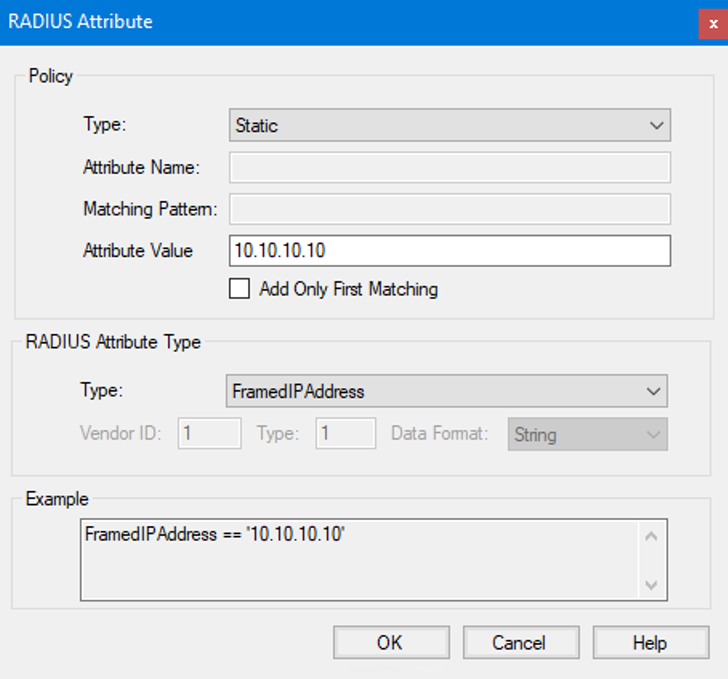
This configuration will send the RADIUS attribute FramedIPAddress with the value 10.10.10.10 to the RADIUS client.
This configuration will send the value of the users memberOf attribute from the Directory server in the FilterID RADIUS attribute, back to the RADIUS client.