
Windows Password Reset – service account rights delegation in AD
The service account used for Windows Password Reset is the one that is set in the User Storage in PSID Admin GUI. The account must have sufficient rights to be able to change the password for the users during the Password Reset process.
Delegate control
-
Right-click on the Organizational Unit (OU) in the Active Directory used for User Storage.
-
Start a Delegation of Control wizard.
-
Select the account (set in PSID Admin under User Storages) to add delegation rights.
-
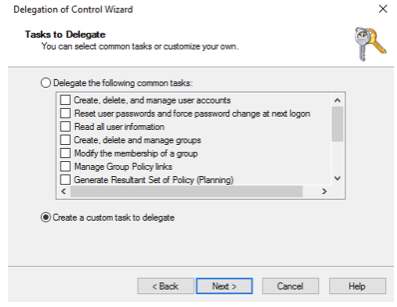
At the Tasks to Delegate window, choose Create a custom task to delegate.
-
Click Only the following objects in the folder and add User objects.

-
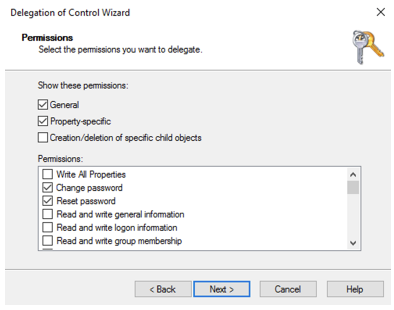
Enable Property-Specific and choose Change Password and Reset Password:
-
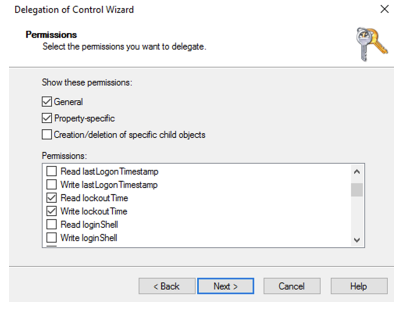
Scroll down and also add Read lockout Time and Write Lockout Time.
-
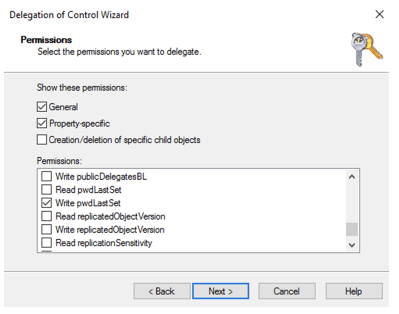
The last checkbox to add is the Write pwdLastSet.
-
The delegation rights needed are now added. Continue and finish the Delegation Wizard.