
Net iD Access Client
Net iD Access client is the app for end users. There are versions for:
-
Windows
-
macOS
-
Linux
-
Android
-
iOS/iPadOS.
| Description | iOS | Android |
|---|---|---|
Start page with different information depending of status. The status can for example be:
|
|
|
PIN dialog for authentication and signing. |
|
|
Settings with:
|
|
|
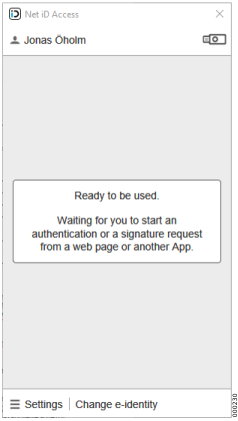
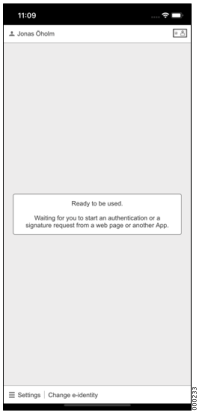
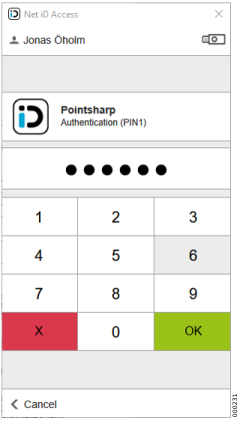
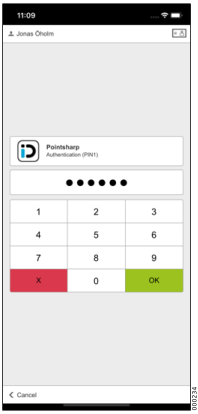
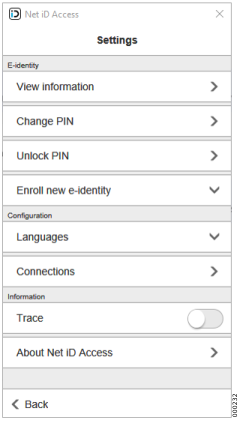
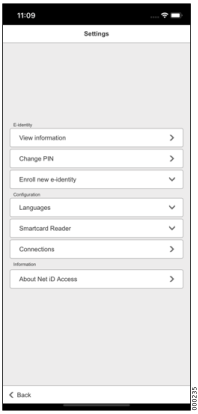
When adding a Net iD Access Server connection in Net iD Access Client, it will use the /niac/-interface which has the following methods. These methods will not be described in detail.
-
ArchiveOpen
-
ArchiveSearch
-
GetInfo
-
GetStatistics
-
LoadData
-
LoadRequest
-
Manage
-
ManageUserDevice
-
RequestGetStatus
-
RequestNext
-
RequestProcess
-
RequestRegister
-
UserAdd
Support matrix
| Card reader support via standard PC/SC | Support for smart cards | Support for YubiKeys | Support for soft tokens | Support for Feitian K9 | Support for bluetooth readers | Custom packages available[1] | Management via GPO or MDM[2] | |
|---|---|---|---|---|---|---|---|---|
Windows |
|
|
|
|
|
|
|
|
macOS |
|
|
|
|
|
|
|
|
Linux |
|
|
|
|
|
|
|
|
Android |
n/a |
|
|
|
|
|
|
|
iOS/iPadOS |
n/a |
|
|
|
|
|
|


Note on the Lightning functionality
The support for the Tactivo card reader to our iOS version of the Net iD Access app follows Apple’s regulations for which apps are allowed to communicate with external hardware via the Lightning port. The support for Yubico’s product YubiKey follows the same regulations. Apple’s regulations in this area are called the "MFi Program", see https://mfi.apple.com/en/faqs.html.
In short, it is based on:
-
The accessory manufacturer must join Apple’s MFi program.
-
Pointsharp contacts the manufacturer of the hardware (formerly Precise Biometrics, now Identos in Germany and Yubico) and get their acceptance to "work together".
-
The accessory manufacturer is given a special "ID" by Apple.
-
In order for Pointsharp to be able to publish an app on the App Store, Pointsharp must provide this ID at each publication (otherwise the app’s publication will be stopped).
-
Apple has some sort of control over the ID numbers provided by Pointsharp (the exact procedures do not concern Pointsharp).
-
If everything is correct, Apple allows Pointsharp to publish their app with support for the hardware that the ID numbers are associated with.
-
This has worked well for many years and Pointsharp updates have always been approved by Apple without objection.
So far so good. But now we come to the transition from the Lightning connector to the USB-C connector. When Apple released the iPad Pro with USB-C connector, Pointsharp asked Identos if they intended to bring out a Tactivo Mini with USB-C. The answer was that they would love to do it but that the MFi program did not include USB-C, only Lightning. The issue was then raised again when one of Pointsharp’s government customers using the YubiKey 5Ci (both Lightning and USB-C model) and USB-C only YubiKeys, wondered if it worked with the Net iD Access app. Our answer was of course: Unfortunately not.
Pointsharp then contacted Yubico again who could only regret that their product YubiKey can only be used with USB-C regarding the OTP generation function, not with YubiKey’s PIV application (PKI part). This is because the MFi program does not currently include USB-C. Pointsharp has also been in contact with Apple Sweden and stated that there are authorities and regions in Sweden that would like to see that the USB-C port could be used.