
TCP Listeners and Proxy
The configured listeners for this Pointsharp Access Gateway.
A TCP listener is used to match a group rules for a specific host and port. When publishing changes, the service Pointsharp Access Gateway TCP Proxy will start one worker process for each unique TCP host/port rule. The matching procedure can be described as follows:
-
A client makes a request towards a specific address and port.
-
If any TCP worker match the listening host + port, the worker will handle the request and connect to backend server.
-
TCP modules can be added for handling specific protocols.
Add Listener
Click Add Listener to start the Add new TCP Listener configuration wizard. Add listening address, TCP Proxy Rule(s) and TCP modules.
| Property | Description |
|---|---|
Address |
The incoming address for a host or service to listen to. Example: local.company.com |
Enabled |
Decides whether the listener is in use or not. The Pointsharp Access Gateway will respond with a HTTP 503 (Service Unavailable) to the client if the listener matched, but is disabled. Default: enabled |
TCP Proxy Rule
The configuration of a TCP Proxy Rule. A TCP Proxy Rule is a configuration of what should happen if a client is requesting resources on a specific host/port.
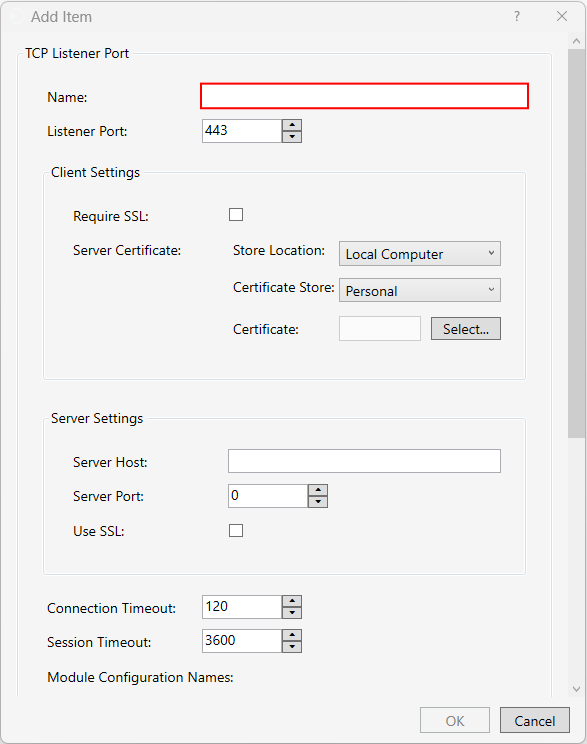
| Property | Description |
|---|---|
Name |
The path identifier name that this rule is for. This name is used as a listener unique friendly name in the logs. |
Listener Port |
The specific port to listen to. |
Client Settings
Settings for incoming connection.
| Property | Description |
|---|---|
Require Client SSL |
Select to require client SSL. |
Server Certificate |
Configure server certificate. |
Server Settings
Settings for backend server connection.
| Property | Description |
|---|---|
Server Host |
The backend host to proxy against. |
Server Port |
The backend port to proxy against. |
Use SSL |
Select to use SSL for backend connection. |
| Property | Description |
|---|---|
Connection Timeout |
The time in seconds that the rule should wait for the backend server to respond. Default: 120 |
Session Timeout |
The time in seconds that the rule allows it to take for a read/write operation to finish. Default: 3600 |
Module Configuration Names |
The names of the module configurations to be used if this rule is applied. |