
Start page
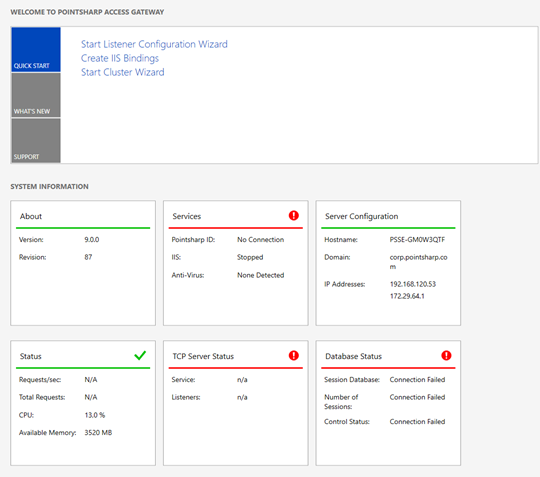
The dashboard displays information about the current system that may be useful when verifying your configuration and hardware setup.
Quick start — templates
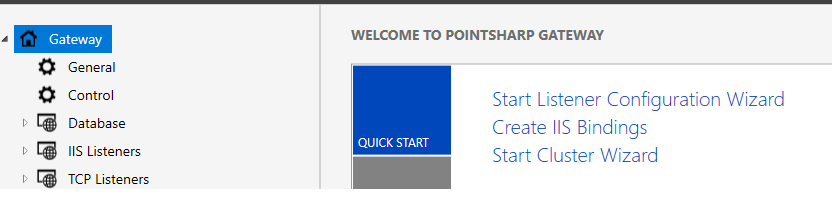
Listener configuration wizard
The wizard automatically connects the most suitable modules for each listener setup. Simply select the wanted option in the Start Listener Configuration Wizard menu, and follow the wizard to guide you through the configuration.
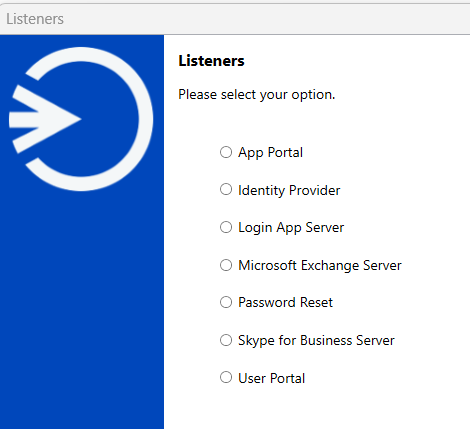
After Listener configuration wizard is completed, you are required to add the created listeners to your Internet Information Services (IIS).
Create IIS bindings
For each configured listener in your configuration, there has to be a binding in an IIS Manager website. These bindings will be added by selecting Create IIS Bindings in the Quick Start menu, or from the TOOLS menu.
| You are only required to create the bindings once per new listener. |
To apply the latest configuration changes, press Publish. This will restart the IIS on your machine, which means that your services published by this machine cannot be accessed through it, until this process is done.
Publish custom paths
To publish other network applications and features than the wizard supported Microsoft Exchange Server or Skype for Business Server, you will have to go through these steps:
-
Setup one or more listeners.
-
Create bindings in IIS.
-
Setup one or more rules.
-
Configure modules to be used, if any, and link the modules from the rules that should use them.
-
Click Publish.
About
General information concerning the current Pointsharp Access Gateway installation.
| Version |
The release version of the current build. |
| Revision |
The current configuration revision. The revision is an identifier of the last saved configuration. |
Services
Provides the status of the current 3rd party services affecting the Pointsharp Access Gateway.
| Pointsharp ID |
Indicates if the API of a Pointsharp ID can be reached. Possible states are:
|
| IIS |
Provides the current state of the IIS. Possible states are:
|
| Session database |
Provides the current state of the session database, Couch DB. Possible states are:
|
| Anti-Virus |
Shows the detected anti-virus software that is installed. Possible states are:
|
Server configuration
Presents information about the current machine.
| Hostname |
The detected hostname of this machine. |
| Domain |
The detected domain, if any, of this machine. |
| IP Addresses |
The list of IP addresses related to this machine. |
Status
Presents live data about performance related status of the current machine.
| Requests/sec |
The number of requests per second to the current machine through the IIS services. |
| Total Requests |
The total number of requests to the current machine through the IIS services. |
| CPU |
The current usage, in percent, of the CPU on the current machine. |
| Available Memory |
The amount of unused space, in MB, of the RAM of this machine. |