
Dataverse - Configuration
With the Dataverse connector you get the chance to connect to Microsoft Dataverse and exchange data.
There are two connection types:
-
Compliance Suite Dynamics
This connection type uses the Compliance Suite connection to communicate with the instance of Dynamics365, that Compliance Suite is part of.This connection type only works if Compliance Suite and Dataverse are in the same environment. -
Dataverse Connection
This connection type uses a dedicated connection to the Dataverse.This connection type can be used to connect to different environments.
How to set up the connection with Dataverse Connection:
-
Create a Dataverse Connection record in Compliance Suite / Dynamics365.
-
Save the ID of this record.
-
Use one of the following connection types to connect to Dataverse:
| Connection Type | Description | Setup | ||||
|---|---|---|---|---|---|---|
User |
The user has to connect via a username and a password. |
|
||||
Application User |
The user has to connect via a ClientId and ClientSecret. |
|
Example for the settings:

How to configure a Dataverse user system:
When creating a new Dataverse user system, you need to perform the following configurations, to define which user entity should be imported and how it should be matched with a CCS person.
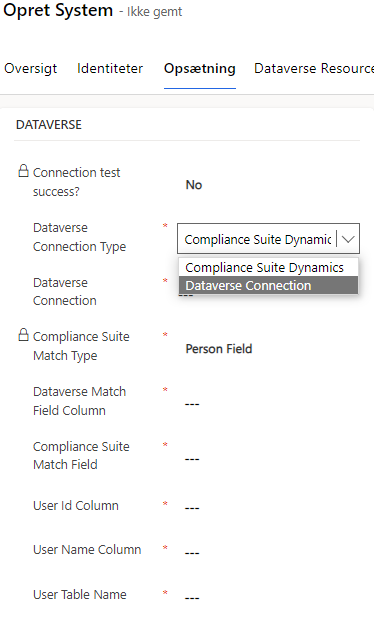
| Field | Description | ||
|---|---|---|---|
Dataverse Connection Type |
Two connection types are available:
|
||
Dataverse Connection |
System name in CCS. |
||
Dataverse URI |
Tell which Dataverse environment to connect to. |
||
Compliance Suite Match Type |
Match on an AzureAD object Id or a person field.
|
||
Dataverse Match Field Column |
The logical name from Dataverse. The field to be used from Dataverse to map to a CCS person. |
||
Compliance Suite Match Field |
The logical field name in CCS to which the Dataverse field should be matched to.
|
||
User Id Column |
The logical Id name of the user. This is the object Id of the Dataverse user system identity. |
||
User Name Column |
The logical display name of the user. This is the name of the Dataverse user system identity. |
||
User Table Name |
The plural name of the type of user, that should be imported. |