
Rule-based mode
In this mode, messages are analyzed by server-side rules and eventually moved into Cryptshare.nsf for further processing.
Create server-side mail rules
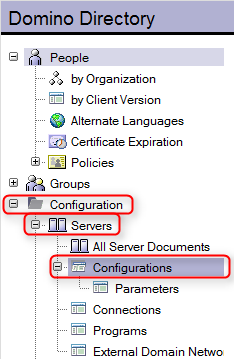
You can manage mail rules in the Domino Directory in the section "Configurations" - "Server" - "Configurations"
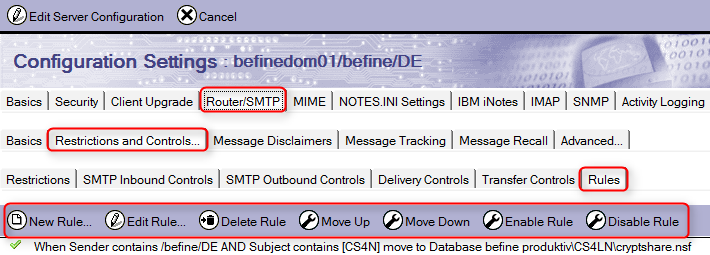
Edit the server configuration document and select the tab "Router/SMTP", then "Restrictions and Controls…", then "Rules". Here you can create new rules or edit, delete or disable existing rules.
| 
If you use a product from a third-party vendor to manage mail traffic rules, you can create rules in the same sense as described below using the product of the third-party vendor to configure the rule-based operation of Cryptshare for Notes. Please note the manufacturer’s instructions.
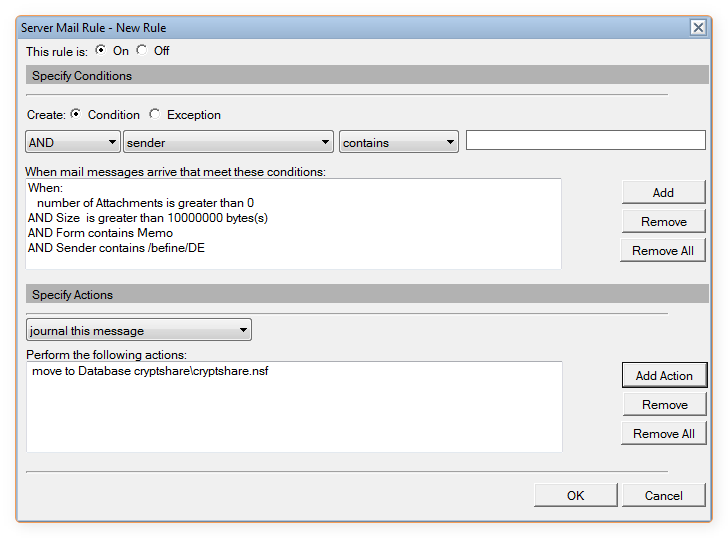
A server-side rule for email messages might look as follows:
-
If the number of attachments is larger than 0,
-
and the total message size exceeds 10.000.000 Bytes (approx. 10 Mbyte)
-
and the form name equals "Memo"
-
and the sender contains your organization name (e.g. "/befine/DE")
-
then the message will be moved into Cryptshare.nsf.
CS4N scans Cryptshare.nsf on a regular basis for new messages to process.
|
Setting up rules in the Domino Directory
|
Advantages
-
A central set of rules can be defined which is mandatory for all specified users of the system.
-
The user doesn’t need to take or consider taking any action.
-
No software roll-out is required on the Client side.
-
The users will just need some basic instruction. They need to understand the auto-generated message that Cryptshare sends back to the sender.
-
The router/mail.box will not have to handle large emails.
-
To distribute the traffic load in a system with several mail.boxes, a number of CS4LN installations can be used.
-
Messages of any size can be delivered regardless of restrictions for the mail-box size or the message size that may exist on the sender’s side.
Important information
-
With large email traffic, the CS4N application (Cryptshare.nsf) may take up a significant amount of storage space.
-
Lotus Domino’s "compact" task should be run against CS4N daily.
-
The emails processed by Cryptshare bypass the standard mail route and may have to be monitored separately.