
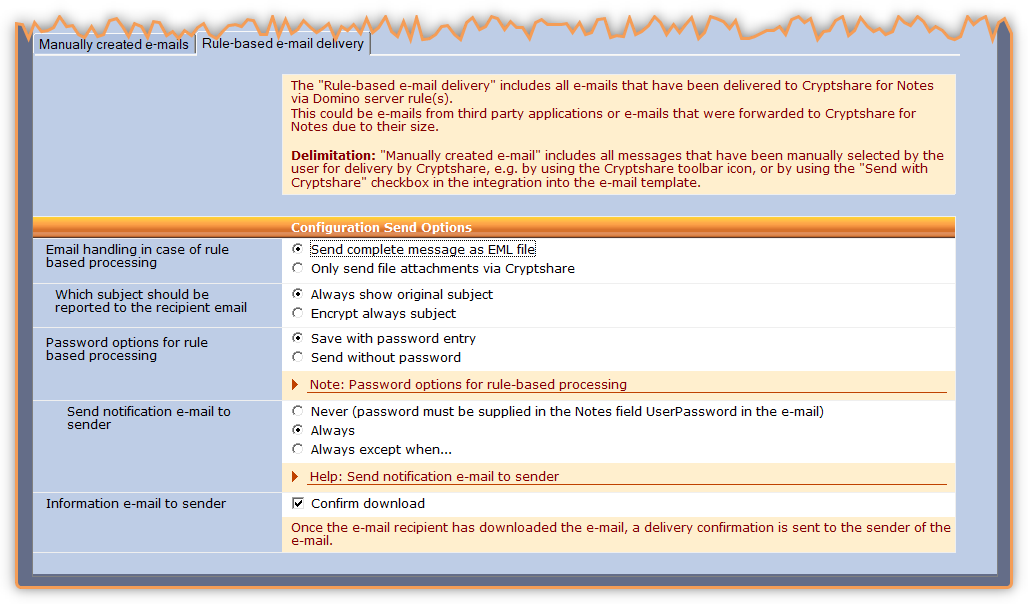
Configuration send options
The "Rule-based email delivery" includes all emails that have been delivered to Cryptshare for Notes via Domino server rule(s). This could be emails from third party applications or emails that were forwarded to Cryptshare for Notes due to their size. Delimitation: "Manually created email" includes all messages that have been manually selected by the user for delivery by Cryptshare, e.g. by using the Cryptshare toolbar icon, or by using the "Send with Cryptshare" checkbox in the integration into the email template.
| Label | Comment | ||
|---|---|---|---|
Email handling in case of rule based processing |
How do you want to deal with messages that come into Cryptshare.nsf based on Domino rules: Only send file attachments via Cryptshare Only the file attachments are provided as Cryptshare downloads. The original message will be complemented by an informational text and a download link and sent as regular email message. Send complete message as EML file The complete message (body text and attachments) is converted into an EML file and provided as Cryptshare download. Instead of the original message a standard notification is sent to the recipients to inform them that a confidential message is available for download to them. |
||
Which subject should be reported to the recipient email |
Choose how the subject line should look Always show original subjectShows original subject without any changes Encrypt always subjectSubject will be the one configured in the language file instead of the original subject. The standard setting is "Confidential message" |
||
Password options for rule-based processing. |
For messages that are automatically processed using server-side rules you can select if recipients have to provide a password to download the files or not.
|
||
Send notification email to sender |
Should the sender of an email that was processed rule-based receive a notification email including password once the email has been successfully made available to the recipients? Never (password must be supplied in the Notes text field "UserPassword" in the email) The sender does not receive an email confirmation once the email sent by them has been made available for download to the recipient. For this purpose, the encrypted password must be included in the additional text field UserPassword in the email sent by the sender so that it can be used. Always The email sender receives a notification email with the password of the transfer. Always except when… The sender of the email receives a notification email unless the email includes a text field CS4N_UploadInfo with the value "1". |
||
Send notification email to sender |
Do you want the sender to receive a confirmation about successful upload to the Cryptshare Server in case of messages that have been processed automatically based on rules? |
||
Information email to sender |
Once the email recipient has downloaded the email, a delivery confirmation is sent to the sender of the email. |