
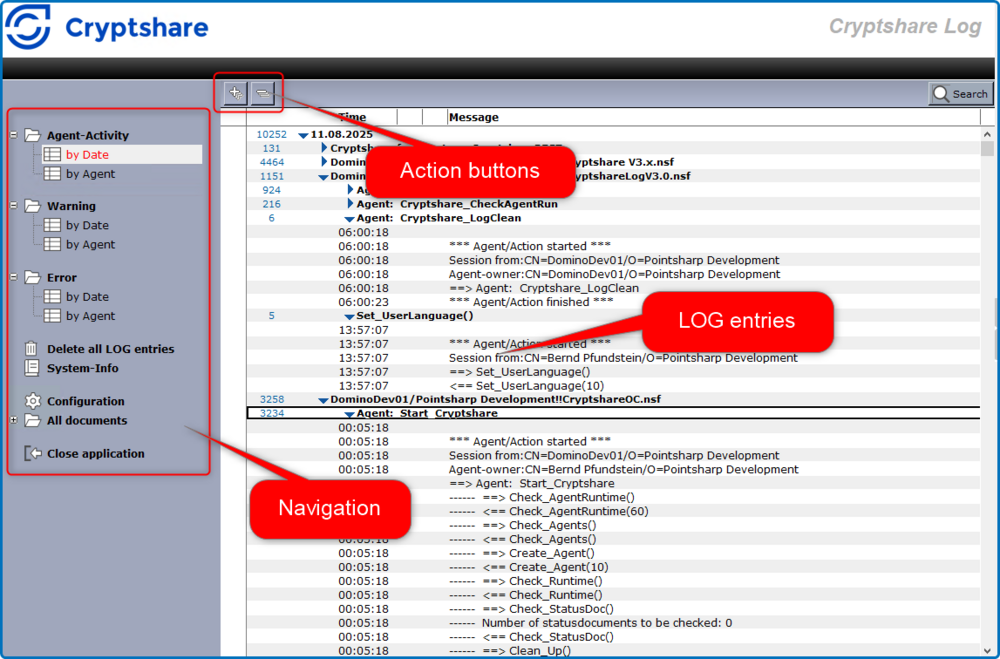
CS4N Log Application Main View
| Element | Comment |
|---|---|
Action buttons |
Depending on the view that is currently opened, context-sensitive action buttons may be shown. |
Search button |
A Search button is available in all views in the upper right corner. You can use this button to do a full-text search in all views of the application. |
Navigation |
Open views and functions from here. |
Navigation – Agent Activity |
Standard views for all log entries sorted by date and agent. |
Navigation – Warning |
Shows only warnings sorted by date and agent. |
Navigation – Error |
Shows only errors sorted by date and agent. |
Delete all LOG entries |
Deletes all log entries from the CS4N log application. |
System-Info |
Screen showing information concerning the application. |
Navigation – Configuration |
Configuration area |
All documents |
Views that show all documents in the application sorted by form name and Universal ID. |
Navigation – Close application |
Closes the Log Application |