
CS4N User Interface Main View
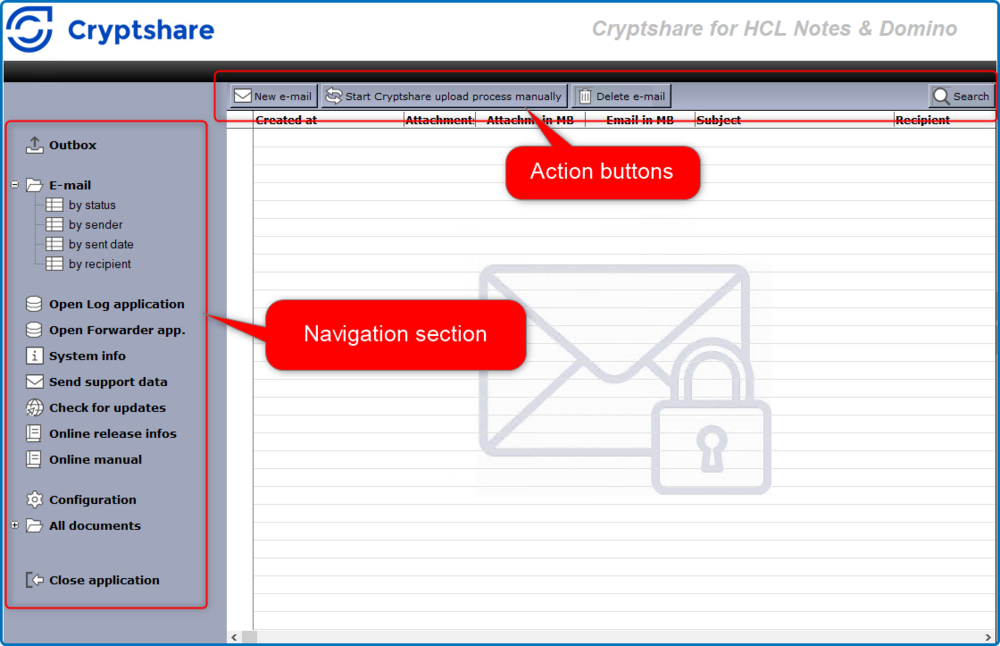
| Element | Description |
|---|---|
Outbox |
Contains all new message that have not yet been processed by CS4N. |
email / by status |
Shows all status documents sorted by status. |
email / by sender |
Shows all status documents sorted by sender. |
email / by sent date |
Shows all status documents sorted by send date. |
email / by recipient |
Shows all status documents sorted by recipient. |
Open Log Application |
Opens the CS4N Log Application into which all events will be logged (depending on log level settings). |
Open Forwarder Application |
Opens the CS4N Forwarder Application. |
System Info |
Displays a screen showing all information relevant for the application. |
Send support data |
Opens the dialog for sending the support data. |
Check for Updates |
Checks whether a newer software version is available for installation. |
Online release info |
Opens a browser window and displays the release information for the current version |
Online manual |
Opens a browser window and displays the online manual for the current version |
Configuration |
Opens the configuration page for CS4N |
All documents / by form |
Shows view of all documents categorised by form name |
All documents / by universal ID |
Shows a view of all documents categorised by universal ID |
Action Buttons (Outbox) |
Depending on the view that is currently opened, context-sensitive action buttons may be shown. |
New email |
Create a new Cryptshare message. |
Start Cryptshare upload process manually |
Trigger the upload agent manually to start processing of messages in the outbox. |
Delete email |
Deletes the selected messages including the corresponding status documents. |
Action buttons (visible in status views only) |
Depending on the view that is currently opened, context-sensitive action buttons may be shown, e.g. expand all or collapse all. |
Delete operation |
Deletes the selected status document – on request including the corresponding message. |
Search button |
A Search button is available in all views in the upper right corner. You can use this button to do a full-text search in all views of the application. |
Status Documents |
Status Document in the view. |