
Status Documents
Status documents contain all information that is relevant for a transfer from Cryptshare for Notes to the Cryptshare Server as well as information for sending notifications to sender and recipient.
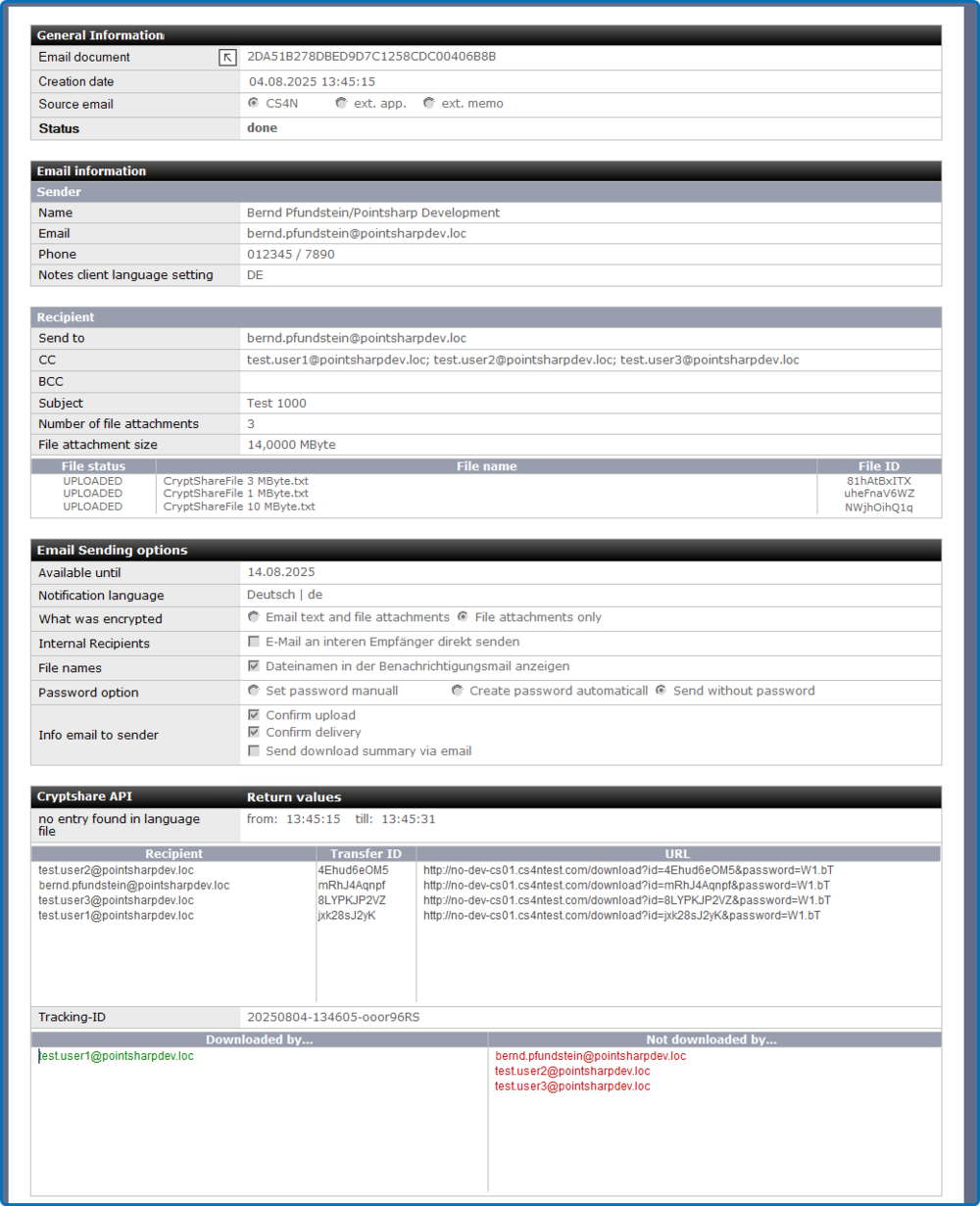
Section: General Information
| Label | Comment |
|---|---|
email document |
Link to the originating document in the CS4N application as well as information about the originating document. |
Create date |
Date of creation of the status document. |
Soudrce emai |
Indicates whether the email was created manually directly in CS4N or whether it was processed via a server rule. |
Status |
Status of the document. |
Section: Email Information (Sender)
| Label | Comment |
|---|---|
Name |
Name of the sender |
Sender’s email address |
|
Phone |
Telephone number of the sender according to Domino Directory |
Notes client language setting |
Notes Client Language setting of the creator of the email |
Section: Email information (Recipient)
| Label | Comment |
|---|---|
Send to |
Original mailing list from the original email |
CC |
Internet email-Addresses of all recipients. Groups are shown resolved. |
BCC |
email subject |
Subject |
Subject of the email |
Number of file attachments |
Number of file attachments |
Attachment size |
Size of all file attachments in MB |
File list |
List with the file upload status, the file name and the file ID. |
Section: Email sending options
| Label | Comment |
|---|---|
Available until |
Date until which the transfer is available for retrieval by the recipient. |
Notification language |
Language of the notification text inserted in the email. |
What was encrypted |
Which encryption option was used to send the email. |
Internal recipients |
Indication of whether internal recipients should receive the email directly. |
File name |
Which password option was used. |
Password options |
Which password option was used. |
Info email sender |
Various possible information for the sender of the email. |
Section: Cryptshare API (Return Value)
| Label | Comment |
|---|---|
Runtime upload agent |
Start and shutdown time of the upload agent. |
Recipients allocation |
Jeder Empfänger erhält eine eigene Transfer ID und eine eigene individuelle URL zum Download der Daten. Wird die Option zum getrennten Versand an interne / externe Empfänger aktiviert, ist an dieser Stelle für die internen Empfänger nur die Empfängeradresse aufgeführt. Die internen Empfänger erhalten die Benachrichtigung in unveränderter Form, deshalb wird keine Download-URL und keine Transfer ID für diesen Empfängerkreis benötigt. |
Tracking-ID |
Tracking-ID des Transfers. |
Downloaded |
Information about which recipients have or have not performed the transfer download. |