
Sub Tab "Create email template"
In the following dialog, all necessary information is entered to add the CS4N&D integration to your existing email template.
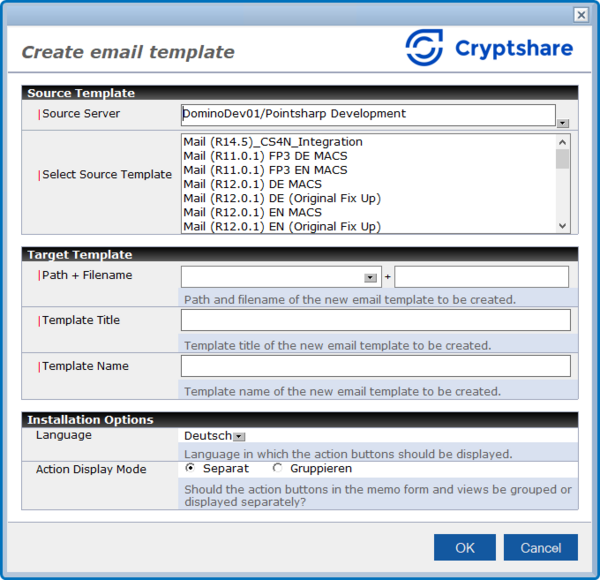
Section: Source template
| Label | Comment |
|---|---|
Source server |
The Domino server on which the email templates are located is entered here. |
Select Source Template |
Here you select the email template that you want to customize. |
Section: Target template
| Label | Comment |
|---|---|
Path + Filename |
Here you enter the path and template file name under which the new template to be created should be saved. |
Template Title |
The new email template title is entered here. |
Template Name |
The new email template name is entered here. |
Section: Installation Options
| Label | Comment |
|---|---|
Language |
For which language should the template integration be carried out? |
Action Display Mode |
Here you can configure how the CS4N&D action buttons should be displayed in the views and mail masks. The following two options are available: Separate See point 1. The 'Send with Cryptshare' and 'Cryptshare Transfer Manager' action buttons are displayed separately. Grouped See point 2. The 'Send with Cryptshare' and 'Cryptshare Transfer Manager' action buttons are displayed in a group. 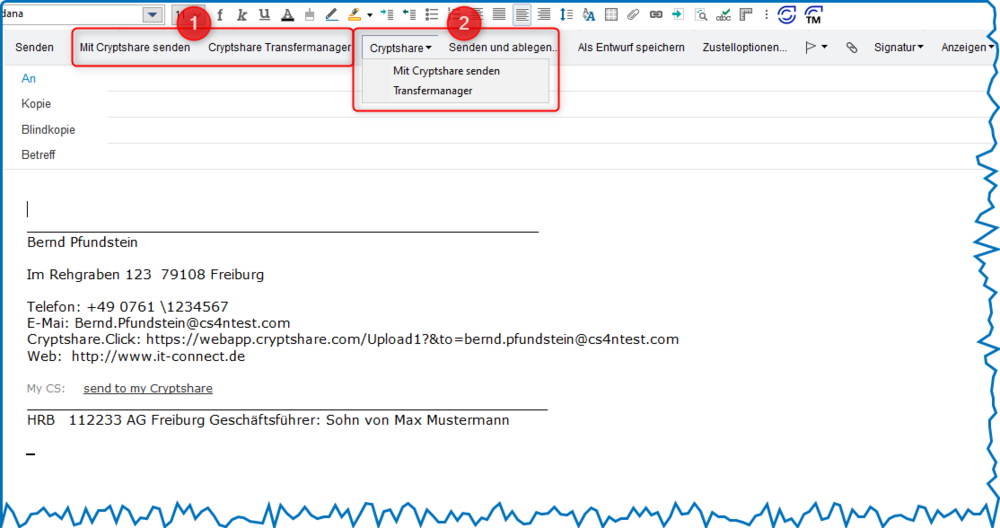
|