
Sub-tab "EML processing"
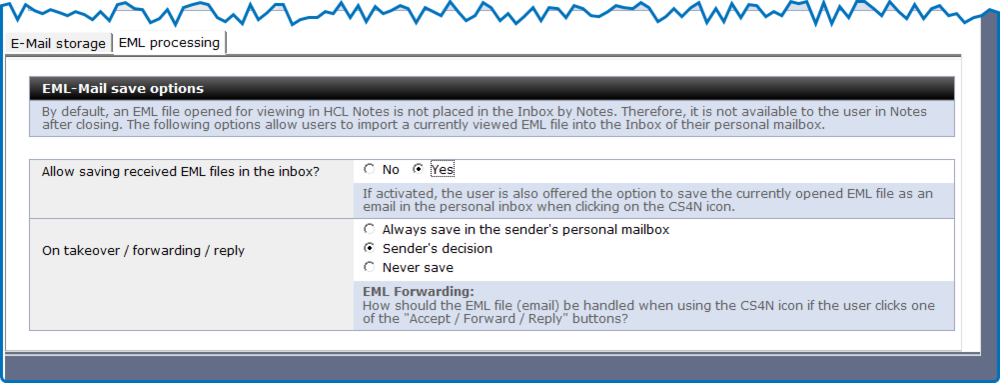
This section defines the behavior of the CS4N application when an EML file (email) is opened in Notes and needs to be forwarded.
| Label | Comment |
|---|---|
Allow saving received EML files in the inbox |
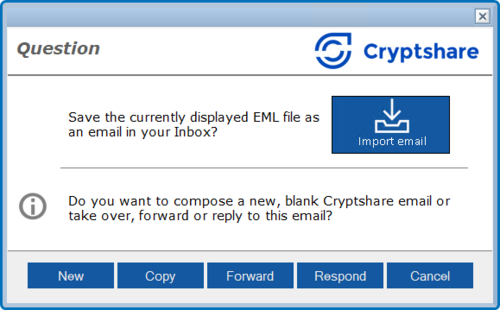
This setting controls whether the ‘Import email’ button should be displayed in the dialogue box when the CS4N icon in the icon bar is clicked.
|
On takeover / forwarding / reply |
This defines how the EML file (email) should be handled when using the CS4N icon if the user selects one of the ‘Accept / Forward / Reply’ buttons. |
|
The Notes INI entry CS4N_EMLTargetApp can be used to redirect the storage of the EML file to a separate application. This INI entry must be stored on the Notes clients intended for this purpose. Syntax: CS4N_EMLTargetApp=Server name#File path#Folder name (where the folder name is optional) Example: CS4N_EMLTargetApp=Dom01/Server name#cryptshare\EML_Archive.nsf#($Inbox) |