
Sub-tab "Error Handling"
This notification scheme should capture all error messages relevant to the email sender. These error messages can be delivered to the sender to give them an opportunity to resolve the issue.
|
Example
The virus scanner on the Cryptshare WEB Server has detected a virus in one of the uploaded files. |
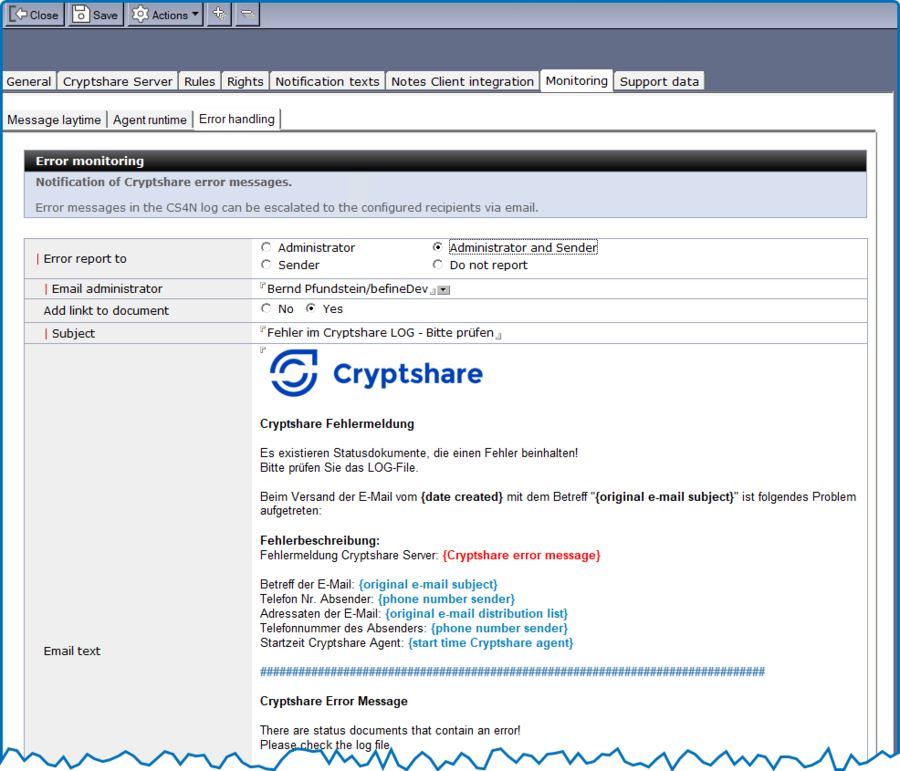
| Label | Comment |
|---|---|
Error report to |
Select who should be notified in case of problems:
|
Email administrator |
Select the administrator email address from the Domino directory. This field is only available if a selection has been made in the ‘Error message to’ field that provides for notification to the administrator. |
Add link to email |
If necessary, a document link to the CS4N email is added to the info mail. This allows the user/admin to reopen the email and make corrections if necessary. |
Subject |
Subject of the email. To make it easier for the recipient to identify the email, the placeholder {original email subject} can be inserted in the subject line. |
Email text |
The text can be formatted as desired and include placeholders in curly brackets. CS4N automatically populates the placeholders. This allows for personalization of the additional text. Allowed placeholders:
|