
Sub-tab "Manually created emails"
‘Manually created emails’ include all messages that were manually created by the user for delivery via Cryptshare. For example: by using the Cryptshare toolbar icon or by integrating the CS4N&D extension into the email template.
Distinction: ‘Rule-based email delivery’ refers to all emails that were delivered to CS4N&D via Domino server rules. These could be emails from third-party applications or emails that were forwarded to CS4N&D due to their size.
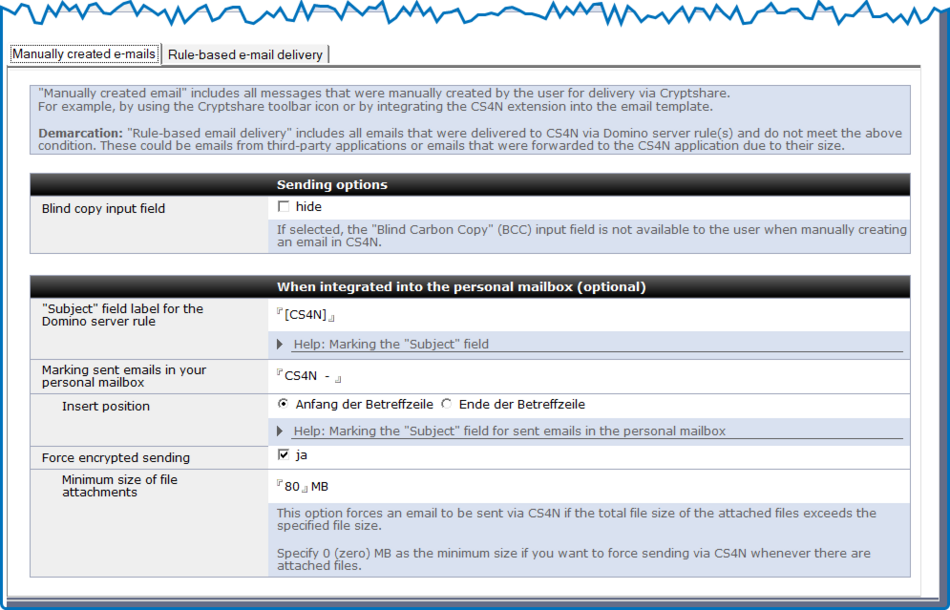
| Label | Comment | ||||
|---|---|---|---|---|---|
Blindcopy input field |
Here you can set whether the ‘Blind Carbon Copy’ (BCC) field should be displayed to the user when creating a manual email. |
||||
"Subject" field label for the Domino server rule |
If you have integrated the CS4N&D functionality directly into the email mask of your personal mailbox, this ‘label’ will be automatically added to the ‘Subject’ field when you send an email from your mailbox. A Domino server rule recognises this email and automatically forwards it to the CS4N&D application. CS4N&D automatically removes this label during further processing. The email recipients thus receive the original subject line of the email that was originally sent.
|
||||
Marking sent emails in your personal mailbox |
Marking of the ‘Subject’ field for sent emails in the personal mailbox. The subject line of a CS4N&D email stored in the personal mailbox is supplemented with this marker. This applies to emails that were sent based on rules.
|
||||
Insert position |
Here you can set the position in the subject line of the email where the label should be added.
|
||||
Force encrypted sending |
This option forces the sending of emails with file attachments if the total size of the file attachments exceeds the configured threshold. |
||||
Minimum size of file attachments |
Minimum size above which emails with file attachments must be sent via Cryptshare for Notes. If the minimum size is 0 MB, all emails with file attachments must be sent via Cryptshare. |