
Tab "General Settings"
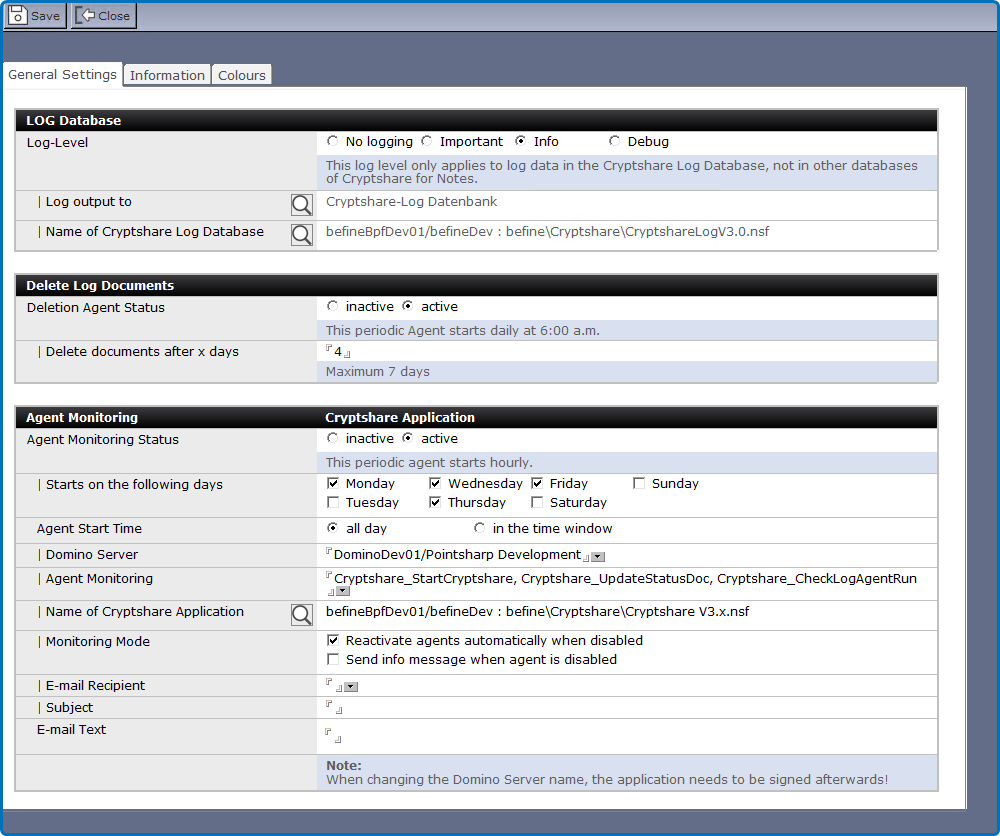
Section: Log Application
This section contains settings concerning the Log Application.
| Label | Comment |
|---|---|
Log Level |
No logging = Logging does not take place. Important = Only important events are logged. Info = Important and informational data are being logged. Debug = All details that might be relevant for problem analysis are being logged. |
Log output to |
Select where you would like the status information to be logged to. |
Name of Log Application |
Select name and location of the Cryptshare Log Application. |
Section: Delete Log Documents
Set up when old entries will be deleted from the log and what to do with errors in the Log DB.
| Label | Comment |
|---|---|
Deletion Agent Status |
Enable or disable the Deletion Agent. |
Domino Server |
Select the Domino Server on which you want the Agent to run. |
Delete documents after x days |
Entries will be deleted after the specified number of days is elapsed. We recommend 7 days or more so you will have enough information to track down the error in case of a problem. |
|
If you change the value in the field "Domino Server" you need to sign the application afterwards. |
Section: Agent Monitoring
Set up the control agent to verify regularly if required periodical agents of CS4N are enabled (and not disabled by a design update or otherwise).
| Label | Comment |
|---|---|
Agent Monitoring Status |
If active, regular checks are performed to check that periodic agents are activated in the Cryptshare Application. |
Starts on the following days |
Choose on which days you want to perform checks. |
Agent Start Time |
Define if you want to check in a certain time frame only or all day. |
Starts only between |
Define the time frame in which you want to check. |
Domino Server |
Domino Server running the Log Application. |
Name of Cryptshare Application |
Select the Cryptshare Application on the Domino Server. |
Monitoring Mode |
Select the action you want to take in case a periodic agent is disabled. |
email Recipient |
Who should be notified in case of a problem? |
Subject |
Notification subject |
email Text |
Notification text |