
Time monitoring
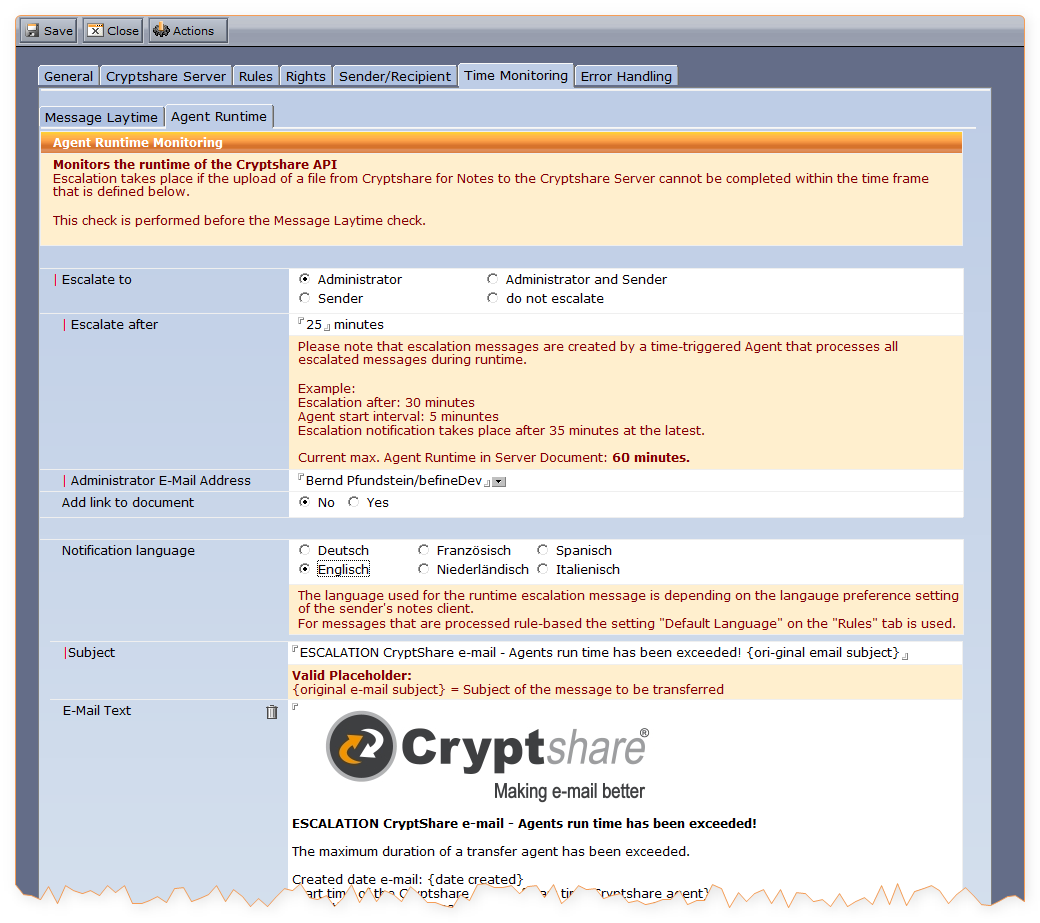
Checks the runtime of the Cryptshare API function.
|
The runtime check is performed before the lay time check! |
An escalation takes place if a file cannot be uploaded from Cryptshare for Notes to the Cryptshare Server within the time interval specified in the field "Escalate after".
| Label | Comment | ||
|---|---|---|---|
Escalated to |
Select who should be notified in case of problems:
|
||
Escalate after |
If this time period (in minutes) is exceeded, a notification will be sent.
|
||
Administrator email Address |
The email address of the administrator who will be notified in case of problems. |
||
Add link to document |
If active a document link will be added to the escalation message that takes you directly to the message causing the escalation. |
||
Notification language |
Select the language to be used for the escalation message. The languages available for selection are depending on the settings you have made on the "Rules" tab. |
||
Subject |
The subject of the alert. To make it easier for the recipient to understand what the notifications refer to, the placeholder {original email subject} can be used here. |
||
email Text |
The text can be customised using formatting and placeholders. Available placeholders:
|