
Add-in settings
Add-in settings are settings that determine the behavior of the add-in during use. Cryptshare for Outlook (Classic) offers you three different approaches to manage add-in settings:
-
Central management of settings via the Cryptshare server with which the add-in communicates ("Administration Interface", "Additional Products" area - "Cryptshare for Outlook (Classic)")
-
Local management of settings via an XML file (CS4OutlookAdminConfig.xml)
-
Manage settings locally from the user interface.
Add-in settings
In this tab you can customize the behavior of your Cryptshare for Outlook (Classic) add-in to your requirements. The options shown here can be pre-assigned by your administrator with different values. Some of these options may be marked by the administrator as non-editable or completely hidden.
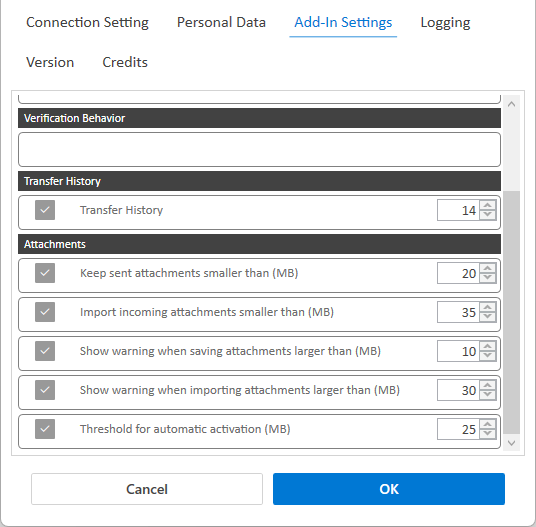
Allow configuration via local file
The control of whether a setting is editable by the user, read only, or invisible, can only be done via the server interface or via Configure: CS4OutlookAdminConfig.
Allow configuration via file - deactivated
This option causes the server settings to have the highest priority when configuring the add-in. When the add-in contacts the server, all options in the configuration file CS4OutlookAdminConfig.xml for which the permission setting "Editable" is set in the server settings are overwritten with values from the server configuration. Options with the permission level "Editable" should be locally influenceable. They are therefore only set once when they first contact the server. In the following, the settings can then be influenced by the settings dialog in the add-in or by modifying the CS4OutlookAdminConfig.xml.
Allow configuration via file - enabled
The server settings are not taken into account when contacting the server. The settings made locally are not overwritten and are retained even if they differ from the server-side settings. All options of the Cryptshare for Outlook (Classic) add-in can be influenced locally. This can be done by the user via the settings dialog in the Cryptshare for Outlook (Classic) add-in, or by the administrator via CS4OutlookAdminConfig.xml on the respective system.
Settings in the user interface can CS4OutlookAdminConfig.xml be hidden, configure the configuration file accordingly. As an administrator, you have the option of configuring the clients individually, but without giving users the option of changing all settings via the user interface.