
Add BankID provider
-
Access Gateway Admin GUI: Set up an IdP BankID authentication with the right set of rules connected to a listener. See Add Pointsharp SSO Identity provider to see how it’s done.
-
Go to the IdP Admin GUI to add BankID as a login method for the user.
IdP Admin GUI
-
Open the Pointsharp IdP Admin GUI.
-
Select the realm you want to configure.
-
Go to Identity Providers (in the menu).
-
Click Add provider.
-
Select the BankID provider.
When you configure an identity provider, the identity provider appears on the login page as an option.
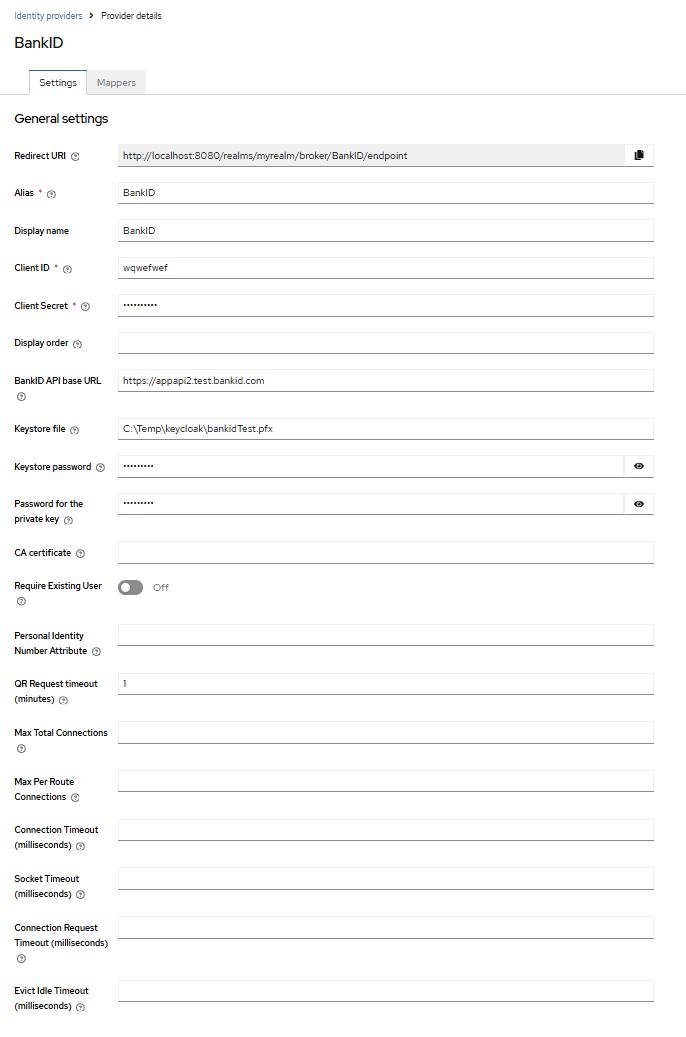
| Property | Description |
|---|---|
Redirect URI |
The redirect URI to use when configuring the identity provider. |
Alias |
The alias uniquely identifies an identity provider and it is also used to build the redirect URI. |
Display name |
Enter display name. |
Client ID |
Use same Client ID as the one you set in the Alias field. |
Client secret |
The client secret registered with the identity provider. This field is able to obtain its value from vault, use ${vault.ID} format. |
Display order |
Number defining the order of the providers in GUI (for example, on the Login page). The lowest number will be applied first. |
BankID API base URL |
The base URL for the BankID API. Without the trailing slash. Normally https://appapi2.bankid.com |
Keystore file |
Full path to the keystore file, that holds the client certificate, including filename i.e. /path/to/file/myfile.p12 |
Keystore password |
The password for the keystore. (Restart required) |
Password for the private key |
Password for the private key. (Restart required) |
CA Certificate |
Full path to the CA certificate file, if left empty, all server certificates are trusted. (Restart required) |
Require existing user |
Check if existing user has matching personal identity number, block if not found. |
Personal identity number attribute |
User attribute for National Personal Identity Number. |
QR Request timeout (minutes) |
Timeout for BankID QR requests in minutes. (Restart required) |
Max total connections |
Maximum total connections for the HTTP client, default 50. (Restart required) |
Max per route connections |
Maximum connections per route for the HTTP client, default 40. (Restart required) |
Connection timeout |
Timeout for BankID connection in milliseconds, default 2000. (Restart required) |
Socket timeout |
Timeout for BankID socket in milliseconds, default 2000. (Restart required) |
Connection request timeout |
Timeout for BankID connection requests in milliseconds, default 500. (Restart required) |
Evict idle timeout |
Timeout for BankID idle connections in milliseconds, default 30. (Restart required) |
Advanced settings
Once the identity provider has been added successfully, the Advanced settings become visible and available for editing.
| Property | Description |
|---|---|
Scopes |
The scopes to be sent when asking for authorization. It can be a space-separated list of scopes. Defaults to 'openid'. |
Store tokens |
Enable/disable if tokens must be stored after authenticating users. |
Accepts prompt=none forward from client |
This is just used together with Identity Provider Authenticator or when kc_idp_hint points to this identity provider. In case that client sends a request with prompt=none and user is not yet authenticated, the error will not be directly returned to client, but the request with prompt=none will be forwarded to this identity provider. |
Disable user info |
Disable usage of User Info service to obtain additional user information. Default is to use this OIDC service. |
Trust email |
If enabled, email provided by this provider is not verified even if verification is enabled for the realm. |
Account linking only |
If true, users cannot log in through this provider. They can only link to this provider. This is useful if you don’t want to allow login from the provider, but want to integrate with a provider. |
Hide on login page |
If hidden, login with this provider is possible only if requested explicitly, for example using the 'kc_idp_hint' parameter. |
Verify essential claim |
If true, ID tokens issued by the identity provider must have a specific claim. Otherwise, the user can not authenticate through this broker. |
First login flow override |
Alias of authentication flow, which is triggered after first login with this identity provider. Term 'First Login' means that no Pointsharp IdP account is currently linked to the authenticated identity provider account. |
Post login flow |
Alias of authentication flow, which is triggered after each login with this identity provider. Useful if you want additional verification of each user authenticated with this identity provider (for example OTP). Leave this to "None" if you need no any additional authenticators to be triggered after login with this identity provider. Also note that authenticator implementations must assume that user is already set in ClientSession as identity provider already set it. |
Sync mode |
Default sync mode for all mappers. The sync mode determines when user data will be synced using the mappers. Possible values are: 'legacy' to keep the behaviour before this option was introduced, 'import' to only import the user once during first login of the user with this identity provider, 'force' to always update the user during every login with this identity provider. |
Case-sensitive username |
If enabled, the original username from the identity provider is kept as is when federating users. Otherwise, the username from the identity provider is lower-cased and might not match the original value if it is case-sensitive. This setting only affects the username associated with the federated identity as usernames in the server are always in lower-case. |
Click Save to update the provider with the settings.
| Please note that there is a complete and well-written user guide describing how to configure and use the Admin GUI. In the examples we show, only selected parts are included. For the complete guide, see: https://www.keycloak.org/docs/latest/server_admin/ |
Click the question mark icon associated with each field to display contextual help.

|