
Login app configuration
This communication module must be configured in order to handle the Pointsharp Login Application authentication and validation requests, between the Pointsharp Login App and Pointsharp ID (via Gateway).
See Login App — technical description and configuration for a complete setup instruction.
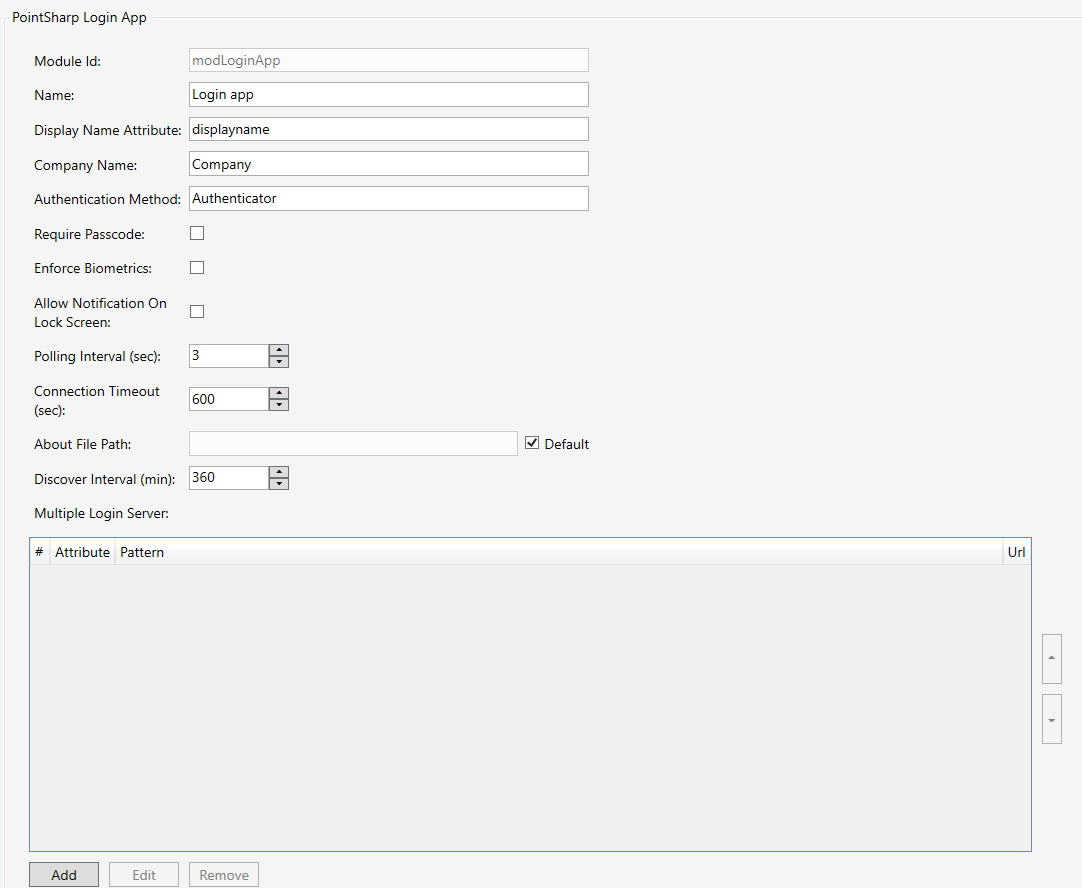
| Property | Description |
|---|---|
Name |
The name of the module configuration. |
Display Name |
User attribute, the value of the user attribute will be used as display name in the Pointsharp Login App. |
Company Name |
This company name will be visible in the Pointsharp Login Application. |
Authentication Method |
The name of the method to use when authenticating towards the Pointsharp ID. |
Require Passcode |
Require Passcode usage in the mobile device in order to use Pointsharp Login App after account setup. |
Enforce Biometrics |
Enforce Fingerprint/Touch ID/Face ID lock for Login Application. If True, Login Application will require biometrics authentication to be unlocked after login account is setup. Default: False. |
Allow Notification On Lock Screen |
Allow or disallow push notification on lock screen via Pointsharp Login App. |
Polling Interval |
The timer to decide when a new status request is sent to Pointsharp ID to check current login status. If set on 3 seconds it will send a status check every five seconds. Default: 3 seconds. |
Connection Timeout |
This will decide the current connection time, when set on 180 seconds the current activity will stop after the expired time. Default: 180 seconds. |
About File Path |
At default, it will point at "…/Pointsharp/Gateway/www/PublicResources/Login/app/about.html" which contains a default contact information that needs to be configured. Default: Empty (…/Pointsharp/Gateway/www/PublicResources/Login/app/about.html). |
Discover Interval (min) |
The timer interval to check for Pointsharp Login App configuration changes after account setup. Default: 360 min. |
Multiple Login Server |
Define multiple Pointsharp Login server addresses to be used. Login Server configuration: Click Add. Match User Attribute value with pattern to change to the new login server URL. Pattern can be matched with: * = always true, *company.com = value must end with company.com, username@* = value must starts with username@, *@* = value must contain @, user@company.com = value must match exactly with the pattern. Example: Attribute: mail, Pattern: *company*, URL: https://newlogin.server.com/app/, user with mail usermail@company.com will get a new login server address after account setup. |