
Form-based Authentication configuration
The configuration of a Form-based Authentication module.
The Form-based Authentication module is used to present an HTML based login-page to the requesting client. The HTML page should be located at the given Forms File Path.
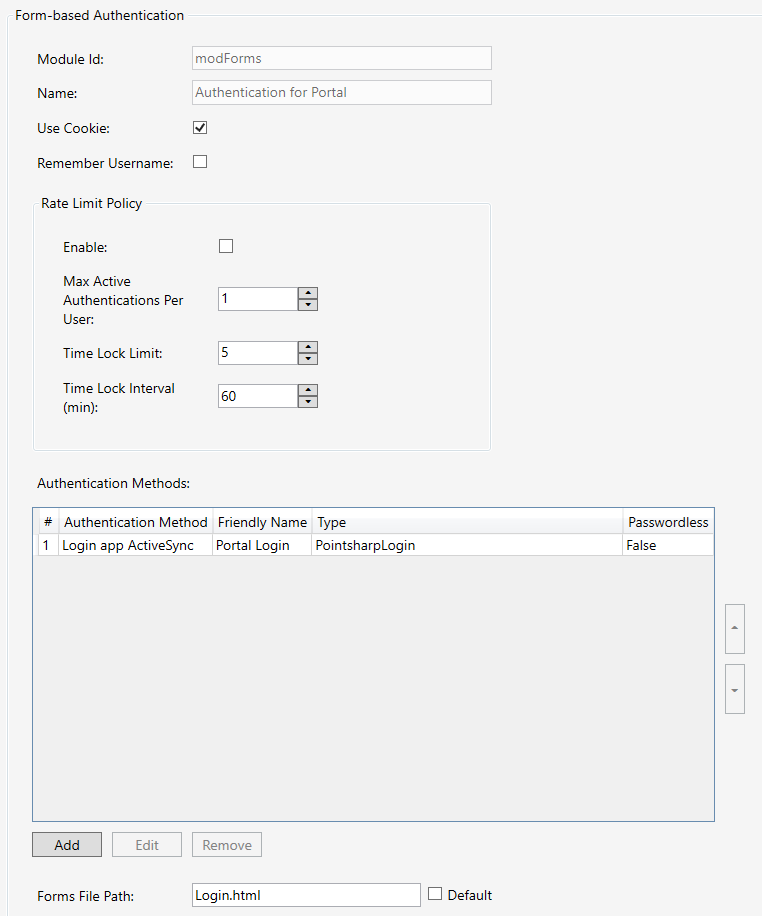
| Property | Description |
|---|---|
Name |
The name of the module configuration. |
Authentication Methods |
List of methods that can be used for authentication towards Pointsharp ID. The first method in the list will be used as default method. |
Use Cookie |
Indicates whether to check if the current user is already authenticated by trying to retrieve the user data from the current session/cookie. If it is disabled, then the request will be sent through the authentication procedure, whether the user is authenticated or not. Default: enabled |
Remember Username |
Remember last used username. |
Forms File Path |
The full path to the local HTML file where the forms website is defined. Default: The default path is directed to the FormsLogin.html in the "www" folder at the Gateway installation location. |
Authentication methods
| Property | Description |
|---|---|
Type |
Type of authentication method. |
Authentication Method |
The name of the method to use when authenticating towards the Pointsharp ID Server. |
Friendly Name |
The name which is presented at forms authentication to be chosen from. |
Passwordless |
Enabled for authentication methods that skips password validation. |
| For FIDO Authentication, see FIDO — How to configure and use |
Certificate Redirect
Redirect user to perform a certificate authentication.
| Property | Description |
|---|---|
Enable |
Enable certificate redirect link. |
URL |
The complete URL path where certificate authentication is performed. |
Signing Certificate |
The signing certificate used to sign jwt token. |
Expire |
Expire time for current certificate redirect challenge. |
Rate Limit Policy
The rate limit policy is to limit the amount of parallel authentications request sent to Pointsharp ID, and to limit the amount of active challenge (OATH) authentication requests.
| Property | Description |
|---|---|
Enable |
Enable the policy. Default: Disabled |
Max Active Authentications Per User |
Max amount of active parallel authentications per user allowed. Request is automatic rejected if max amount exceeded. Default: 1 |
Time Lock Limit |
Max amount of authentications before time lock triggers, temporary reject all authentications when time locked. Policy resets when Pointsharp ID replies with Accept or Reject (Pointsharp ID will handle rejects). Default: 5 |
Time Lock Interval (min) |
The expire time before resetting the time lock. Expire time is set from the first request that created the policy. Default: 60 min |