
Portal landing page configuration
The portal module is used to show a landing page for a website with different resources. These resources are weblink shortcuts defined to make it easier for user to navigate and find company resources.

| Property | Description |
|---|---|
Name |
The name of the module configuration. |
Display Name Attribute |
The attribute name to be used to find a value belonging to the current signed on user, to be displayed on the landing page. Default: display name index.html file can be found under ..\Gateway\www\PublicResources\Portal\ |
Icon Height/Width |
The resources are displayed with an icon image and link name. These settings will define the icon images height and width size on the landing page. |
Resources |
The list of resources where you define what link name to be displayed on the landing page, the web URL to be redirected to, and what icon image to be used for the resource. |
Link Name |
Friendly link name. |
URL Link http(s) |
The URL link in format dns:port/path?query Values that can be replaced in the link are: {mail}, {upn}, {username}. They use user attributes returned via authentication from the ID Server: ({mail} > mail, {upn} > userprincipalname), {username} > user id used on login. |
Image Source |
The image source name in Portal image folder. |
Resources
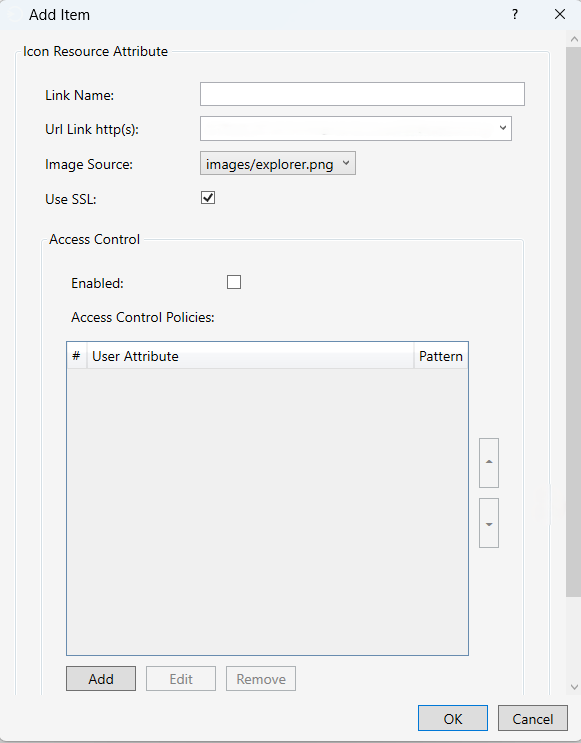
Icon resource
| Property | Description |
|---|---|
Link Name |
The link name to bo showed. |
URL Link http(s) |
URL link to be redirected to. |
Image Source |
The icon image source. |
Use SSL |
Usage of http or https. |
Access control
| Property | Description |
|---|---|
Enabled |
Enable/Disable Access Control. |
Access Control Polices |
List of polices to match with user attribute values. |
User Attribute |
User attribute name, it’s value will be matched with "Pattern". |
Pattern |
The pattern value to be matched with user attribute value. Examples: * (allow all) Examples: *@domain.net (allow values ending with domain.net) Examples: user* (allow values starting with user) Examples: user@domain.net (match exact values) |
Extend device access time
The Extend path /extend is used to extend device access time.
Extend Path: ../Gateway/www/PublicResources/Portal/extend/index.html
See also: Add extend path manually