
Server Farms for load balancing
Set up Server Farms for load balancing of backend servers, or Pointsharp ID Servers. A server farm can be configured as a list of hosts or full URL:s.
- backend server URL
-
If URL is used, the field backend server URL in a listener rule is not used.
- Hosts
-
If the Server Farm contains a list of hosts, the backend server URL field in listener rule configuration have the format https://serverfarm/path where the word serverfarm is replaced by the active host.
Server Farm sessions
After the Server Farm configuration is published, the Server Farm engine starts when the first request is processed.
If IIS closes the worker thread responsible for Server Farm, the Server Farm will resume its schedule on another thread. Ongoing / existing Server Farm sessions won’t be affected when the Server Farm changes thread.
| The Idle Time-Out time parameter in the IIS Application Pools configuration should be increased, in order to not disturb the Server Farm too often. |
Configure Farms
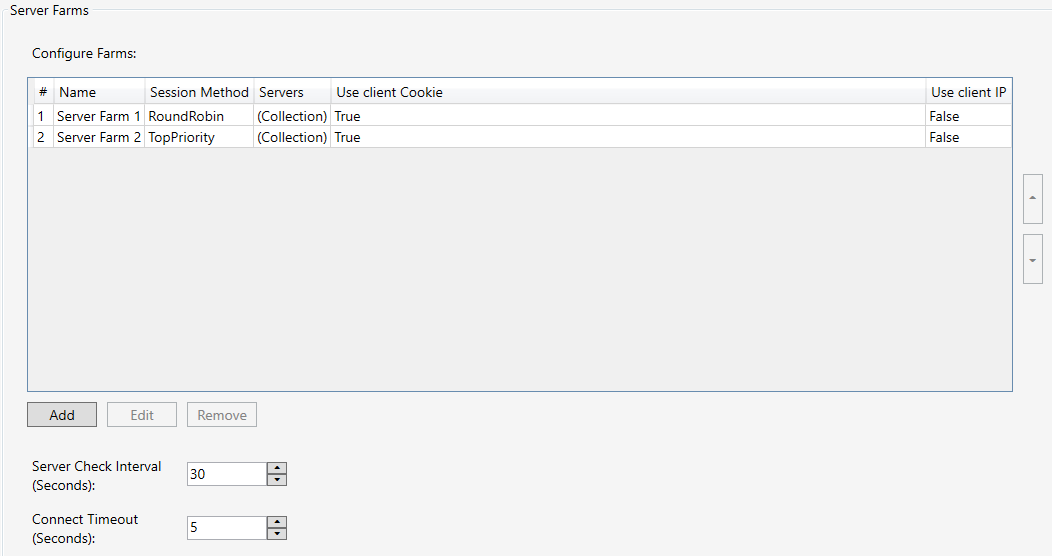
Add a new Server Farm, edit or remove existing ones in the list of Server Farms.
-
Open the Access Gateway Admin GUI.
-
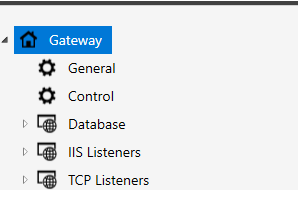
On the left hand side, right-click General.
-
Go to Server Farms.
| Property | Description |
|---|---|
Server Check Interval (Seconds) |
The frequency of server availability check. Default: 30 seconds |
Connection Timeout (Seconds) |
Connection wait time during server availability check. If no server response during timeout, server status changes to not available. Default: 5 seconds |
Add a Server Farm
-
Open the Access Gateway Admin GUI.
-
On the left hand side, right-click General.
-
Go to Server Farms.
-
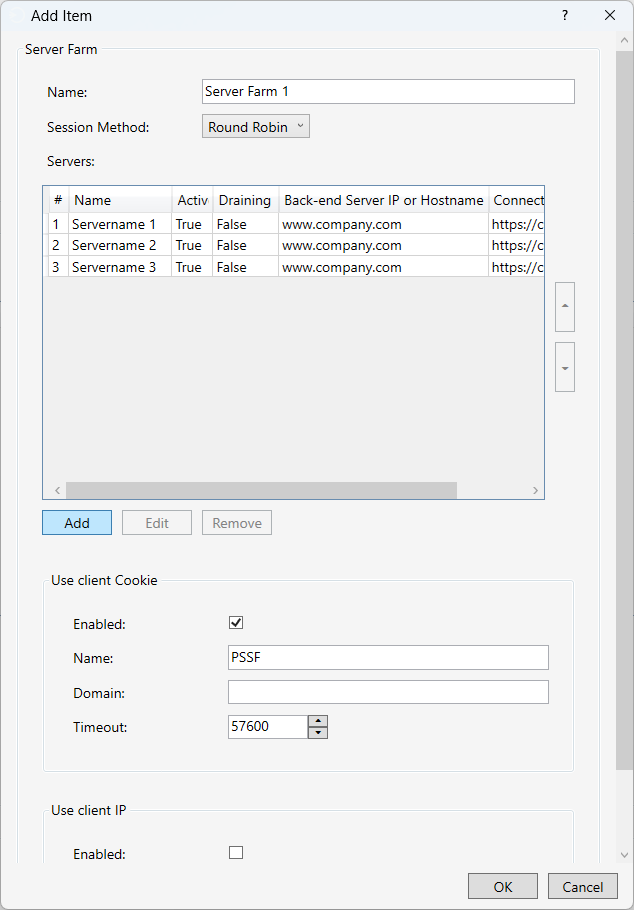
Click Add.
| Property | Description | ||
|---|---|---|---|
Name |
Server Farm Name. |
||
Session Method |
Select algorithm used when a client request is assigned a server. Once assigned, the client will use that server in future requests.
|
||
Servers |
The list of backend servers. See Add a Server to a Farm below. |
||
Use Client Cookie |
Enabled: Use client cookie-
|
||
Name |
Name of the cookie. This name is used as an identifier for this Server Farm. |
||
Domain |
With cookie domain set, the cookie will only work for its defined domain, and be shared between sub-domains. |
||
Timeout |
Cookie expire time in seconds. |
||
Use Client IP |
Enable usage of client IP as Server Farm identifier.
|
Add a Server to a Farm
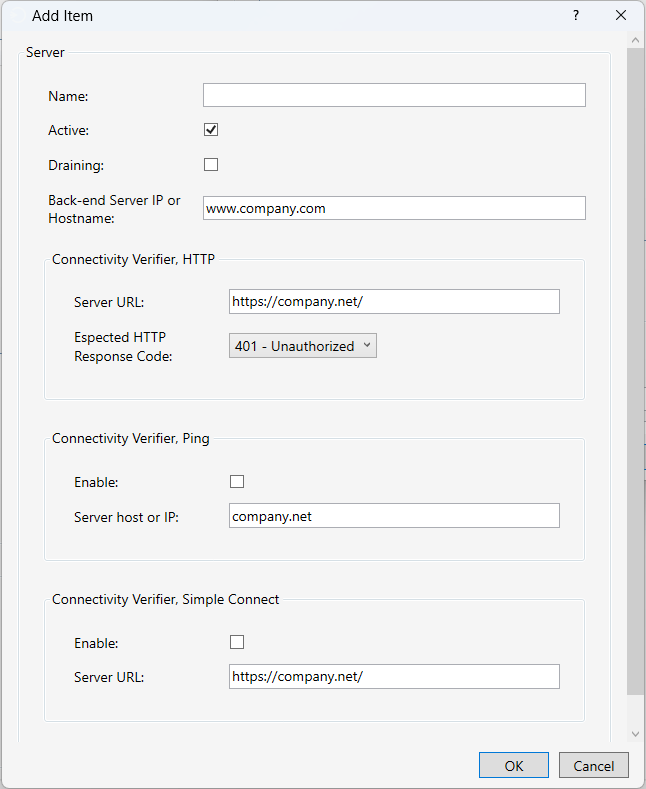
A Server Farm consists of backend servers. To add a new Server to the Server Farm, go to the Server Farm and click Add.
| Property | Description |
|---|---|
Name |
Server Name/Description. |
Active |
Disable server during maintenance. When not active, no availability check will be performed and no clients will use this server. |
Draining |
Active sessions will continue using this server. Availability check will be performed. No new clients will be assigned to this server. |
backend server IP or Hostname |
The backend server IP or hostname. A Server Farm can be configured as a list of hosts or full URL:s. |
Connectivity Verifier, HTTP |
Availability check, make HTTP request and expect a HTTP response code. Server is considered available if response code match. |
Server URL |
URL used for availability check. |
Expected HTTP Response Code |
The expected HTTP response code. |
Connectivity Verifier, Ping |
Use Ping as server availability check. |
Server host or IP |
Server to perform Ping against. |
Security Protocol
The security protocol to be used when establishing a secure connection (HTTPS) to the backend server.
| In order for the TLS versions to work, require support by current server OS. |
| Property | Description |
|---|---|
SSL 3.0 |
The security protocol SSL v 3.0. |
TLS 1.0 |
The security protocol TLS v 1.0. |
TLS 1.1 |
The security protocol TLS v 1.1. |
TLS 1.2 |
The security protocol TLS v 1.2. |
TLS 1.3 |
The security protocol TLS v 1.3. |
Default: Enabled