
KCD towards single Exchange Server
These instructions describe how to configure the Access Gateway Server to delegate towards a single Exchange Server. This is a good way for first tests, before involving more Exchange Servers and load balancing scenarios, etc.
Load balancer scenarios demands ASA Account to be deployed on all involved Exchange Servers, to be able to perform delegation. Refer to KCD towards multiple Exchange Servers using Load Balancer for this configuration.
| KCD |
Kerberos Constrained Delegation |
| ASA Account |
Alternate Service Account |
| SPN |
Service Principal Name |
Service Account for Access Gateway Server
Create an account to be used in the Access Gateway configuration to delegate towards internal resources. This example will be for Exchange. Create a standard account and then add a SPN to it. Once a SPN is added, the account will be able to delegate to other resources.
Add Service Principal Name (SPN)
Use this command in Powershell to apply SPN to an account:
$ Setspn -S http/<accountname> <accountname>
Setspn -S http/svc_kcd_test svc_kcd_test
After the SPN is added, use the command <setspn -l> to list the SPN available on the account.
| The -l is an "L" as in "list". |
Delegation Tab in Active Directory
The Delegation Tab is now available for the account in the Active Directory. Use the settings below for delegation:
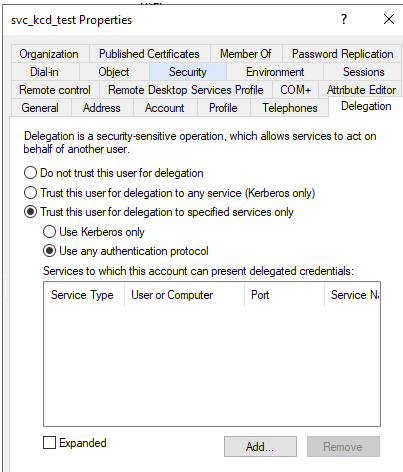
Click Add and locate the resource to delegate towards. In this example, a single Exchange server is chosen and Service Type needs to be http:
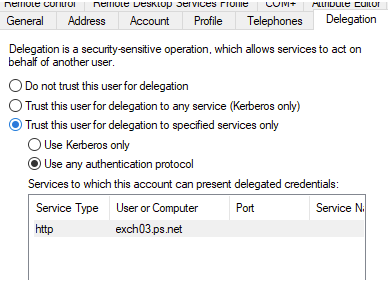
The exch03.ps.net in this example is the name of the Exchange Computer Account. The Exchange Server might already have a preferred SPN to be used, one that is also used for external access.
Use this if a SPN needs to be added to the Exchange Account:
SETSPN –S http/<computeraccount or external name to be used> computeraccount
| If you have a setup where the external name and internal name is the same but not added as an SPN, and you add that name and enable KCD (Kerberos Constrained Delegation) for it, then it can cause all resources towards that name to start using KCD. Take note of this since it can cause issues depending on your current setup. |
The configuration in AD is now completed. Next step is the Access Gateway.
Access Gateway configuration
-
To set up a new Listener, for example Outlook on the web (OWA), that will be used in this example, run the Start Listener Configuration Wizard from the Access Gateway Dashboard. The installation wizard offers several options for delegations or no delegation.
This guide uses the first option as seen below:
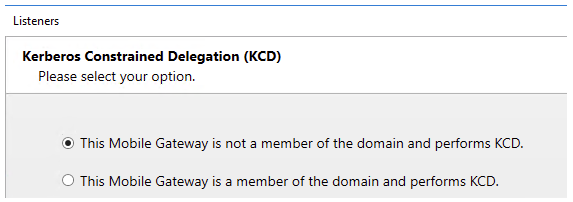
| This option adds the module modAuthenticationDelegation. If there is already an existing Listener that only uses, for example, Basic Authentication, then this module can be manually created and added to the configuration later on. |
-
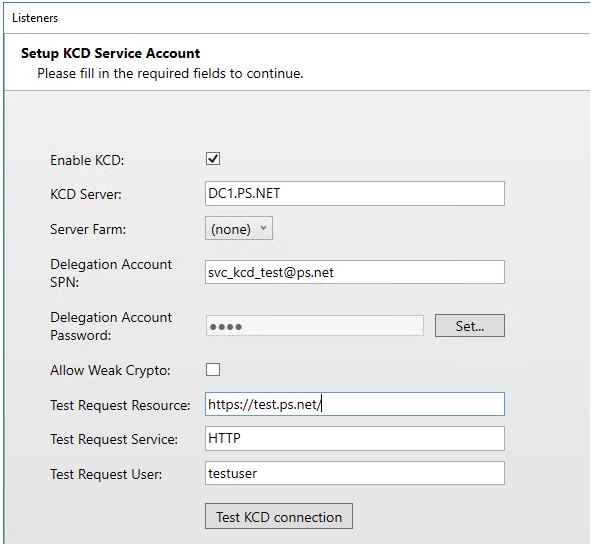
The wizard will display the Setup KCD Service Account page. Add the new account created.
-
Define the Directory server to be used for delegation of KCD tickets.
Add KCD Server with capital letters like displayed below:
-
Allow Crypto: This might need to enabled; it depends on the cryptos supported and the functional level of the domain. If the test tool sends back any errors similar to
ERR_ETYP_NOTSUPP, enable this setting. -
Backend Extended Protection Enabled: Enable if the Exchange Servers are updated and runs this feature.
-
Test KCD Connection: Test towards a specific resource, not just the Exchange itself but for example
/owaas in the screenshot. The username must be the user’s userPrincipalName (UPN). -
Complete the wizard. The Listener is then created:
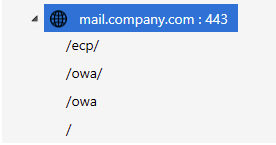
-
Click
/owa/rule to see the modAuthenticationDelegation module.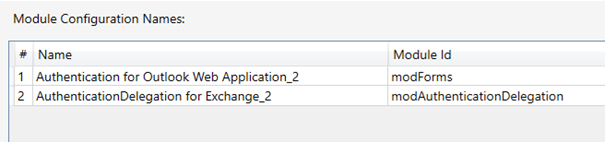
-
To edit the module: right-click the module and choose Go To Module.
-
Save and publish the configuration.
Backend Server URL and DNS or Local Host
The backend Server URL needs to be the same as the SPN used for the Service Account. See example screenshot below:
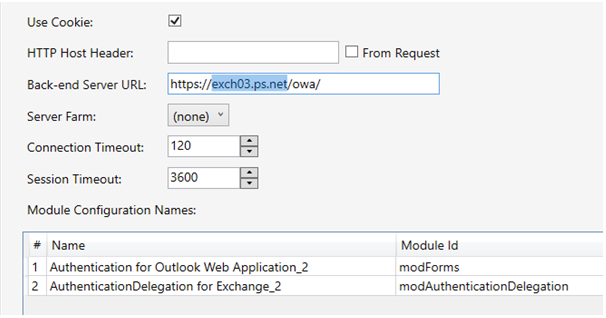
The backend Server URL must be reachable from the Access Gateway server. Either by DNS, or add this as an entry in the Local Host file on the Access Gateway server.
Exchange configuration for delegation
The resource in Exchange that will be used to delegate towards (OWA in this example), needs to have these settings:
-
Windows Authentication must be enabled.
-
The Provider Settings must use Negotiate as first option.
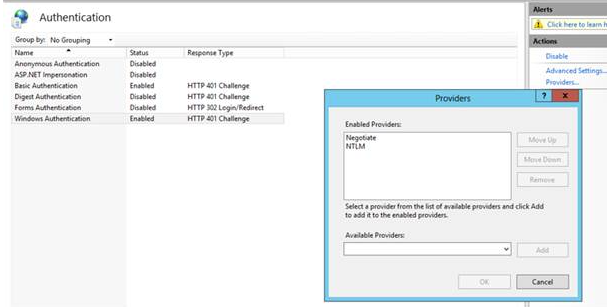
The configuration is now completed and ready to be tested.
IIS Application Pool Account
If changing an already existing Listener rule from old version of KCD (where a Domain Joined Access Gateway Server Computer account is used for Kerberos) you need to change the Application Pool used for the Listener to Network Service instead of Local System. This will be done automatically if setting up a new Listener using the Access Gateway Wizard.
Multiple Exchange Servers and Load Balancer
When KCD is used in combination with multiple Exchange Servers and Load Balancers, an ASA Account must be deployed on all involved Exchange Servers, in order to be able to perform delegation.
Please see separate instructions KCD towards multiple Exchange Servers using Load Balancer for this configuration.