
NTLM - Configuration for Outlook using MAPI over HTTPS
Configuring the NTLM method to be used with Outlook client running MAPI over HTTPS, assumes that a working KCD configuration is already setup in the Access Gateway server (a service account with delegation rights towards a specific Exchange server or an ASA Account if load balancing is used).
| KCD |
Kerberos Constrained Delegation |
| ASA Account |
Alternate Service Account |
Create NTLM site
-
First step is to create a basic website on the ID Server. This will be used to capture the NTLM request before the ID Server has approved the user, and sends the authentication request to the backend resource. An easy way to do this is to go to C:\inetpub\wwwroot and create a folder named NTLM.
-
Then copy the already existing index.html file that is located in the root of C:\inetpub\wwwroot and paste it into the NTLM folder.
-
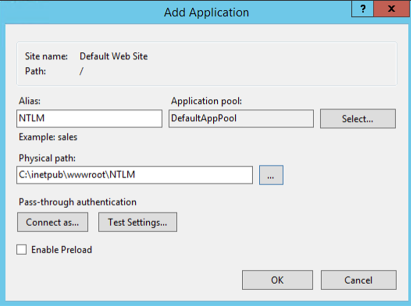
Open IIS Manager on the ID Server and right-click the Default Website (or whatever site the Admin Portal, API and User Portal resides under) and choose Add Application. Configure it like this:
-
Go to the Authentication in the IIS Manager for this new NTLM site.
-
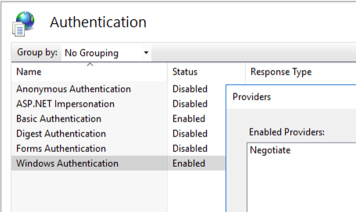
Enable Windows Authentication and then right click that option and go to Providers and make sure NTLM is used:
-
The site and configuration in IIS Manager is now completed. Test to authenticate towards the new NTLM site. When this works, go to next step.
NTLM method
-
Open PSID Admin UI and go to the tab Authentication.
-
Add a new NTLM method.
-
Configure it like this.
The Windows Password URL is the URL towards the site created in the guide above. 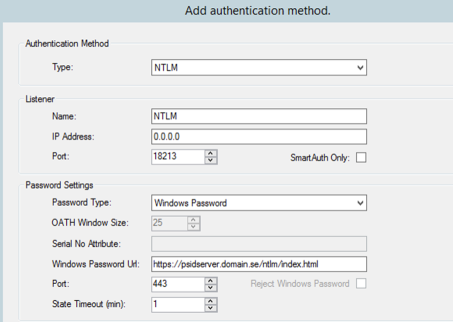
-
Click Apply and restart the service.
The NTLM is now completed and can be used in the Gateway for authentication towards Exchange.
Access Gateway configuration
-
The Access Gateway needs to be set to use KCD towards backend resources with the module modAuthenticationDelegation added to the /mapi/ rule. The Wizard adds this module automatically when KCD option is used. This can also be added manually afterward, if needed.
-
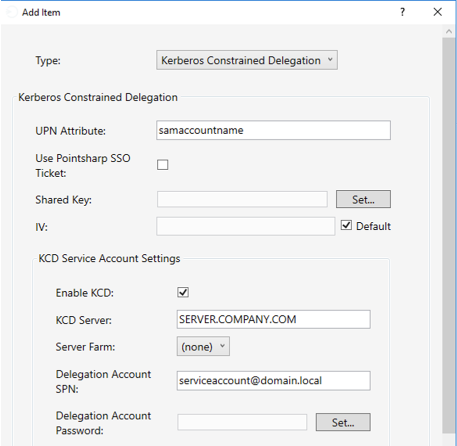
The module needs to be set to Kerberos Constrained Delegation. Under the KCD Service Account Settings, set the service account used for delegation towards Exchange Server or Exchange ASA Account.
See example below:
Exchange configuration
-
The MAPI site on the Exchange Server needs to use Windows Authentication.
-
The Providers Settings for this authentication method needs to be set to NTLM.
Autodiscover
If NTLM is to be used for the Outlook client Autodiscover, do not forget to add this option on the Autodiscover Listener.
-
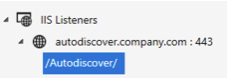
In Gateway GUI go to the Autodiscover Listener and expand the rule.
-
Click /Autodiscover/:
-
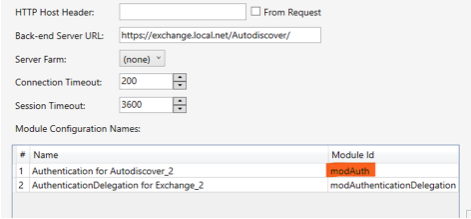
Right-click the modAuth module and choose Go to module:
-
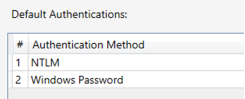
Go to Default Authentications in the modAuth module.
-
Add the authentication methods. Multiple options are supported:
-
Add Authentication Policies to force specific devices and apps to use specific authentication methods.
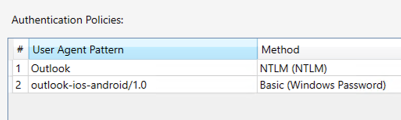
| In the example above, the Outlook client will be using a NTLM method, but the Outlook App on a mobile device will be using Basic Authentication. |
| Please take note that the User Agent Pattern might differ depending on versions of applications used, and needs to be edited to work in each specific configuration. |