
Active Directory - AD DS OUs
Organizational Units (OUs) in AD DS allow logical grouping of objects such as user accounts, service accounts or computer accounts. They can also be used to divide users or groups by, for example, location, department, company or user type. From here, default values can be specified for the OU (e.g. which default printer to link to the user) or permissions (e.g. which file drives they can read).
You can find the Active Directory Organizational Units created in your system under "AD DS OUs" in the "Connectors" sub-area of Compliance Suite.
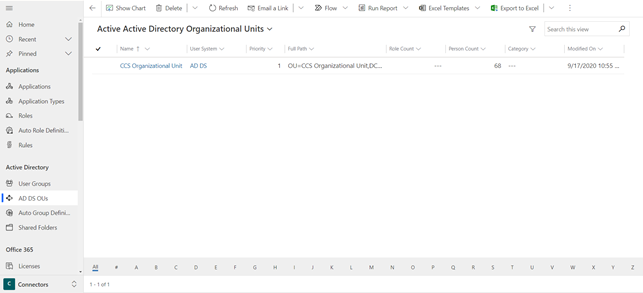
Organizational Units are loaded into Compliance Suite and cannot be created directly in your solution. Based on meetings, the relevant Organizational Units are reviewed and a decision is made with regard to the roles to be assigned to the existing OUs. Compliance Suite will then automatically place and move users to the correct OU.
Active Directory Organizational Units tabs
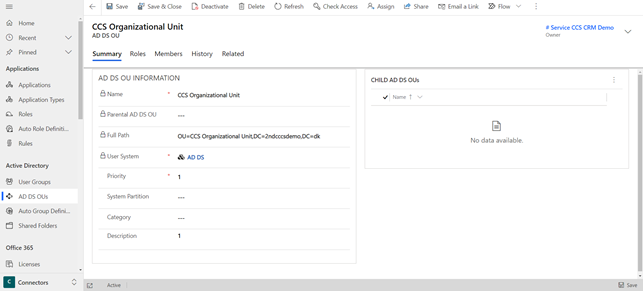
When you open an OU in Compliance Suite, you will be greeted by the following fields:
| Filed Name | Type | Description |
|---|---|---|
Name |
Locked Field (Imported) |
The name of the group. |
Parental AD DS OU |
Locked Field (Imported) |
Parental AD DS OU on the group. |
Full Path |
Locked Field (Imported) |
Full Path on the group. |
User System |
Locked Field (Imported) |
User System on the group. |
Priority |
Text Field |
Group Priority |
Category |
Lookup |
The group’s possible Category. |
Description |
Text Field |
Description of the group. |
The "Roles" tab gives you an overview of the roles linked to the given AD DS OU.
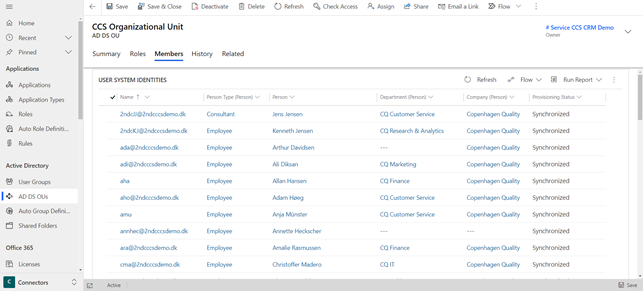
The "Members" tab gives you an overview of all the people in your system who are members of the specific AD DS OU.
The tab History gives you an overview of the log linked to the specific AD DS OU. Here, you can get an overview of all changes made to it.