
Business Processes (GDPR)
In the GDPR module of Compliance Suite, you will find "Business Processes". It allows you to register your organizational processes and is an obvious documentation tool.
You need to create a new Business Process for each organizational process you have that registers a person, either on paper or in a system. This includes every organizational process that handles personal data.
This could be, among other things, onboarding processes, recruitment processes or when a new order lands in your webshop.
You can get an overview of your active processes under "Business Processes" in the sub-area, "GDPR":
image::15644171948316.png[]
How to create a new Business Process
To create a new process, click on "New" in the menu bar.
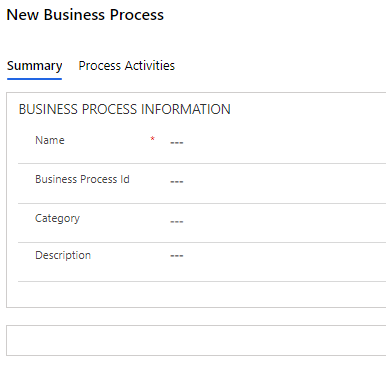
You fill in the fields of the process as follows:
| Field Name | Type | Description |
|---|---|---|
Name |
Text |
Fill in the name of the process. |
Business Process ID |
Text |
Fill in the process ID. |
Category |
Look-up |
Insert the category of the process. |
Description |
Text |
Fill in a description of the process. |
Once you have saved the process, you will have the option to link a "Legal Company", an "Owning Department" and/or an "Owning Person" to the process. This is the company, department and/or person responsible for this Business Process. You can add more companies, departments and people as needed.
Process Activities in Business Processes
The "Process Activities" tab gives you an overview of the activities linked to the process. All activities process personal data.
You can create new process activities directly from your Business Process or do so from "Process Activities", which you will also find in the "GDPR" sub-area.
You can read more about the relationship between Business Processes and Process Activities in Compliance Suite in this article.