Compliance Suite 2023 - Release Wave 2

Feature Description

New reboarding step - Restart offboarded-stopped accesses dynamic

This step got introduced to allow reactivating all accesses that have the stopping reason Stopped by Offboarding when reboarding an inactive person.

Accesses that were stopped manually cannot be reactivated with this step. * New offboarding status - Stopped by Offboarding
This status got introduced to support the reboarding step Restart offboarded-stopped accesses dynamic.

Connector > Dataverse

You can now establish a connection to Microsoft Dataverse. For this, the following adjustments were made in the Compliance Suite:

  • Connectors > User Systems > System type Dataverse
    The system type Dataverse is now available, when setting up a new system. The following new features are available for this system type:

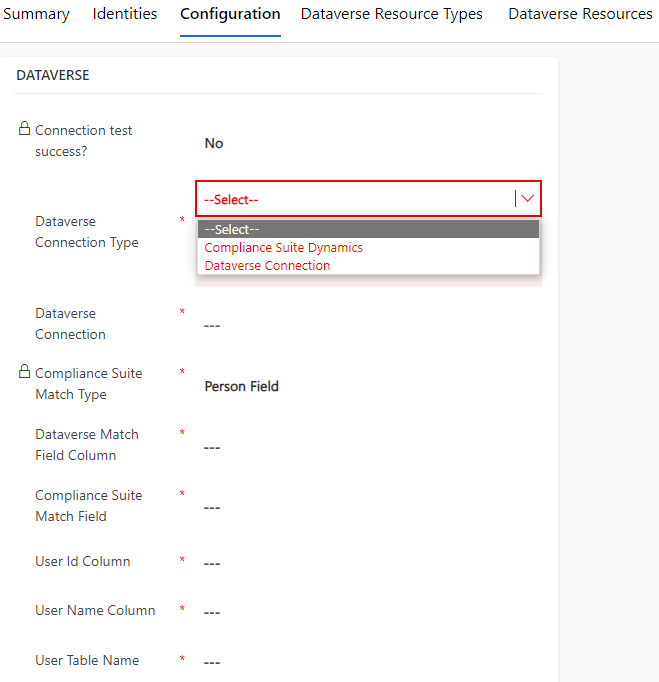
    • The tab Configuration allows you to configure the following fields in order to match data from Dataverse with Compliance Suite:

      15643311735068
      Field Description

      Dataverse Connection Type

      Dataverse Connection

      Compliance Suite Match Type

      Dataverse Match Field Column

      Compliance Suite Match Field

      User Id Column

      Here, you have to enter the name of the user Id column in Dataverse.

      User Name Column

      Here, you have to enter the name of the username column in Dataverse.

      User Table Column

      Here, you have to enter the name of the user table column in Dataverse.

    • Tab Dataverse Resource Types
      Here, you can assign the Dataverse resource types to this system.

    • Tab Dataverse Resources
      Here, you can assign Dataverse resources to this system.

  • Option Dataverse under category Connectors
    The option to configure the connection to Dataverse has been added. Here, you can:

    • Define a new Dataverse resource type
      Dataverse Resource Types define the types of Dataverse resources that CCS can give to Dataverse users.

    • Configure a new Dataverse resource
      Dataverse Resources are resources that you can assign to Dataverse users.

  • Assign Dataverse Resources to a Role
    In a role you can now assign Dataverse resources to it. The Dataverse resources are then available for the persons who get the respective role assigned.

Compliance Suite <-> SIVIS Suite data exchange

Compliance Suite can now be configured to establish a data exchange with the SIVIS Suite.

You can now synchronize role and access information of a person between the two systems.

To synchronize the data, the following configurations need to be performed:

  • User system
    You require one user system for the outbound and one for the inbound data exchange:

    • Outbound
      E.g. SIVIS-Outbound
      This system is required to synchronize data from Compliance Suite to SIVIS Suite.

      When you create this system, make sure its priority is set to < 1000.
      In the configuration of each user system you can define which Compliance Suite fields should get synchronized. For this, the status Sync Always needs to be set for the respective field.
      When exporting data with Dynamics 365 you also have to set the value for the fields ExportRoles and ExportAccesses to true.
    • Inbound
      E.g. SIVIS-Inbound
      This system is required to synchronize data from SIVIS Suite to Compliance Suite.

      When you create this system, make sure its priority is set to > 1000.
      In the configuration of each user system you can define a match field. The match field identifies the person for whom the data should get synchronized. We recommend using the initials of a person as match field as they are unique for every person.
      In case the data of a person is synchronized from SIVIS Suite whose initial is not known in Compliance Suite, it is created automatically.
      You also define the Compliance Suite fields that should get synchronized. For this, the field status Sync Always needs to be set for the respective field.
      When importing data with Dynamics 365 you also have to set the value for the fields ImportRoles and ImportAccesses to true.
  • Role
    For the outbound and inbound data exchange, you need to create a role to which the respective SIVIS user system is assigned.

    • Outbound
      To make sure that every person gets this role assigned automatically, a special rule was created. For this, the outbound role is assigned to the outbound rule, which is configured in that way that every user has the role assigned automatically.

Asset Models - new fields for Device Info

Under Asset Models > Asset Form for Device Info, two new fields are now available to you:

  • IP Address

  • MAC Address

Under Asset Form, fields on an Asset can be controlled. The control can tell if a field on the Asset should be:

  • Optional

  • Hidden

  • Required

  • Hidden

This will only work when the asset does not have any asset sources.