
Compliance Suite 2025 - Release Wave 1
| In this release, we focused on performance improvements to increase security and user experience. |
Improvements
| Improvement | Description | ||
|---|---|---|---|
FrontDesk - Default value |
The behavior of the default values for fields has been improved. Up to now, the defined default values were only used when a person got created. Now, you can also define default values for updating the details of a person. For this, the field Default Value Behavior was added to the section Default Value when adding a field. 
Here, you can choose between the following values:
|
||
FrontDesk - New security role |
HubSpot ticket: 95540659442 - Tildeling af administrator i sandbox miljø New security role - CCS FrontDesk Administrator - was added. To be able to grant a CCS administrator full access to FrontDesk related entities, a new security role was added to Compliance Suite - CCS FrontDesk Administrator. With this role, you can only administer FrontDesk entity permissions.
|
||
FrontDesk - List Latest tasks shows now also expiring accesses |
In the list Latest tasks in FrontDesk, you can now also see accesses that are about to expire and can renew their expiration date. By default, the list shows tasks that are about to expire within the next 31 days. This value can be adapted to your needs. 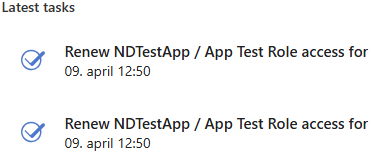
In this list you see the task name and the date and time when the task got created. Clicking on a task opens the task details. 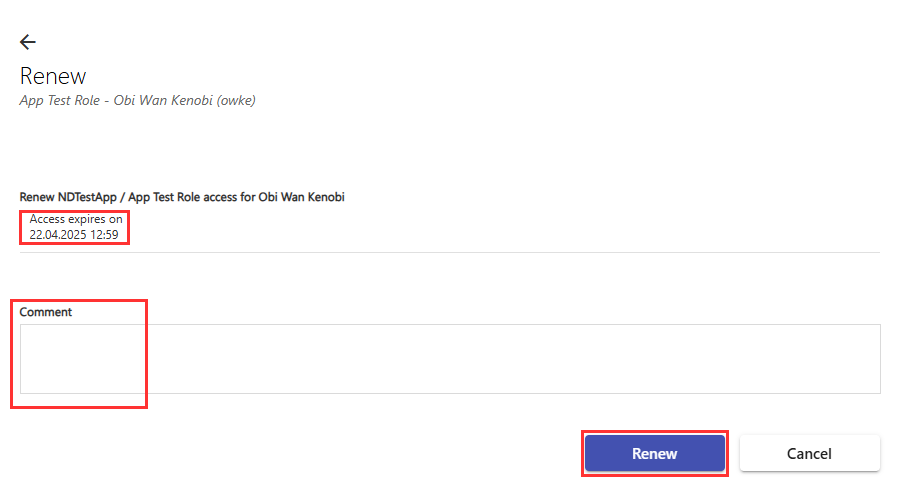
Here, you can:
|
||
Dynamics 365 - List My Task shows now also expiring accesses |
In the list My Task in Dynamics 365, you can now also see accesses that are about to expire and can renew their expiration date. By default, the list shows tasks that are about to expire within the next 30 days. This value is fix and cannot be changed. Like described for FrontDesk, you can renew a task and leave a comment. |
||
Audit History - Shows now also the name of the person who requested or approved a change in FrontDesk |
To be able to inform about the history of critical changes from FrontDesk, the information on tab Audit History of a person has been extended. Here, you can also find now the information about the user who requested or approved a change in FrontDesk. For this, two new fields have been added to the tab Audit History:
|
||
On-/Offboarding - Improvement of field On-/Offboarding Process in step details |
The field On-/Offboarding Process is locked as soon as the on-/offboarding step is saved. Each created on-/offboarding step is associated to an on-/offboarding process. This information is saved in field On-/Offboarding Process. To prevent the modification of this field after the step has been saved, it is now locked once the step is saved. 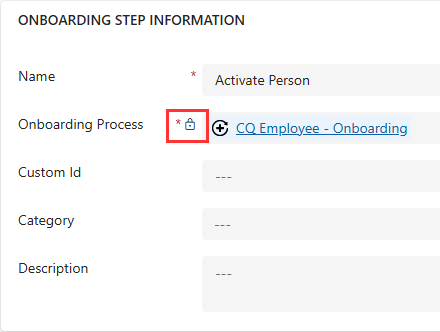
|
||
Entra ID - Support for password definition |
Compliance Suite now also supports the password definition for Entra ID users. |
||
Dynamics 365 - UI adjustments |
To prevent that a user accidentally deactivates certain entities, the button Deactivate has been removed from all relevant entities.
|
||
Dynamics 365 - Layout changes of dialog boxes |
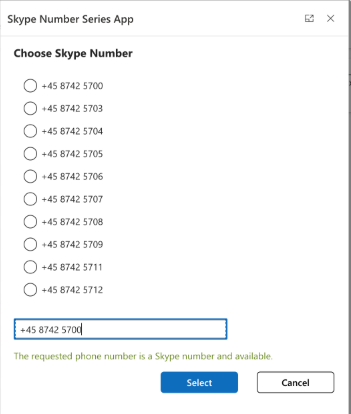
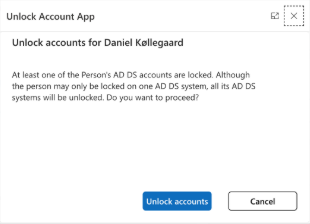
Due to changes in Dynamics 365, dialog boxes are not supported anymore. Thus, die dialog boxes for Password Reset, Skype Number Series, and Unlock Account cannot be imported anymore when importing into a new empty environment. To make sure the dialog boxes can be imported again, we use a different technical approach, which results in minor layout changes of the dialog boxes. New layout for:
|
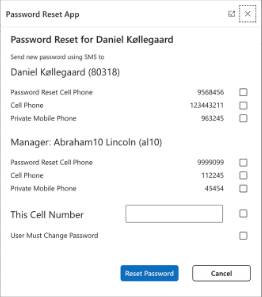
Fixed bugs
| Summary | Error description | Solution | ||||
|---|---|---|---|---|---|---|
Data doesn’t always gets updated between Entra ID and CCS. |
Entra ID has introduced new privileged roles and sensitive properties. These properties won’t be updated between Entra ID and CCS, if the user or application performing the update doesn’t have a privileged role. |
To be able to read the protected properties, a new role has been assigned to the Entra ID app in CCS - Privileged Authentication Administrator. |
||||
Compliance Suite does not recognize a user group when it is restored from the Active Directory bin. |
A user group that is deleted in Active Directory and restored again, is not found in Compliance Suite. |
When a user group is deleted in Active Directory, it is set to Inactive in Compliance Suite. As soon as this user group is restored in Active Directory, it is set to Active again in Compliance Suite. |
||||
When using the option Save & Close in the details of a person, the selection of quick roles is lost after saving and reopening the details. |
In the details of a person, you can assign quick roles from the loaded menus. In the following situation the last selections are not saved:
|
For the option Save & Close, while the saving process is still ongoing, the menus are disabled. Thus, no quick roles can be selected and a message is displayed. |
||||
Notification email is also sent to wrong person. |
Because the email notification settings for approver and implementer are not considered correctly, the notification email for the implementer is also sent to the approver. |
|||||
The same problem as described above also occurs in remove stage. |
||||||
Duplicated entries for offboarding steps. |
In Compliance Suite, when deleting an offboarding process membership and restarting a stopped access, duplicated entries are created for the respective person. |
To prevent duplicated entries, an extra check has been implemented for the column PersonID in the database. Thus, the same entry for the same PersonID cannot be added. |
||||
FrontDesk - Error message when step owner is set to Manager substitutes roles if present. |
In FrontDesk, an error message is shown for a task when the following was set up:
In FrontDesk, the task is shown in your list of tasks, but when opening it, an error message is shown. |
Because no roles have been added to the FrontDesk Definition, this task is not shown in your FrontDesk list of tasks anymore. |
||||
Update of Microsoft Intune assets causes an update loop for one asset. |
Since serial numbers for assets do not have to be unique in Microsoft Intune, updating the data of several Intune assets in CCS results in a loop update of a specific asset. |
To be able to ignore reoccurring serial numbers from Microsoft Intune, we offer now a parameter that needs to be set in Microsoft Azure - IgnoredAssetSerialNumbers.
|
||||
A deleted membership in CCS is assigned again to the person, but without a role. |
Because the data changes were not synched correctly between two systems, an already deleted membership in CCS was assigned again to the person and the reassignment contained no role. |
To be able to add a delay before certain functionalities are executed, a Microsoft Azure environment variable value needs to be adjusted.
|