
Custom Resources - Custom Resources
Custom Resources generally consists of three different entities in Compliance Suite:
-
Custom Resources
-
Custom Resource Sets
-
Custom Resource Types
You will find Custom Resources in the "Connectors" sub-area of Compliance Suite.
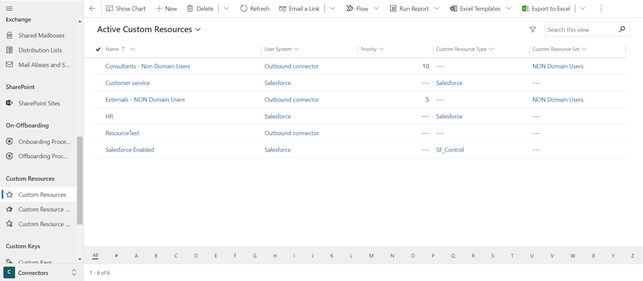
Custom Resources are used to import and export resources to or from a database - via the Compliance Suite Custom Connector.
Custom Resources is an extension to Custom Connector and Cloud Connector. A resource is a value or a membership in an external system, such as an amount limit in Business Central, a Salesforce-specific role, or equivalent in SAP or other systems. For example, it could be:
-
The "Superuser" value in Salesforce Connector (Outbound) written in extension attribute 4
-
Business Central (Navision) resources, which are updated on Business Central users
-
Business Central (Navision) profiles, which are updated on Business Central users
These system-specific resources can be defined in the Compliance Suite and linked to roles so that it can be defined who gets which resources in the external system.
For example, Custom Resources can be used to specify a Salesforce-specific role (such as a Sales Manager) that can be associated with one or more Compliance Suite roles (such as a Position or Department role) through the Cloud Connector. In this way, Compliance Suite allows you to create users in the connected systems and at the same time manage additional system-specific assignments for these users in the system - in addition to master data.
Resources are a visible tab on the entities "Custom System" and "Cloud App System" and a visible tab on the identity card.
This is how Custom Resources works
For Cloud Connectors, the IDs of the resources are transferred to an optional attribute in ADDS, which can be used when setting up the Cloud Connector in Entra ID.
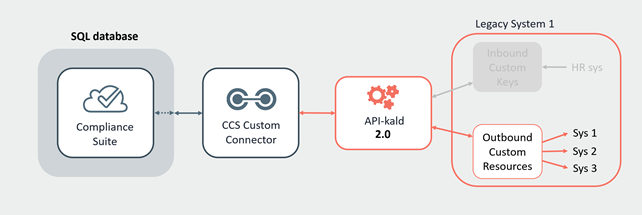
For Custom Connectors, IDs for the resources are transferred to a table in the Connector Database, and can thus be read for transfer in the external system via database, API 2.0 or Powershell Commandlet.
Note that semicolons, colon, and commas must not be used in the Custom ID field on a Custom Resource.
How Custom Resources Work in a Custom System
If a person is assigned an Access and there is an associated Custom Resource associated with the system and the role, then the resource is created in the database (or removed if it already exists in the database).
Via the Outbound Connector, Accesses are retrieved into Compliance Suite from a special table via Custom Resources. Via the Inbound Connector, Accesses are sent out to a special table via Custom Resources.
It is important to note that this is limited by a possible Custom Resource Set.
How Custom Resources Work in a Cloud App System
If a person is assigned an Access and there is a Custom Resource associated with the system and the role, then the Custom Resource ID is sent to a specified field in ADDS in the format "SF: Company PC; VIP Access, QP: 10000", where SF and QP is "ResourceType.Shortname". It is important to note that there must not be Custom Resources from different systems in the same ADDS attribute, but preferably from different resource types that are comma separated.
Additionally, it is important to note that this is limited by a possible Custom Resource Set.
Specify roles on a Custom Resource
On a Custom Resource, specify roles to be exported with the resource. You do this via the "Roles" tab.
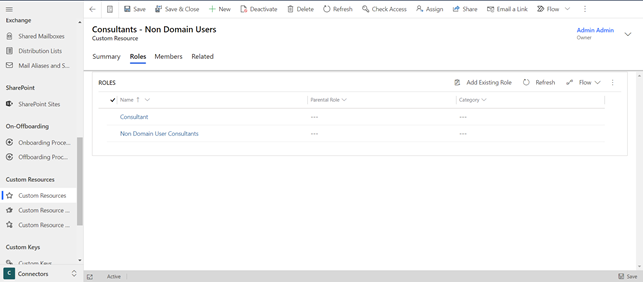
You add new roles by clicking on "Add Existing Role".
Custom Resource Sets
A Custom Resource can be connected to a Custom Resource Set. Such a set ensures that users are assigned only one of the roles linked to a given Custom Resource - even if the user matches multiple roles. This can be ensured by pooling the roles in a Custom Resource Set and giving each of them a unique priority.