
FrontDesk Process Definitions
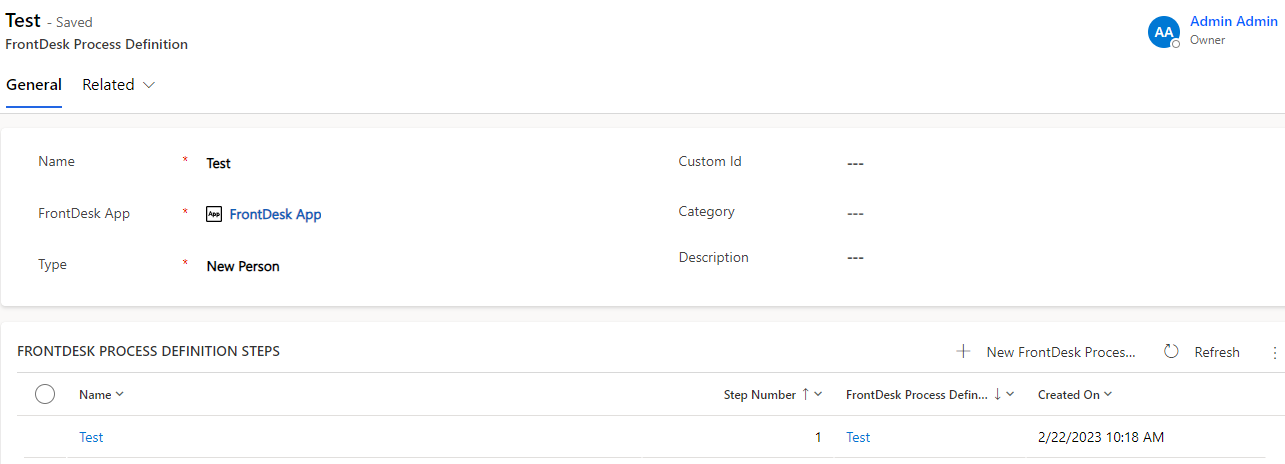
With FrontDesk process definition you can define an explicit workflow that can be performed on a person in Compliance Suite. A FrontDesk process definition consists of:
-
Basic information
-
A number of FrontDesk process definition steps
 ]
]
| Tab | Field / button | Description | ||||||
|---|---|---|---|---|---|---|---|---|
General |
||||||||
Name |
The name of the process which is shown in the frontend of FrontDesk and used in the administration. |
|||||||
FrontDesk App |
The FrontDesk App that the process belongs to. |
|||||||
Type |
The type of workflow that the process defines. This can be either for a New Person or Update Person in FrontDesk. |
|||||||
FrontDesk Process Definition Steps |
Here, you define the steps of the respective workflow. Each step is part of the process for creating or updating a person. It can have have multiple pages and a mechanism to control who can perform the step.
|
| If no roles are assigned to a Process Definition Step, you will be informed about it in view FrontDesk Process Definition. |
+ New FrontDesk Process Definition Step
To add a new step, click + New FrontDesk Process Definition Step.
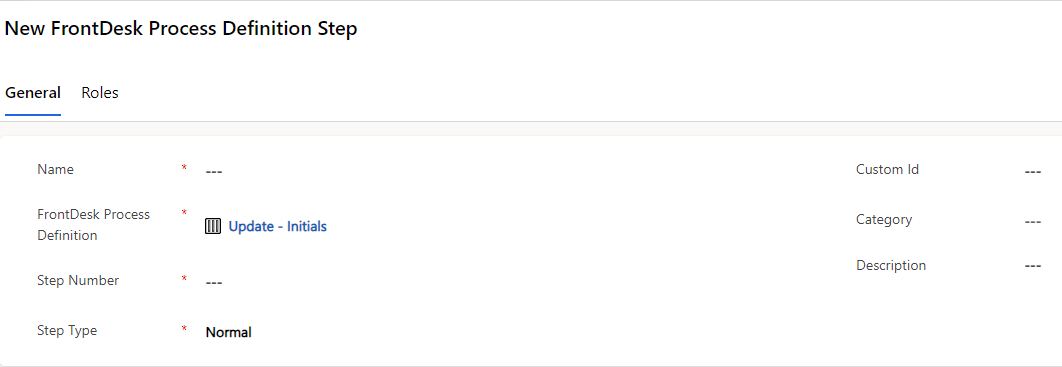
The administrative interface has two tabs:
| Tab | Field / button | Description | ||
|---|---|---|---|---|
General |
Contains basic information about the step and a list of the pages. |
|||
Name |
|
|||
Front Desk Process Definition |
Shows the FrontDesk process definition. |
|||
Step Number |
Here, you define at which step this part of the workflow should be performed.
|
|||
Step Type |
Here, you can define the type of the step in the workflow:
|
|||
|
||||
Role |
Step Owner |
Here, you can define a person in Compliance Suite that can perform the step. |
||
Add Existing Role |
Grid association to an existing role. When defined, only users/persons that have this role assigned can access this step. |
|||
| In case no roles are assigned to a Process Definition Step, the respective Process Definition becomes invalid and thus, is not shown in FrontDesk UI. You will be informed if no roles are assigned to the Process Definition Step. |
FrontDesk Pages
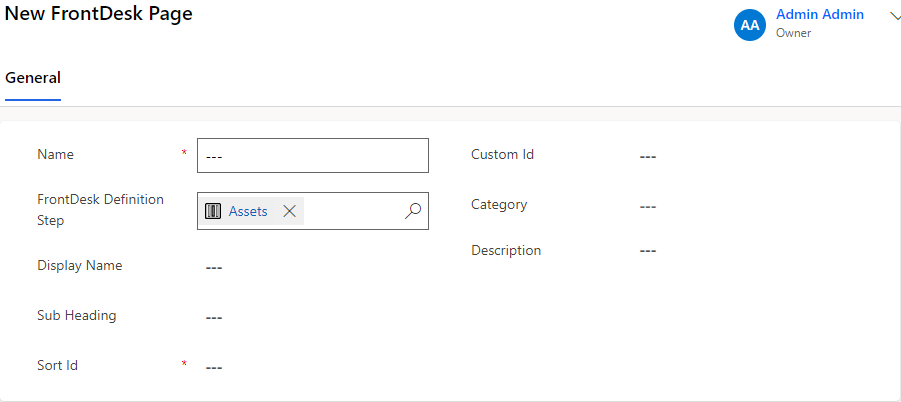
To add a new page, click + New FrontDesk Page.
In the frontend of FrontDesk one step in a workflow execution can consist of multiple pages, containing text fields, checkboxes etc.
Here, you define an actual page for the step that is shown in the frontend. The pages are listed in the order they are shown in the frontend.
 ]
]
| Field / column | Description | ||
|---|---|---|---|
Name |
Name shown in D365 and in FrontDesk if Display Name is not filled out. |
||
FrontDesk Definition Step |
Name shown in FrontDesk. If not filled out, Name field is used. |
||
Sub Heading |
Not shown. |
||
Sort Id |
The order of the pages. |
||
|
|||
FrontDesk Fields
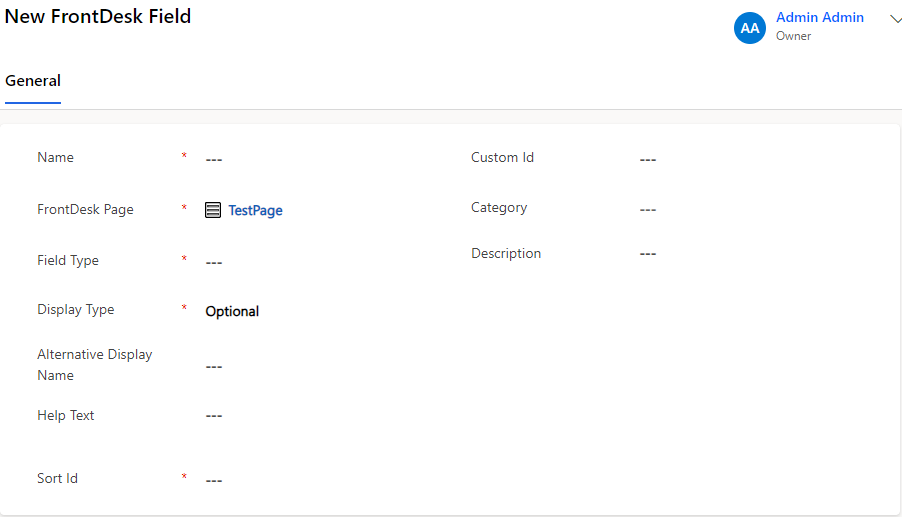
To add a new page, click + New FrontDesk Field.
Here, you define a field on the page form when a FrontDesk page is rendered in the FrontDesk frontend. It is possible to create fields for all Compliance Suite person properties such as first name, company and employment date.
| Field | Description | ||
|---|---|---|---|
Name |
Name of the field shown in D365 and in the FrontDesk frontend, unless the alternative display name field is used. |
||
FrontDesk Page |
The FrontDesk page that the field is shown on. |
||
Field Type |
Here, you can choose a field type from the drop-down menu, indicating what person field to map to or an option field. All fields that are currently available for the Compliance Suite person are supported. |
||
Display Type |
Here, you can choose a field type from the drop-down menu:
|
||
Alternative Display Name |
Text is added to an empty field to inform the user about what information needs to be added.
|
||
Help Text |
Entered text is shown as tool tip when hovering with mouse cursor over the info icon beside the field. |
||
Sort Id |
Here, you define the order of the field on the page. |
||
Custom Id |
General value that is used in Compliance Suite. |
||
Category |
General value that is used in Compliance Suite. |
||
Description |
General value that is used in Compliance Suite. |
||
Default value |
In this section you can define a default value for the respective field.
|