
Office 365 - Teams/365 Groups
Groups are created in the associated systems, Active Directory Domain Services (AD DS) and Entra ID, or alternatively in other systems relevant to your organization.
Security groups, distribution lists from Exchange Online and Office 365 groups are handled in the same way in Compliance Suite. Groups can be linked to one or more roles, which means that all persons in the role become members of the group in the associated system.
You can find all active Office 365 groups in your system under "Office 365 Groups" in the "Connectors" sub-area.
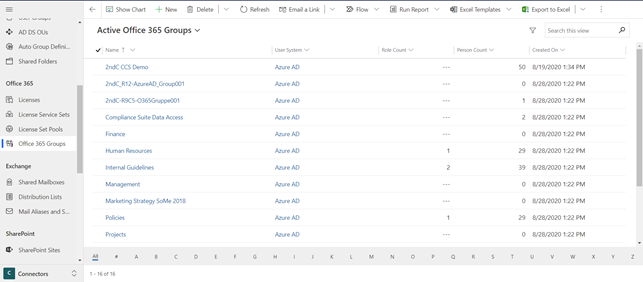
Compliance Suite automatically imports new groups and group memberships from AD DS and Entra ID. These are updated regularly.
On each group in Compliance Suite, you can select the "Keep Access" or "Remove Access" option.
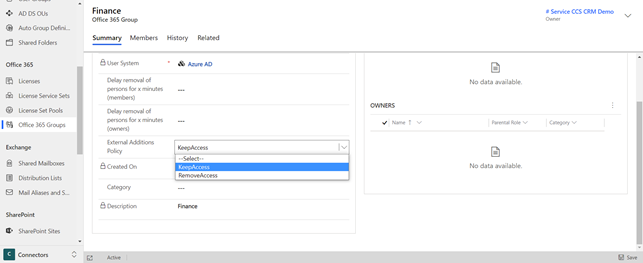
Keep Access: If you add users directly in the external system, the membership is imported to the group. The group now has the members from the role as well as the manually added members.
Remove Access: If you add users directly in the external system outside the role, they will be removed again by Compliance Suite. Thus, the "Remove Access" option ensures that the group only has members with the associated role.
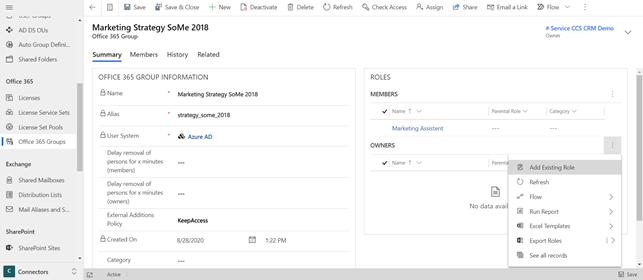
For Office 365 groups, you can select roles for both "Owner" and "Member". To add an existing role, click on the three dots next to either "Members" or "Owners" directly on the Office 365 group and select "Add Existing Role".
Delayed removal of user
The field "Delay removal of persons for x minutes" is added to the following memberships (for Office 365 groups, this applies to both owners and members):
-
User group
-
Shared mailbox
-
Distribution list
-
Microsoft365 group
Example of User Group:
New Status:
-
"Plan for removal"
New field on the membership unit:
-
"Removal time"
How it works
When the access granting access to the group is removed and the group
has a value in "Delay removal of persons for x minutes", the assignment
status is set to "Schedule removal" and the removal time to UTC. Now
plus the value of "Delay removal of persons for x minutes".
The timer function D365MembershipSchedulerFunction checks every 15
minutes if there are any memberships to be removed now. If so, the
preparation status is set to "Removal" and the membership calculation
continues as before.