
Person Status
Here, you can find the person statuses created in Compliance Suite.
"Person Status" is set up during the configuration of the system and reflects the capabilities of the connected systems.
Active Person Status
Click on "Configuration | Person Status" to get an overview of the person statuses created in the system:
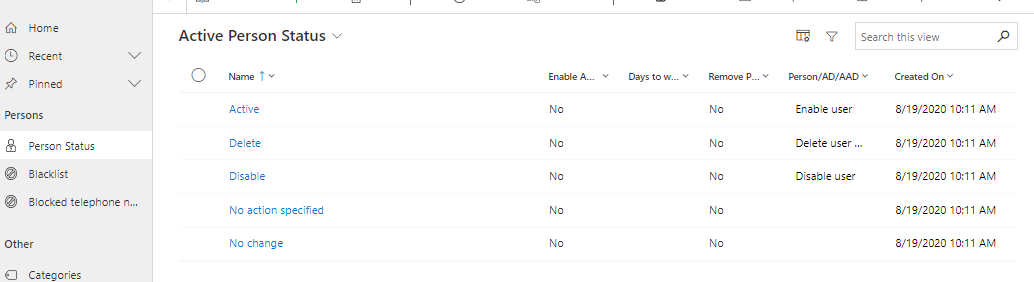
Configuration of Person Status
Person Status can be configured to perform different things with regard to the person.
Action |
Description |
[blank] |
Default Status, when a person is created in Compliance Suite. |
Activate |
Once the person is created in the connected systems, the status automatically changes to Activate. |
Deleted |
The person is removed from the assigned roles, accesses and licenses. Next, Compliance Suite deletes the person’s user identities in the connected systems. The person will be stored in Compliance Suite and can be found in the overview. The person is set as "Deactivated" in Compliance Suite. |
Disable - License Removed |
The person’s user identities are deleted in the connected systems. |
No Action Specified |
No changes are made to the user. |
No Change |
No changes are made to the user. |
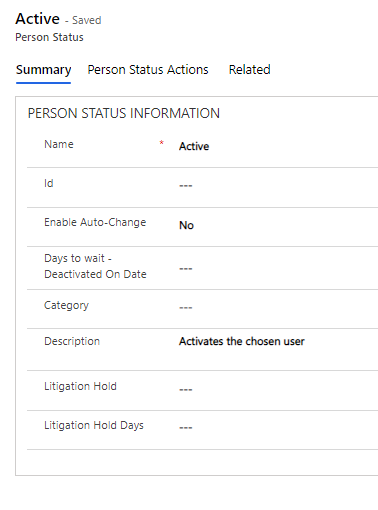
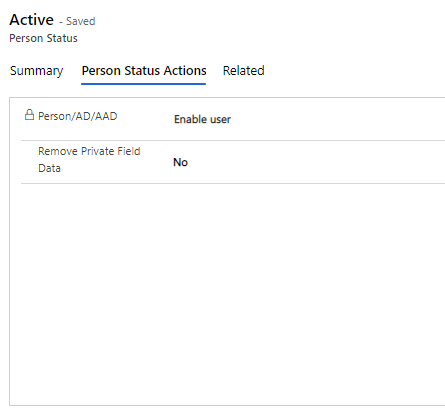
How to create a new Person Status
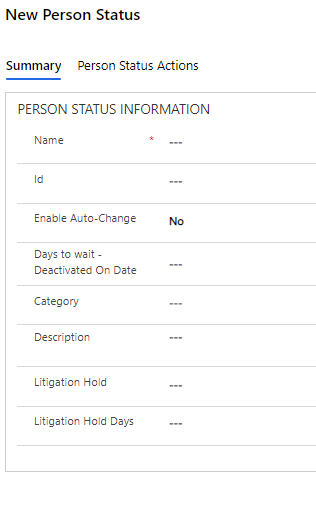
Field Name |
Types |
Description |
Name |
Text |
New name of Person Status |
Id |
Text |
Id for new Person Status |
Category |
Look-up |
Category for new Person Status |
Description |
Textt |
Add a description to the Person Status, to that others may know what happens if they choose this Person Status |
Enable Auto-Change |
Look-Up |
Set to "Yes" if you want the system to automatically disable the user. |
Days to Wait - Deactivated On Date |
Date |
Number of days until a user is disabled. |
Person AD/Entra ID |
Look-Up |
Indicates what happens to the user in AD and Entra ID. |
Remove Private Field Data |
Choice |
If the field is set to "Yes! the private information of the user is deleted. If set to "No" they will be kept. |
Inactive Persons
The person is set to Delete and the status changes to Read-Only. You can then follow the log and see the user being removed from the external systems.
If you wish to create the same person again, you can change the status of the deleted person from Delete to Active.
| The accesses of an inactive person can either have the status Stopped by User or Stopped by Offboarding. When reboarding an inactive person with the onboarding step Restart offboarded-stopped accesses dynamic, all assigned accesses in status Stopped by Offboarding become active automatically. |
Time-controlled person status
Person Status can change automatically based on the Deactivation Date or Leave Return Date on the person card. An offset can be defined for a number of days (e.g. 0, 30, 90 or 180 days), after which, for example:
-
the user Is disabled; OR
-
personal information is reset; OR
-
role mappings and system identities are deleted and initials are released.
Notes on synchronization
-
Person Status set on import or connection
-
Person Status is synchronized outwards only against lower priority systems (changes in higher priority systems are not synchronized inwards)
-
If a user in a higher priority system is deactivated and Deactivate On is not set, Deactivation Date is set to today’s date
-
If a user in a higher priority system is activated and Deactivate On is set to a date earlier than today, then Deactivate On is set to null