
Profile - User Systems
General
Under "User Systems" in the "Connectors" sub-area, you get an overview of all the User Systems that are managed in Compliance Suite. For example, Dataverse, Entra ID and AD DS.
| You can maintain multiple Entra ID tenants. |
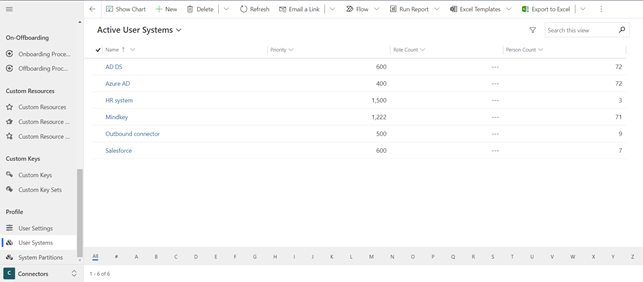
User Systems are set up when the Compliance Suite is installed. If you need to connect additional systems, you must do so in collaboration with Pointsharp.
On the individual User System, you can see which system your User System is connected to. In addition, you can define which Person Status or Person Type should be assigned to persons imported from the system to Compliance Suite.
You also get an overview of which roles are linked to your User System.
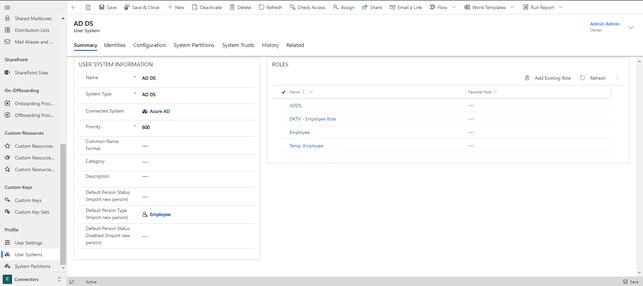
Identities - Assign a person
If a person is assigned one of the roles linked to your User System, they are created in the system and Compliance Suite manages their master data based on the data entered on the person card (if the priority of your User System is below 1,000).
The tab Identities gives you an overview of which people are synchronized between Compliance Suite and your User System.
| To open the details of a user system identity, double-click the entry. |
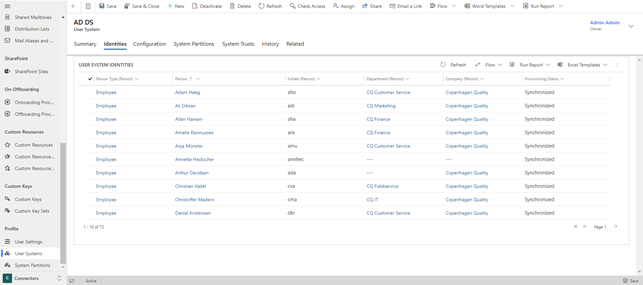
In the details of a user system identity, you can find information about the identity on this system, like unique identifier, mail alias etc. Additionally, you also find these fields:
-
Has Mailbox
If an identity has a license for a mailbox, this information is synchronized with Compliance Suite. In this case, in the details of a user system identity, the field Has Mailbox is automatically filled with the value Yes. -
Account Locked
If a person is locked on any of its AD DS systems, the value of this field is set to Yes. Once the account of this person is unlocked, the value is set to No.For information on how to unlock an account, see Locked Accounts Board.
Configuration - Import Match Field
To map data from a custom connector with data in Compliance Suite, you need to configure the fields to be mapped here.
For user systems like ADDS or Entra ID you can use the field Import Match Field to define which field values of a user need to be identical to the field values of a person in CCS in order to be matched to each other.
| You can only set this field when creating a user system. Once the user system is created, the field is locked. |
| The field Import Match Field cannot be set to synchronize on-premises users. |
The following values are available with this field:
-
Initials
If the initials of a person in CCS is identical to the initials of a newly created user in Entra ID, then the created Entra ID user is matched to the CCS person. -
Primary E-mail
If the primary email of a person in CCS is identical to the primary email of a newly created user in Entra ID, then the created Entra ID user is matched to the CCS person. -
EmployeeId
If the employee ID of a person in CCS is identical to the employee ID of a newly created user in Entra ID, then the created Entra ID user is matched to the CCS person. -
None
Creates a new person in CCS.
Synchronizing data from other systems
A User System is assigned a priority. The priority determines whether or not the Compliance Suite should manage master data in the system.
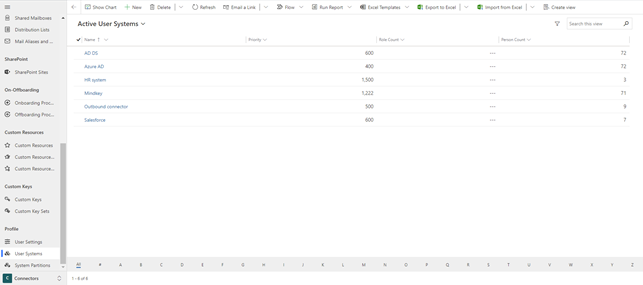
If the Compliance Suite is to manage master data, a system such as AD DS must have a priority below 1,000. If a system is to manage master data in Compliance Suite, the priority of the system must be set to, for example, 2,000; a priority higher than 1,000.
What does priority mean?
| Only changes in the highest priority User System are imported - and only if the priority is higher than Compliance Suites which is 1,000. |
All systems with a lower priority than the Compliance Suite will be updated with any changes made in the Compliance Suite or the highest priority system. Fields synchronized from a system higher than Compliance Suite can only be corrected in that system and not on the person card in Compliance Suite.
Changes do not affect group memberships/roles, only master data synchronization.
Synchronizing data to and from SIVIS Suite
You can synchronize role and access information of a person to and from SIVIS Suite.
For this, the following two systems need to be created and assigned to a role, which is then assigned to the respective persons.
-
An Outbound user system
E.g. SIVIS-Outbound
This system is required to export data from Compliance Suite to SIVIS Suite. It’s user system priority needs to be < 1000.When configuring the system, the value for the fields ExportRoles and ExportAccesses needs to be set to true.
To make sure that the changed data from every person gets exported to SIVIS Suite automatically, the outbound role is assigned to a special rule. -
An Inbound user system
E.g. SIVIS-Inbound
This system is required to import data from SIVIS Suite to Compliance Suite. It’s user system priority needs to be > 1000.When configuring the system, the value for the fields ImportRoles and ImportAccesses needs to be set to true.