
Sub-tab "Miscellaneous"
Section: Email archiving
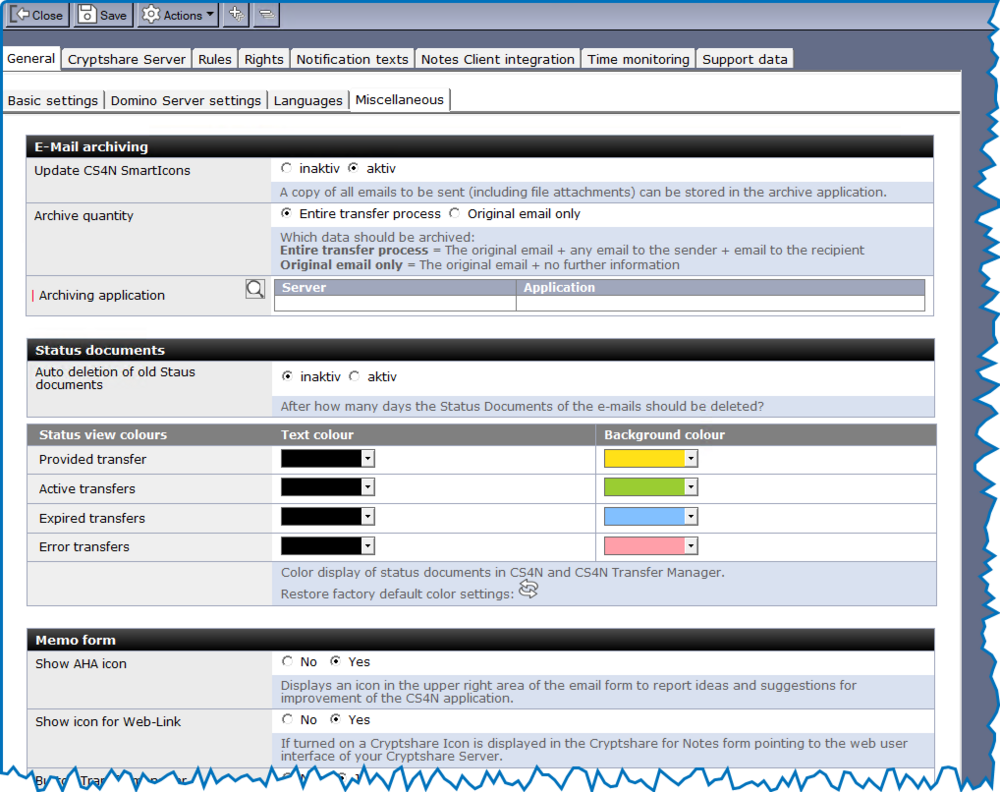
In this section, you can configure the archiving settings for the email to be sent. Each email to be sent, including file attachments, can be stored as a copy in a freely definable Notes application that contains standard email templates (e.g., a mail database with memo and reply templates). Access via ACL is required for the server and the users you have freely defined as authorized. The original email creators do not need access!
|
Beachten Sie, dass die ACL der Archiv-Anwendung korrekt konfiguriert sein muss, um Dokument erstellen zu können. |
| Label | Comment |
|---|---|
archive function |
Inactive = The email will not be archived. Active = All emails to be sent, including attachments, will be stored in the specified Notes application. |
archive quantity |
Entire transfer process: All emails related to the transfer process will be archived. This includes the original email from the sender, the email to the recipient, and the email to the creator. Original email only: Only the original email from the sender will be archived. |
Name of the archive application |
The archive application is entered here. |
Section: Status documents
This section contains settings for the status documents, such as color representation and retention period.
| Label | Comment |
|---|---|
Auto deletion of old Staus ducuments |
Inactive = No status documents will be deleted Active = Status documents will be deleted after the specified number of days |
Status documents deleted after x-days |
Number of days after which a status document should be deleted. |
Color display of status documents. These settings are used in the status views of the CS4N&D application as well as in the views of the Transfer Manager.
| Label | Comment |
|---|---|
Provided transfers |
Color representation for transfers that are in the source corps of the CS4N&D application and have not yet been processed. |
Active transfers |
Transfers available for download by the recipient |
Expired transfers |
Transfers whose expiration date has passed and can therefore no longer be downloaded by the recipients. |
Error transfers |
Transfers that have a problem. |
