
Using Subject Line Tags for Auto Processed Messages
About Tags in Subject Lines for Auto-Processed Messages
To trigger rule-based processing of email messages, you have the option of integrating a text label in the subject line of an email to be sent. This label must be communicated to the CS4N application and is removed from the subject line when the message is processed in Cryptshare.nsf, so that the recipient receives the subject line without the label. The flag can either be entered manually in the subject line by the sender or automatically via a control element in the HCL Notes email template.
From version 2.15 onwards, the forwarding of notifications to internal recipients can be set up so that they are delivered directly to the relevant recipients without having to go via the Cryptshare Server. However, the labeling of such notifications must also be taken into account in rule-based forwarding. The keyword for labeling such notifications is defined in the configuration in the section Rules > Send type to internal recipients > Labeling for internal email forwarding. This keyword must then also be taken into account in the server-based rules so that such notifications are delivered directly.
|
Using Journal.NSF for email archiving
If there is a Domino Server rule for redirecting Cryptshare for Notes emails … and another Domino Server rule exists for archiving to Journal.NSF … and the relevant Journal.NSF is not on the same server as the Cryptshare application … then the existing Domino server rule for archiving must be extended in order to avoid duplication of emails. Additional condition: The Cryptshare for Notes placeholder (e.g. [CS4N]) must not be included in the subject of the email. |
Option 1 - No integration into personal mail file
The sender can enter the tag into the subject line. If a Domino server-side rule exists that checks for the tag in the subject line, the email will be forwarded to Cryptshare.nsf if the tag is found in the subject. However, you should consider the settings concerning how Cryptshare should deal with attachments. If the setting is set to only send messages with attachments, messages containing the tag but no attachments will still be delivered as standard emails. The sender cannot be made aware of this in advance. If all messages (with and without attachments) should be delivered via CS4N, the Domino Server rule only needs to check for the subject line. In this case you need to configure CS4N so that messages that are processed based on rules are sent as complete encrypted messages (Send complete message as EML file).
|
If messages without attachments should also be sent as encrypted EML files, the outbound messages have to contain the text field CSEMLBodyOptions and the field value has to be "0". Also the option "Send complete message as EML file" has to be selected in the field email handling in case of rule based processing on the Sub-tab "Rule-based processing". |
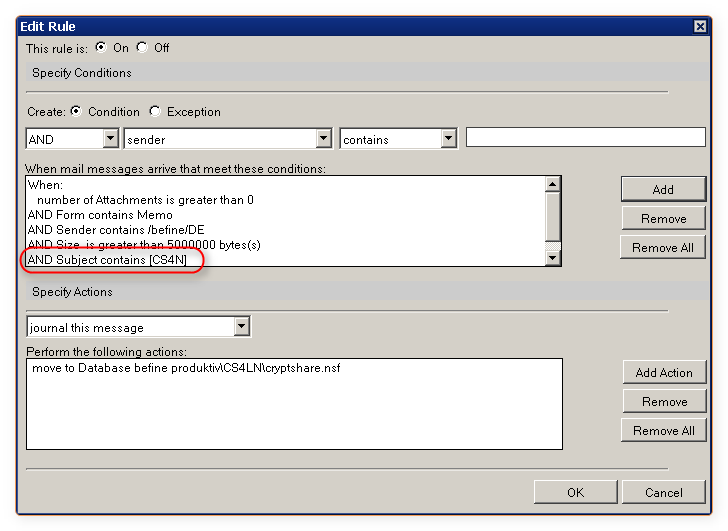
Option 2 - Integration into the Memo Form of the personal mail file
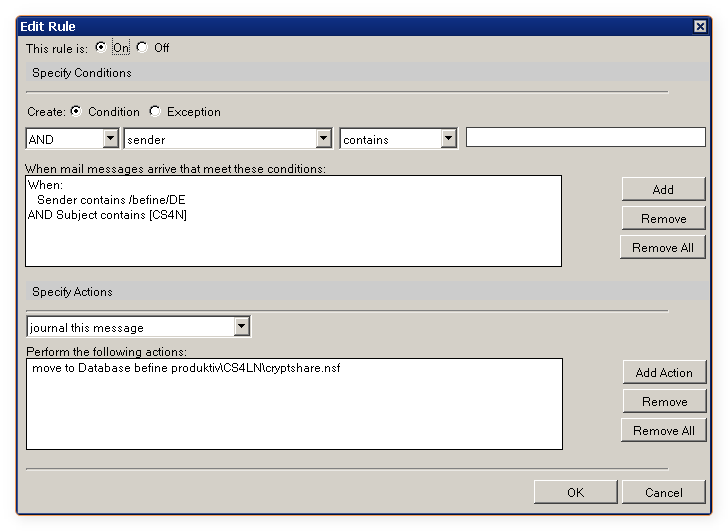
If the sender sends the message from his personal mail file (see Integration into personal mail files) using the option "As Cryptshare messge" (text label configurable), the defined tag will automatically be added to the subject line of the outbound message. The Domino Server rule checks the subject line for the tag and forwards the message into Cryptshare.nsf if applicable.
When sending from the personal mail file, the system checks which configuration settings in CS4N apply for sending rule-based email messages.
Depending on the configuration of CS4N, the Domino server rules may have to be adapted.
Example:
|
Note
The Domino router server task should be restarted after each change. |