
Email classification
Email classification makes it possible to classify outgoing messages into different protection classes depending on the vulnerability of their content.
-
Administrators can define the email classifications and specify certain transmission paths and settings.
-
The administrator has the option to decide whether classification of emails is either always mandatory, or optional.
-
The administrator may also specify whether a particular classification is pre-set or the selection is not pre-defined, so a classification must be deliberately selected each time before a message can be sent.
-
Restrict permissible recipients / Avoid incorrect addressing: It is possible to limit the number of recipients per protective classification. This provides additional security because it can be guaranteed that no accidental recipients become part of a transfer.
-
It is possible define up to 25 different classification levels and assign their own names, descriptions and color codings from the MS Outlook color palette.
If the feature is activated, there is a button for the classification next to the button Send with Cryptshare.
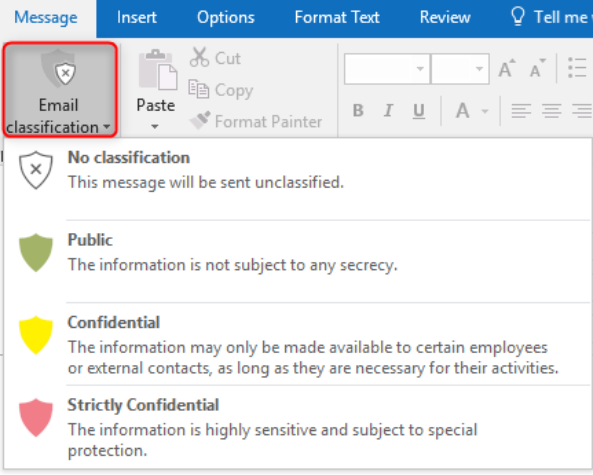
For each available level there is a brief description and a tooltip, which makes it easier for the user to select the correct classification for a message.
For each classification level, the administrator can determine whether the message has to be sent via Cryptshare, whether the selection of Cryptshare as a transport path is optional for the user, or whether Cryptshare is not to be used.
Transfer dialog settings
If Cryptshare is the transport medium, the administrator can pre-set each available transfer option in the Transfer dialog, and decide whether this setting is changeable by the user. If not, he can also decide whether to display the non-changeable value in the transfer options or to hide the entire option.
| The settings for the maximum retention time and the available password options already set in the policy, can only be further restricted by the classification. |
If the settings are made so that the user does not have to make any entries, the entire step of displaying transfer options can be skipped.