
Custom Connector - Inbound
How Custom Connector Inbound works
Custom Connector Inbound integrates other systems with Compliance Suite. Via the Connector Database you can create new users in Compliance Suite by simple transfer to an SQL table. This means that it is easy to integrate, for example, HR systems with Compliance Suite in order to take advantage of Compliance Suite’s logging capabilities and to maintain master data management in the HR system.
A system is Inbound when its priority is set to higher than 1,000.
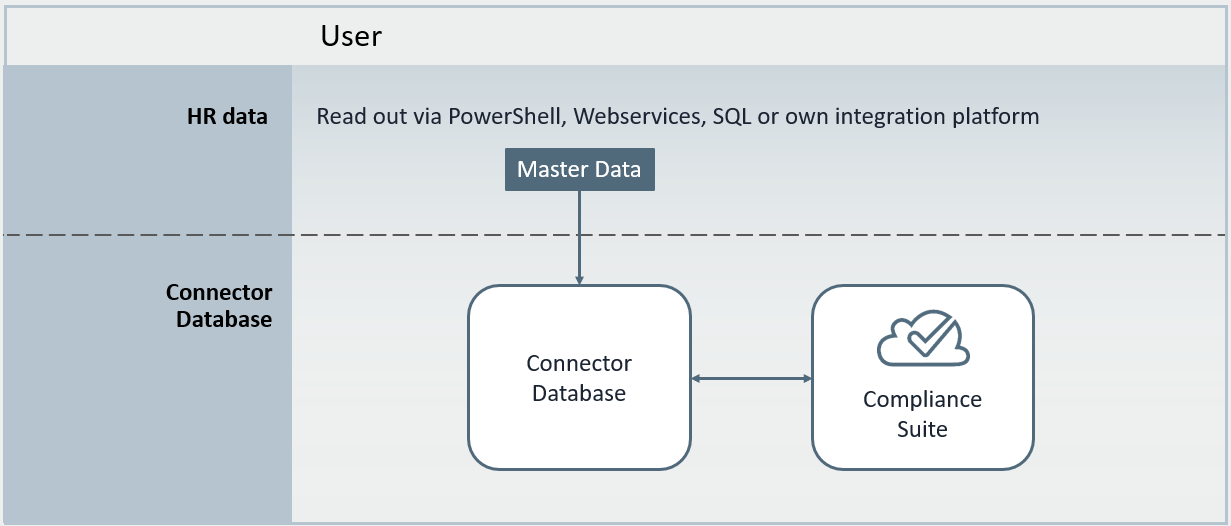
The Custom Connector uses "Custom Keys" to import roles from the database into Compliance Suite. You must specify the roles to be imported into Compliance Suite as Keys. If a person has a Key associated in the Connector Database, and there is a Role Key for the system, the person will be assigned a corresponding access.
Fields in the Inbound table
The Custom Connector in Compliance Suite makes it easier to build integrations between external systems and Compliance Suite. New users can be created by simple transfer to an SQL table, making it easy to integrate with, for example, an HR system, with logging into Compliance Suite.
This article describes the fields in the Inbound table. The table contains all data that can be viewed on the person card in Compliance Suite.
Fields
| Name | Type | Description | Example | ||
|---|---|---|---|---|---|
ID |
Text |
Person unique string-value. |
6ca7b087-4315-41d3-b226-b1b2d8906d4b |
||
Handled |
Numbers |
Numbers indicating the status of the entry in the table. See the Handled section below for more details. |
1 |
||
HandledError |
Text |
The description/cause of the error. See the Handled section below for more details. |
Could not create user because initials were invalid. |
||
PersonTypeName |
Reference |
The person type of person in the Compliance Suite. |
Employee |
||
PersonStatusName |
Reference |
Status of the person in the Compliance Suite. |
Activate |
||
CompanyName |
Reference |
Specifies which company the person belongs to. |
<company name> |
||
CompanyID |
Reference |
Specifies which company the person belongs to. |
13 |
||
FirstName |
Text |
First name |
John |
||
LastName |
Text |
Last name |
Doe |
||
Name |
Text |
Full name |
John Doe |
||
Initials |
Text |
Initials used to log on to the various systems.
|
JDoe |
||
EmployeeID |
Text |
Special ID for the person. |
1 |
||
EmployeeCardID |
Text |
Special ID for the identity card. |
10 |
||
Salutation |
Reference |
Specifies the person’s form of indictment. |
Mr. |
||
Phone |
Tekst |
Phone Number |
+45 32 14 56 78 |
||
Cellphone |
Tekst |
Mobile Phone |
+45 78 65 43 21 |
||
PositionName |
Reference |
Specifies the person’s position. |
Assistant |
||
PositionID |
Reference |
Specifies the person’s position. |
12 |
||
JobTitleName |
Reference |
Specifies the person’s job title. |
Marketing Assistant |
||
JobTitleID |
Reference |
Specifies the person’s job title. |
3 |
||
DepartmentName |
Reference |
Specificerer, hvilken afdeling personen tilhører. |
Marketing |
||
DepartmentID |
Reference |
Specifies which department the person belongs to. |
3 |
||
CostCenterName |
Reference |
Specifies which Cost Center the person belongs to. |
Default |
||
CostCenterID |
Reference |
Specifies which Cost Center the person belongs to. |
22 |
||
DivisionName |
Reference |
Specificerer, hvilken division personen tilhører. |
Administration |
||
DivisionID |
Reference |
Specifies which division the person belongs to. |
33 |
||
Manager |
Reference |
Specifies the person’s Manager via their ID. |
7ca7b087-4315-41d3-b226-b1b2d8906d4c |
||
LocationName |
Reference |
Specifies the location of the person. |
Kongens Nytorv 8 |
||
LocationID |
Reference |
Specificerer, hvilken lokation personen befinder sig på. |
23 |
||
PreferredLanguageName |
Reference |
Specifies the person’s preferred language. |
Danish – Denmark |
||
LeaveReturnDate |
Date |
Date of the person’s return from leave. |
01-01-2022 |
||
Description |
Text |
Description of the person |
Denne person er uundværlig for organisationen. |
||
CategoryName |
Reference |
Categorization of the person. |
Marketingmedarbejdere |
||
ActivateOn |
Date |
Date of activation of the person. |
01-01-2017 |
||
DeactivateOn |
Date |
Date of deactivation of the person. |
01-06-2021. |
||
PrivatePhone |
Text |
Private telephone number. |
+45 87 65 43 21 |
||
PrivateMobilePhone |
Text |
Private mobile number. |
+45 22 33 44 55 |
||
PrivateEmail |
Text |
Private email address. |
john.doe@<company>.com |
||
PrivateAddress |
Text |
Home address. |
Kongens Nytorv 78, 2. tv. |
||
PrivateZipCode |
Text |
Private Zip code |
1050 |
||
PrivateCity |
Text |
Private City |
København K |
||
PrivateCountryName |
Reference |
Private Country |
Danmark |
||
DateOfBirth |
Date |
Date of birth |
02-05-1978 |
||
ModifiedOn |
Date and time |
Change date of the entity. This field is not used by the Compliance Suite to synchronize. Instead, the Handled field is used. |
23-09-2021 09:23:00 |
||
CreatedOn |
Dato and time |
Date of creation of the entity. The field is not used by Compliance Suite to synchronize. |
31-12-2016 00:00:00 |
Requirements when creating table objects in Compliance Suite
-
ID column is specified for a unique ID of the person. It can be EmployeeID, Initials, E-mail or another ID that must be unique for all rows in the table.
-
Manager uses ID column as reference, so format must match ID column.
-
Organizational units (company, department, cost center, position, job title, division and location) are automatically created and updated in Compliance Suite. If you want to support the updates, the ID column (DepartmentID) must be filled in - or a new department will always be created on non-match.
-
To delete a person, specify a date in DeactivateOn or specify PersonStatusName. This is only used in scenarios where you should not be able to perform a manual deactivation in Compliance Suite.
-
Initials are automatically generated and updated in the table if they do not appear in the field.
-
Handled Flag must be set. See how to do it further down in this article.
When you write a new record in the database - or update an existing one - a time-based job that runs every minute checks for new records and changes. These changes will then be reflected and displayed in Compliance Suite accordingly.