
Password Reset
Password Reset unlocks a user account, gives the user a new password, and sends it via text messaging. The button can be used by users assigned the "CCS Service Desk" or "CCS Administrator" role.
Example:

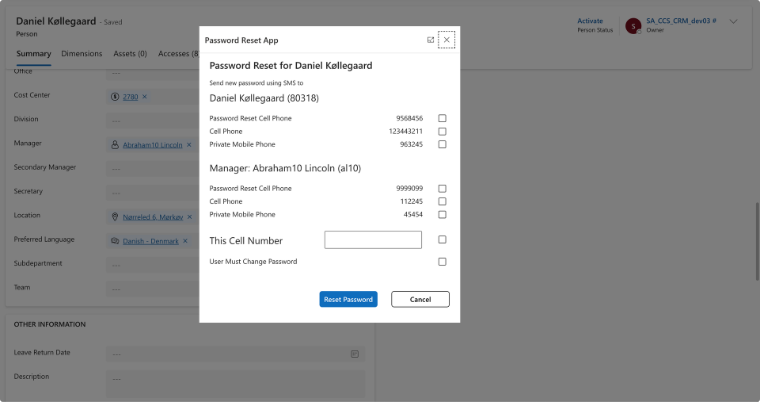
How it works
| Step | Point | Remarks |
|---|---|---|
1 |
The user presses "Reset Password" |
|
2 |
The dialog box above appears |
The first 3 + 3 numbers are only
displayed if they are filled in on the person (lines without a telephone
number are hidden). Check box for the first of the displayed numbers is
checked. |
3 |
Reset password, Unlock Account, send sms |
Via the functionality below. Several fields can be checked, and then more text messages are sent. |
Functionality
| Functionality | Description | Remarks |
|---|---|---|
Person - New personal card field "Password Reset Cell Phone" (text) under Cell Phone |
Can be selected on / off on Person Type and Manage Definition |
Canceled as Microsoft does not have / will not implement (t) API (i.e. will not transfer to Entra ID in a special field if filled in. See Field in Entra ID for reset password |
Entity - Password Reset |
The temporary entity is generated by java script in a dialog box. Deleted by server code when read and forwarded to ADDS agent. |
|
ADDS Agent - Dan password |
Via Password Definition transferred to a database (not password). |
|
ADDS Agent - Unlock Account and Set password |
ADDS Account unlocked if locked. A new password is set with "User Must Change Password" depending on SMS. |
|
ADDS Agent - Send SMS |
Via Twilio, and via an Account ID that matches the customer. |
Must be able to be configured somewhere + the text below + the sender name below. |
ADDS Agent - Delete SMS |
Delete SMS from Twilio. |
|
The text of the SMS reads: "New password generated: [% password]" (configuration) from "Compliance Suite" (configuration) |
The password, the user’s name and initials must be able to be merged into the text. |