
Log configuration
-
Open the Access Gateway Admin GUI.
-
On the left hand side, right-click General.
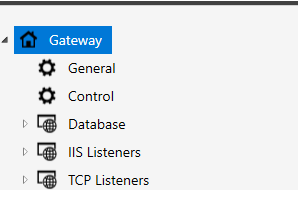
-
Go to Log.
The configuration of the log:

| Property | Description | ||||||||||||||
|---|---|---|---|---|---|---|---|---|---|---|---|---|---|---|---|
Debug |
Enables the debug logging. If disabled, then the detailed data about the requests to the server is skipped in the log.
|
||||||||||||||
Proxy Log File |
The relative path to the log file for the current IIS application pool or thread. The current application pool identifier of a request will replace any occurrences of "{0}" in the path. If the application pool is not set, then the current thread ID of the request will be used instead. Default: logs\{0}.log |
||||||||||||||
Audit Message Format |
The format of the audit log message. The audit log message is printed in the beginning of a handled request to inform about the client request content and the server response. This format has some predefined variables that is replaced by a value from the request. They are used to allow for customized syntax to ease reading of the message.
Default: {ClientIP} {RequestType} {AbsoluteUri} {ResponseNumber} {ResponseString} |
||||||||||||||
Audit Proxy Time |
Enables extended time delay information in audit row. Displayed in milliseconds. If log item time equals zero, log item is not displayed.
Example: [time: 364 connect: 153 autz: 2 ClSe: 3 SeCl: 205] |
||||||||||||||
Content data log |
This setting will display request/response data in a standard hex/string format. This setting should not be used unless content/advanced troubleshooting is required. Generates large files as a result. (If mg.xml hidden value FullContentTrace is set to false, only the first 256 bytes of each data set is logged.) |
||||||||||||||
Add X-PS-Transaction header |
This header is used to trace one transaction (request-response sequence) trough multiple Access Gateways and ID Server. Example 1. Example of X-PS-Transaction created by Access Gateway
X-PS-Transaction: d846a91d-7a47-40c8-8fc9-9fcb43fe9123.2 Where d846a91d-7a47-40c8-8fc9-9fcb43fe9123 is a unique identifier for the transaction (request-response sequence), and the following "2" is the debug log identifier for the transaction. (Can be found by searching for {2} in Access Gateway debug log.) Example 2. Example of X-PS-Transaction in ID Server debug log (psid-ws.xxx.log)
DEBUG AuthenticationController - ===== Authenticate IN ===== d846a91d-7a47-40c8-8fc9-9fcb43fe9123.2 The same 'id' as above will be displayed. If two Access Gateway are used in sequence, transaction id:s from both are displayed in ID Server log. (Assuming the second Access Gateway made the request towards ID Server.) |